

Paignion: Pixel Camera
Jaehoon Lee Photo & Video iPhoneiPadiPod touch
Paignion: Pixel Camera is a free Photo & Video app for iPhone and iPad by Jaehoon Lee. Requires iOS 18.6. Updated October 2, 2026.
- Price
- Free
- on the App Store
- Size
- 4 MB
- Age 4+
- Updated
- Oct 2
- 2026 · v1.2.0
Screenshots

About Paignion: Pixel Camera
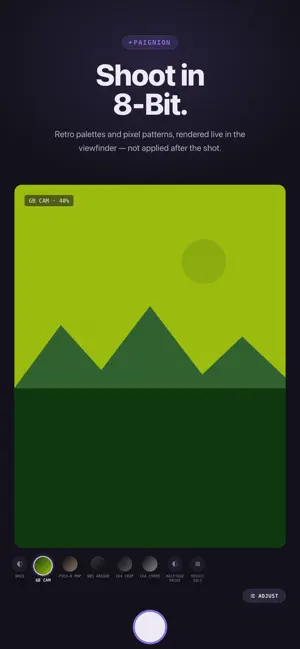
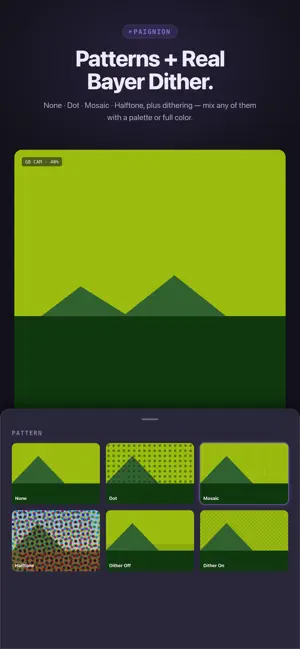
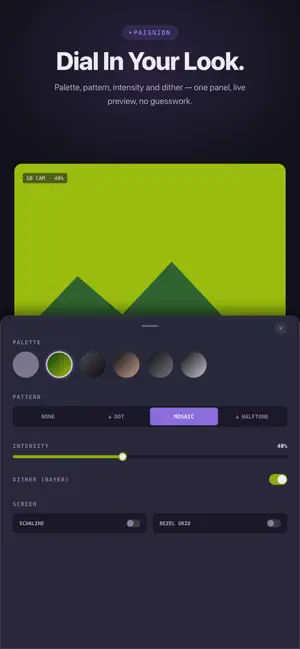
Retro palettes and pixel patterns, rendered live. No editing after the shot — what you see in the viewfinder is what gets saved. LIVE PIXEL RENDERING Paignion runs a real Metal pixel-effect pipeline on every frame of the live camera feed — palette quantization, pattern, and dithering all happen before you tap the shutter, not as a filter applied afterward. 5 ICONIC PALETTES * Game Boy — the classic 4-shade green handheld display * NES — the 64-color palette from the original console's PPU * PICO-8 — the 16-color fantasy-console system palette * C64 — the Commodore 64's Pepto palette * CGA — the 16-color RGBI palette from early PC graphics Palettes work on their own, or paired with any pattern. 3 PATTERNS + REAL BAYER DITHERING * Mosaic — chunky, blocky pixelation * Dot Screen — a single-channel dot grid * Halftone — a true CMY halftone rosette (three independently rotated ink-channel dot grids), full color or on a palette * Authentic ordered (Bayer) dithering, not a random-noise approximation — works with any palette, and it's never gated SCREEN FX Two screen finishes that turn the viewfinder into a tiny console display: CRT-style scanlines, and an LCD pixel-grid bezel overlay. FREE TO START Shoot with the Original (no filter), Game Boy Cam, and Mosaic Only presets at no cost — Bayer dithering is included free with every palette, always. Full Unlock adds the NES, PICO-8, C64, and CGA palettes, the Dot Screen and Halftone patterns, and both Screen FX finishes — a single one-time purchase, not a subscription. EVERYTHING ELSE YOU'D EXPECT * Pinch to zoom, tap to focus * HEIF capture, saved straight to a dedicated "Paignion" album in your Photos library — no separate account, no cloud * In-app gallery to browse, share, and delete your shots * The preset you shot with is written into every photo's own EXIF No ads. No tracking.
What’s new
Version 1.2.0 · Updated October 2, 2026
Paignion now speaks Japanese and Korean. • Full Japanese and Korean localization across the app, including permission prompts and in-app purchase details
App privacy
The developer, Jaehoon Lee, reported these privacy practices to Apple.
Data Linked to You
The following data, which may be collected and linked to your identity, may be used for the following purposes:
- Purchases: Purchase History
- Identifiers: Device ID
- Usage Data: Other Usage Data
- Diagnostics: Other Diagnostic Data
Used for: Analytics, App Functionality
Alternatives to Paignion: Pixel Camera
Looking for apps like Paignion: Pixel Camera? Here are 6 similar apps on the App Store. The highest rated is CYANO - Cyanotype Photos (5.0/5), and all 6 are free to download.
-
 CYANO - Cyanotype Photos
5.0
CYANO - Cyanotype Photos
5.0
-
 Echoroll: Sound Film Camera
-
 Bitsy Cam
5.0
Bitsy Cam
5.0
-
 PixelCamera - Retro 8-bit Cam
-
 Grainera: Retro Film Camera
-
 DitherCamApp ASCII
| App | Rating | Price | Last updated | Compare |
|---|---|---|---|---|
| Paignion: Pixel Camera | – | Free | October 2, 2026 | |
| CYANO - Cyanotype Photos | 5.0 / 5 (1) | Free | Sep 12, 2026 | Compare |
| Echoroll: Sound Film Camera | – | Free | Aug 28, 2026 | Compare |
| Bitsy Cam | 5.0 / 5 (2) | Free | Oct 7, 2026 | Compare |
| PixelCamera - Retro 8-bit Cam | – | Free | Mar 20, 2026 | Compare |
| Grainera: Retro Film Camera | – | Free | Jul 29, 2026 | Compare |
| DitherCamApp ASCII | – | Free | Oct 2, 2026 | Compare |