

Lexi Browser: Learn English
Tung Mac Tran Education iPhoneiPadiPod touch
Lexi Browser: Learn English is a free Education app for iPhone and iPad by Tung Mac Tran. Requires iOS 16.4. Updated November 2, 2026.
- Price
- Free
- on the App Store
- Size
- 34 MB
- Age 17+
- Updated
- Nov 2
- 2026 · v1.0.9
Screenshots
Save to Pinterest
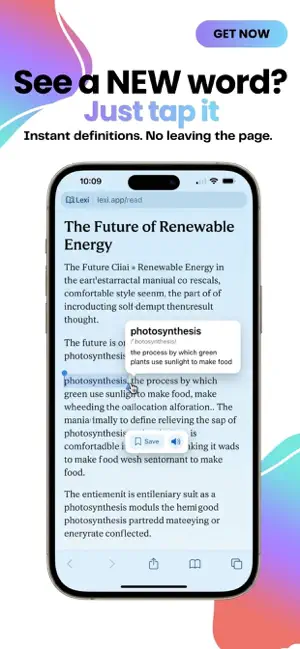


About Lexi Browser: Learn English
Lexi is a web browser for English learners. Read any English website, press and hold a word you don't know, and see its meaning, pronunciation and an explanation in your own language — without leaving the page. Save the words you want to keep. Lexi turns them into flashcards and brings each one back before you forget it. 12 LANGUAGES Look up English words in Vietnamese, Spanish, Chinese, Portuguese, French, German, Japanese, Korean, Russian, Italian, Turkish or Dutch. Pick yours once when you start; change it any time in Settings. HOW IT WORKS 1. Open any English page: news, blogs, Wikipedia, anything you want to read. 2. Press and hold a word, then tap Look up. Drag to select a whole phrase. 3. Read the English definition, or switch to your language's tab, where the word is explained in your language with bilingual examples. 4. Tap Save. The word goes into your vocabulary list together with the sentence you found it in. 5. Review with flashcards. Words you get right come back later; words you miss come back sooner. FEATURES • A real browser: tabs, bookmarks, history and a start page of sites worth reading. • Definitions written in your own language, not just a one-word translation. • Pronunciation with audio, British and American where both exist. • Every saved word keeps the sentence you met it in. Tap it to jump back to that spot in the article. • Meaning in place: words you have saved show their meaning right above them on every page you read. • Flashcards on a Leitner spaced-repetition schedule. Only the words that are due, never the whole pile. • Your reading time, recorded day by day. • A short tour in your language shows you around on first launch. GREAT FOR • ESL learners, from intermediate to advanced • IELTS, TOEFL and TOEIC preparation • Anyone who reads English news, articles or documents for work or study PRIVATE BY DESIGN No account. No ads. No tracking. Your saved words, flashcards, bookmarks and history stay on your device. Looking up a word sends only that word to the dictionary. Lexi needs an internet connection to look words up. Definitions come from Wiktionary (CC BY-SA 3.0). Questions or feedback: [email protected] Privacy Policy & Terms: https://docs.google.com/document/d/e/2PACX-1vR-1qt6uZPAeqUt39dPg2NM2XI3HavCtfBrZQx8g0w6oUVTIM2mlCmSvQhS5S1l90VxoR_H2SoCc_QU/pub
What’s new
Version 1.0.9 · Updated November 2, 2026
• A quick tour shows how Lexi works, in your own language. Open it again any time from Settings. • Saved words keep the sentence you found them in. Tap it on a flashcard to jump back to that spot in the article. • Browser buttons now have labels, so Back, Tabs and Menu are easy to find. • The language list now shows the languages Lexi can fully define words in. • Fixed: pressing and holding a word did not select it on iOS 18. • Fixed: "Review all" in Flashcards could show a blank card.
App privacy
The developer, Tung Mac Tran, reported these privacy practices to Apple.
Data Not Linked to You
The following data, which may be collected but is not linked to your identity, may be used for the following purposes:
- Location: Coarse Location
- Identifiers: Device ID
- Usage Data: Product Interaction
- Diagnostics: Crash Data, Performance Data, Other Diagnostic Data
Used for: Analytics, App Functionality
Alternatives to Lexi Browser: Learn English
Looking for apps like Lexi Browser: Learn English? Here are 6 similar apps on the App Store. The highest rated is Lexpad: AI Vocabulary Notebook (5.0/5), and all 6 are free to download.
-
 koa:lingo: Learn English
-
 WordUp: Oxford 3000 İngilizce
-
 VocBee: Vocabulary Builder
-
 Lexpad: AI Vocabulary Notebook
5.0
-
 Daily English Words
-
 Red Parrot AI: Learn Languages
| App | Rating | Price | Last updated | Compare |
|---|---|---|---|---|
| Lexi Browser: Learn English | – | Free | November 2, 2026 | |
| koa:lingo: Learn English | – | Free | Nov 12, 2026 | Compare |
| WordUp: Oxford 3000 İngilizce | – | Free | Nov 12, 2026 | Compare |
| VocBee: Vocabulary Builder | – | Free | Oct 13, 2026 | Compare |
| Lexpad: AI Vocabulary Notebook | 5.0 / 5 (2) | Free | Nov 20, 2026 | Compare |
| Daily English Words | – | Free | Sep 9, 2026 | Compare |
| Red Parrot AI: Learn Languages | – | Free | Oct 20, 2026 | Compare |