

Tiny Mighty: Compress Videos
Edward Lawford Photo & Video iPhoneiPadiPod touch
Tiny Mighty: Compress Videos is a free Photo & Video app for iPhone and iPad by Edward Lawford. Requires iOS 27.0. Updated November 22, 2026.
- Price
- Free
- on the App Store
- Size
- 15 MB
- Age 4+
- Updated
- Nov 22
- 2026 · v1.0.6
Screenshots
Save to Pinterest


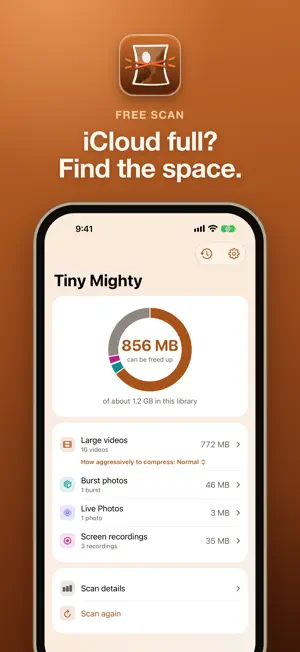
About Tiny Mighty: Compress Videos
Large videos fill your iCloud faster than anything else you keep. Tiny Mighty finds them, makes a smaller copy of each one, and gives you the space back, so you can stay on your iCloud plan. Every library is different; try the free scan to measure yours before you decide anything. HOW IT WORKS • Scan. See how much space your library can give back. • Preview. See how a video will look as a smaller copy before you start. The preview is free. • Shrink. Tiny Mighty makes a smaller copy of each video you choose. The copy keeps the date, the place and the albums of the original. • Compare. Tap to switch between each copy and its original. When you are happy, delete the originals in one step. MORE SPACE, NO CHARGE Clear the extra shots of your bursts and the screen recordings you forgot about. Tiny Mighty keeps the best photo of each burst, plus your favorites and the photos you picked. SAFE BY DESIGN • No ads, ever. • Tiny Mighty changes nothing until you select items and confirm them. Your device asks you before every delete. • Every copy is checked before its original is deleted: it must be smaller, as long as the original, and keep the sound and the color. • If a smaller copy would not save enough space, Tiny Mighty keeps the original and moves on. • Cinematic, spatial and slo-mo videos are left as they are. • A run can keep going while your screen is locked or you use other apps. If the system stops it, every finished copy is kept. GOOD TO KNOW Your storage goes up before it goes down. Tiny Mighty makes each copy before anything is deleted. iCloud stops counting an original when you delete it, and it can take a day to show the space. Photos keeps deleted originals in Recently Deleted for 30 days, unless your iCloud is full. Empty Recently Deleted in Photos to get that space back on your device. If your iCloud is full, a new copy is only on your device at first. iCloud saves it when it has room. PRICING Making large videos smaller needs a purchase. You do not pay for the scan, burst photos, screen recordings or your first run of 3 videos. A one-time purchase unlocks it for good. One purchase covers your family. Each member installs Tiny Mighty and cleans their own library. Terms of Use: https://www.apple.com/legal/internet-services/itunes/dev/stdeula/ Privacy Policy: https://tinymighty.app/privacy/
What’s new
Version 1.0.6 · Updated November 22, 2026
This update makes the big total on the start screen more accurate. • The total now counts only the space Tiny Mighty can actually free up for you today. Live Photos are still listed, marked "Coming soon", but they no longer add to the total, so on some phones it will look smaller than before. • If there are no Large videos, this is now more obvious and clear. Thanks to a friend who spotted this!
App privacy
The developer, Edward Lawford, reported these privacy practices to Apple.
Data Not Linked to You
The following data, which may be collected but is not linked to your identity, may be used for the following purposes:
- Purchases: Purchase History
Used for: Analytics
Alternatives to Tiny Mighty: Compress Videos
Looking for apps like Tiny Mighty: Compress Videos? Here are 6 similar apps on the App Store. The highest rated is Piqt: Photo & Video Curator (4.7/5), and 5 of the 6 are free to download.
-
 TakeFlow: Video Teleprompter
2.0
-
 Clipquota: Exact Video Size
-
 Emulsine Film Emulation Camera
-
 ColorGrail
-
 Piqt: Photo & Video Curator
4.7
-
 Dinovi
| App | Rating | Price | Last updated | Compare |
|---|---|---|---|---|
| Tiny Mighty: Compress Videos | – | Free | November 22, 2026 | |
| TakeFlow: Video Teleprompter | 2.0 / 5 (1) | Free | Sep 22, 2026 | Compare |
| Clipquota: Exact Video Size | – | 2.99 USD | Nov 23, 2026 | Compare |
| Emulsine Film Emulation Camera | – | Free | Nov 9, 2026 | Compare |
| ColorGrail | – | Free | Nov 5, 2026 | Compare |
| Piqt: Photo & Video Curator | 4.7 / 5 (3) | Free | Nov 24, 2026 | Compare |
| Dinovi | – | Free | Nov 24, 2026 | Compare |