

Cutline: Projector Sewing
Cenk ALASONYALILAR Lifestyle iPhoneiPadiPod touchMac
Cutline: Projector Sewing is a free Lifestyle app for iPhone and iPad by Cenk ALASONYALILAR. Rated 5.0/5 from 2 ratings. Requires iOS 17.0.
- Rating
- 5.0
- 2 ratings
- Price
- Free
- on the App Store
- Size
- 38 MB
- Age 4+
- Updated
- Oct 7
- 2026 · v1.4
Screenshots

About Cutline: Projector Sewing
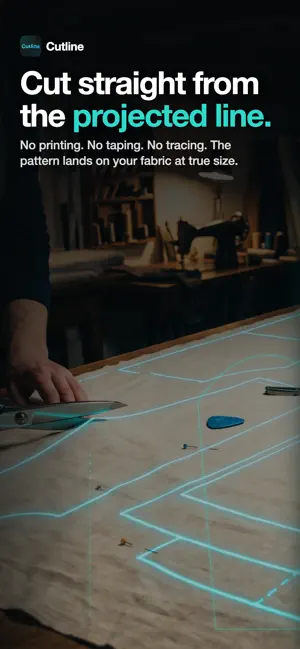
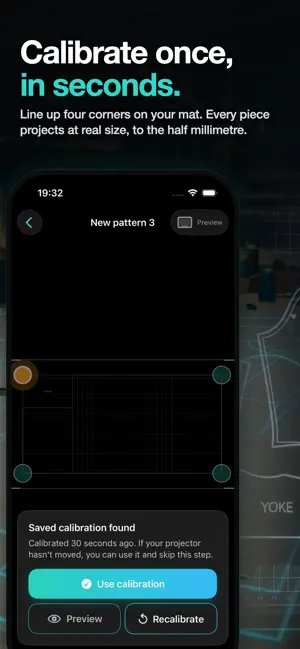
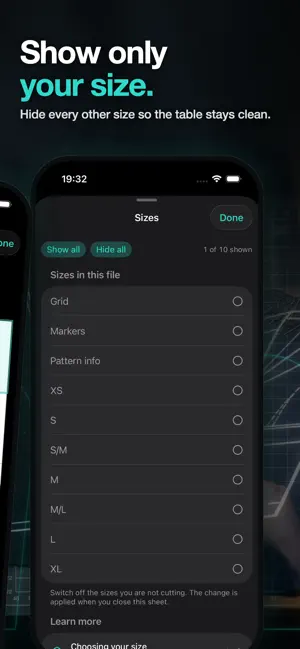
Project sewing patterns onto your cutting table at true physical size. No printing. No taping forty pages together. No trimming margins at midnight. Mount a projector above your table, connect your iPad, calibrate once — then cut straight from the projected line. ACCURATE, AND YOU CAN CHECK IT YOURSELF Calibration starts from a rectangle you already own and can measure: a cutting mat, a quilting ruler, a square you taped out. Tell the app its real size, drag four corners onto it, and you are done. That one step fixes scale and keystone distortion together. Then test it. Project a 100 mm square, lay a ruler on it, and read the measurement. With correct calibration it lands within half a millimetre. You do not have to take our word for it — that is the point. SET UP BEFORE YOU OWN A PROJECTOR The whole app runs with nothing attached. Pick the resolution your projector will use and the iPad shows a scaled preview of the projection surface, with the calibration handles sitting right on it. Open a pattern, position your pieces, get everything ready before any hardware is involved. When you do connect a projector, your existing calibration is rescaled onto the new surface instead of being thrown away. WORKS WITH THE PATTERNS YOU ALREADY OWN • Open PDF patterns from Files, iCloud Drive, or anywhere else on your iPad • Show only your size and hide the others, on patterns with size layers • The app tells you when a pattern's layers cannot be switched, instead of silently doing nothing • Lay out tiled pattern pieces: reading order, blank pages, overlap snapping, align and distribute • Mirror pieces along a fold line • Adjust line weight and invert the display so the pattern reads against busy fabric • [CONFIRM] Import SVG patterns as well as PDF • [CONFIRM] Export a print-ready file for home or copy-shop printing • [CONFIRM] Mark up the projection with your own annotations • [CONFIRM] Navigate large patterns with an overview map BUILT FOR THE WAY YOU ACTUALLY WORK The control panel adapts to the space it has, not to the device name. An iPad in Slide Over gets the compact layout. An iPhone in landscape gets the full one. Works on iPhone and iPad, iOS 17 and later. No account. No cloud. No proprietary projector to buy. Your patterns stay on your device. Terms of Use (EULA): https://www.apple.com/legal/internet-services/itunes/dev/stdeula/ Privacy Policy: https://omurolgunay.com/cutline-pp.html
What’s new
Version 1.4 · Updated October 7, 2026
Auto assemble is now available for your sewing patterns! Also, we have made some performance, experience imrpovements and some bug fixes.
App privacy
The developer, Cenk ALASONYALILAR, reported these privacy practices to Apple.
Data Not Collected
The developer does not collect any data from this app.
Alternatives to Cutline: Projector Sewing
Looking for apps like Cutline: Projector Sewing? Here are 6 similar apps on the App Store. The highest rated is IntelliSew: Pattern Projector (5.0/5), and 5 of the 6 are free to download.
-
 IntelliSew: Pattern Projector
5.0
IntelliSew: Pattern Projector
5.0
-
 Frigo Smart
-
 Crocheting Patterns
-
 Sewing Pattern Translator
-
 Biblical Chaplets
-
 Radiant Church of Austin
5.0
Radiant Church of Austin
5.0
| App | Rating | Price | Last updated | Compare |
|---|---|---|---|---|
| Cutline: Projector Sewing | 5.0 / 5 (2 ratings) | Free | October 7, 2026 | |
| IntelliSew: Pattern Projector | 5.0 / 5 (12) | Free | Oct 9, 2026 | Compare |
| Frigo Smart | – | Free | Sep 30, 2026 | Compare |
| Crocheting Patterns | – | 4.99 USD | Sep 2, 2025 | Compare |
| Sewing Pattern Translator | – | Free | Sep 15, 2026 | Compare |
| Biblical Chaplets | – | Free | Sep 1, 2026 | Compare |
| Radiant Church of Austin | 5.0 / 5 (7) | Free | Feb 5, 2026 | Compare |