

Driftnote: Story Planner
Abhijay Shandilya Productivity iPhoneiPadiPod touch
Driftnote: Story Planner is a free Productivity app for iPhone and iPad by Abhijay Shandilya. Requires iOS 15.0. Updated September 7, 2026.
- Price
- Free
- on the App Store
- Size
- 5 MB
- Age 9+
- Updated
- Sep 7
- 2026 · v1.0
Screenshots


About Driftnote: Story Planner
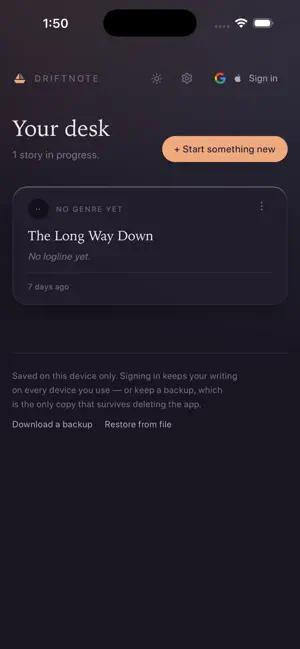
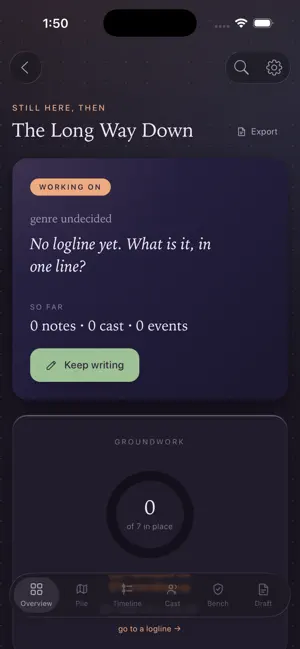
Driftnote is for the part of writing that happens before the writing — working out who is in the story, what happens, and whether any of it holds together. You tell it what you're writing: horror, romance, mystery, thriller, fantasy, science fiction, drama, comedy, adventure, or nothing in particular. The app adjusts to the answer. The questions it asks about a character in a horror story are not the ones it asks in a romance. There are five places to put things. The pile is for anything half-formed. No structure, no fields to fill in. Put a #hashtag on something and it becomes a filter you can pull on later. The cast holds characters, places, objects, and whatever is standing in the way. Each one gets a set of fields that suit what you're writing. The timeline is what happens, in the order it happens in the story's world. You can start from an existing structure if the blank page is the problem, or build it a beat at a time. The workbench is how your story works, in sections you name yourself. It suggests things. You can ignore all of them. The draft is a proper writing space — real formatting, version history for every page going back twenty states, and Markdown export when you want your words somewhere else. On privacy. Signed out, which is the default, everything stays on your device and nothing is sent anywhere. The app works with no connection at all. Signing in exists for one reason: having the same desk on more than one device. If you had already written things before signing in, it asks whether to bring them with you rather than quietly replacing them. You can download all of your work as a single file, restore from one, or delete your account and everything in it. All of that is in Settings, and none of it requires emailing anyone. On AI. There isn't any unless you turn it on and supply your own Anthropic API key. Every room, template and export works without it. Nothing you write is used to train anything. Ten themes, light and dark. Free. No subscription, no purchases, no ads, no analytics.
App privacy
The developer, Abhijay Shandilya, reported these privacy practices to Apple.
Data Linked to You
The following data, which may be collected and linked to your identity, may be used for the following purposes:
- Contact Info: Email Address, Name
- Identifiers: User ID
- Other Data: Other Data Types
Used for: App Functionality
Alternatives to Driftnote: Story Planner
Looking for apps like Driftnote: Story Planner? Here are 6 similar apps on the App Store.
-
 My Drawer Books
-
 ScribeMaster
-
 Unus Liber: AI Book Writer
-
 INK.BOOK - Write Your Book
-
 Typetoe: Novel & Book Writer
-
 World Builder: Story Planner
| App | Rating | Price | Last updated | Compare |
|---|---|---|---|---|
| Driftnote: Story Planner | – | Free | September 7, 2026 | |
| My Drawer Books | – | Free | Sep 19, 2026 | Compare |
| ScribeMaster | – | Free | Oct 4, 2026 | Compare |
| Unus Liber: AI Book Writer | – | Free | Aug 3, 2026 | Compare |
| INK.BOOK - Write Your Book | – | Free | Oct 26, 2026 | Compare |
| Typetoe: Novel & Book Writer | – | Free | Oct 15, 2026 | Compare |
| World Builder: Story Planner | – | Free | Jul 11, 2026 | Compare |