

CyberNest Digital Safety
AIA Cyber RIsk Solutions LLC Education iPhoneiPadiPod touch
CyberNest Digital Safety is a free Education app for iPhone and iPad by AIA Cyber RIsk Solutions LLC. Requires iOS 16.0. Updated September 26, 2026.
- Price
- Free
- on the App Store
- Size
- 128 MB
- Age 9+
- Updated
- Sep 26
- 2026 · v1.22
Screenshots
About CyberNest Digital Safety
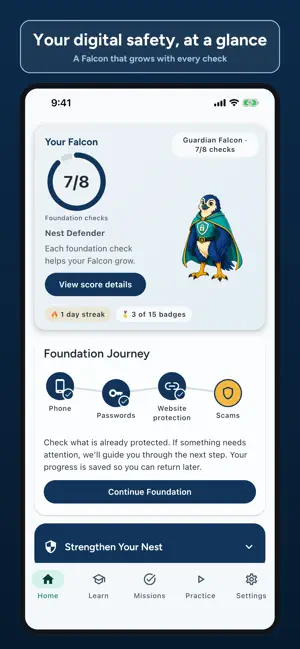
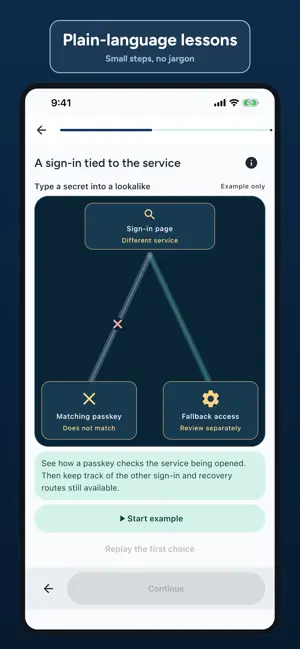
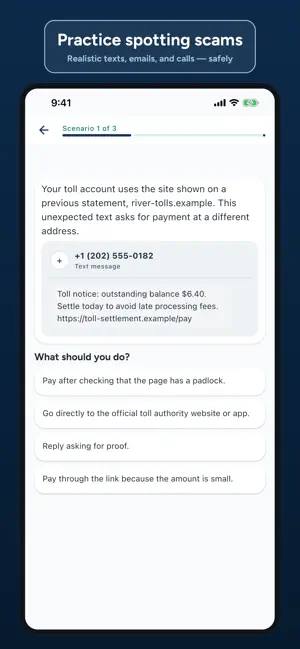
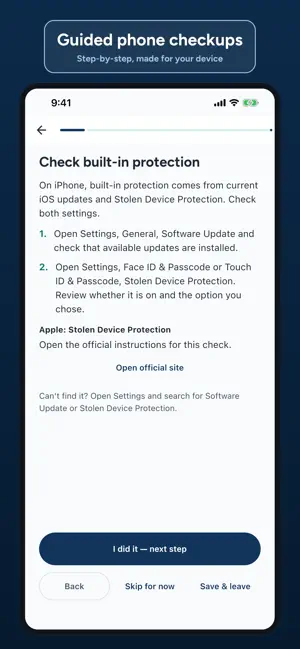
Build practical cybersecurity habits for yourself and your household. CyberNest turns online safety into clear lessons, realistic practice, and step-by-step actions. Learn how to spot scams, strengthen accounts, protect privacy, secure devices, and respond calmly when something goes wrong. LEARN AT YOUR PACE - Follow guided lessons on scams, passwords, email, devices, privacy, and family safety. - Get a recommended path based on your progress. - Track your Cyber Health Score, streaks, and achievements. PRACTICE REAL-WORLD DECISIONS - Work through realistic texts, emails, calls, QR codes, and fake alerts. - Choose the safest next step and get a clear explanation. - Build confidence across Beginner, Intermediate, and Advanced scenarios. TAKE PRACTICAL ACTION - Follow step-by-step plans for stronger accounts, safer devices, backups, privacy, and family protection. - Reduce public exposure of personal information with direct links to official opt-out resources. - Browse trusted guidance from reputable public and nonprofit sources. - Set gentle reminders for the habits worth rechecking. GET HELP AFTER AN INCIDENT - Use "I think I was scammed" for calm, prioritized recovery steps. - Use "I think I've been hacked" for account, email, phone, or device recovery. - Check off steps and return later without losing your place. PRIVACY-FIRST BY DESIGN No account is required. CyberNest has no ads. Lesson, action, and recovery progress stays on your iPhone. Available in English and Spanish. CyberNest provides educational guidance. It is not emergency services, antivirus software, personalized breach monitoring, or a replacement for professional advice.
What’s new
Version 1.22 · Updated September 26, 2026
Practice real life. Six new branching scam stories put you in the moment: a "bank fraud team" call, a familiar voice asking for help, a marketplace buyer, a changed home-closing wire, a lookalike bill-pay site, and a ticket resale outside the official platform. Calls are voiced in English and Spanish with captions, and your choices change how each story ends. Your progress in each story is saved. Meet your Falcon. The Guardian Falcon on Home now greets you, looks around, and reacts to your progress with short animations. Finish a scam-practice round to unlock a one-time Shield Clash celebration. Clearer journeys. Foundation now walks through your phone, passwords, website protection, and scam practice, and shows how many Advanced scenarios you've solved. Credit freezes and backups live in Strengthen Your Nest, where the backup guide includes checking a restored file. Everything you've already earned stays earned. Calmer motion and Reduce Motion are respected throughout.
App privacy
The developer, AIA Cyber RIsk Solutions LLC, reported these privacy practices to Apple.
Data Not Linked to You
The following data, which may be collected but is not linked to your identity, may be used for the following purposes:
- Diagnostics: Crash Data
Used for: App Functionality
Alternatives to CyberNest Digital Safety
Looking for apps like CyberNest Digital Safety? Here are 6 similar apps on the App Store. The highest rated is Skillfully (5.0/5), and all 6 are free to download.
-
 Skillfully
5.0
Skillfully
5.0
-
 Level: Adult
5.0
Level: Adult
5.0
-
 Adulting Plus
5.0
Adulting Plus
5.0
-
 Adulting 101: Life Skills App
5.0
Adulting 101: Life Skills App
5.0
-
 uCertifyPrep CompTIA Project+
-
 Lifebits: Learn Life Skills
1.0
Lifebits: Learn Life Skills
1.0
| App | Rating | Price | Last updated | Compare |
|---|---|---|---|---|
| CyberNest Digital Safety | – | Free | September 26, 2026 | |
| Skillfully | 5.0 / 5 (1) | Free | Aug 17, 2026 | Compare |
| Level: Adult | 5.0 / 5 (2) | Free | Sep 28, 2026 | Compare |
| Adulting Plus | 5.0 / 5 (1) | Free | Jun 10, 2026 | Compare |
| Adulting 101: Life Skills App | 5.0 / 5 (1) | Free | May 12, 2026 | Compare |
| uCertifyPrep CompTIA Project+ | – | Free | Mar 31, 2026 | Compare |
| Lifebits: Learn Life Skills | 1.0 / 5 (1) | Free | Jul 8, 2026 | Compare |