

Expense Tracker: SMS & Voice
Mohamed Elatabany Finance iPhoneiPadiPod touch
Expense Tracker: SMS & Voice is a free Finance app for iPhone and iPad by Mohamed Elatabany. Requires iOS 17.0. Updated October 13, 2026.
- Price
- Free
- on the App Store
- Size
- 73 MB
- Age 4+
- Updated
- Oct 13
- 2026 · v1.4.0
Screenshots


About Expense Tracker: SMS & Voice
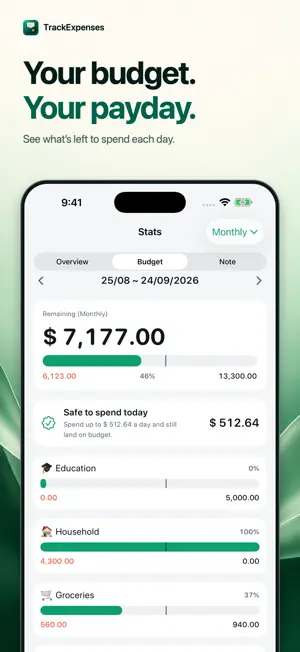
Log expenses without typing: your bank's SMS alerts become expenses through a Shortcuts automation you set up once, and one spoken sentence becomes several entries. Your month starts on payday, with a daily budget that tells you what is safe to spend today. Expense Tracker: SMS & Voice (TrackExpenses) is a private money manager for iPhone and iPad. Keep your spending, income, accounts and bills together without connecting your bank or creating an account. BUDGET AROUND YOUR PAYDAY Start your month on any day, such as the 25th when your salary arrives. Your transactions, budgets and charts follow the same pay cycle. See your remaining budget for free. Pro adds spending forecasts and a daily allowance calculated from your budget and the days left. LESS WORK TO LOG EXPENSES • Add an expense with a calculator keypad, categories and reusable templates. • Say several purchases at once, then review and save the drafts. 10 voice entries a month are free; Pro makes it unlimited. Voice entry understands English and Arabic on compatible devices. • Paste a supported bank message to fill in transaction details. • Set up an optional Shortcuts automation to import supported bank SMS or Wallet purchases, then review the entries in the app. Setup is required; TrackExpenses does not read your Messages inbox. SEE YOUR SPENDING CLEARLY • Browse expenses day by day on the spending calendar. • Review daily details, monthly totals and spending grouped by payee. • See cash flow and category changes for free. With Pro, test a daily target or a purchase before you spend. • Track cash, bank accounts and cards, including transfers and running balances. • Schedule recurring transactions for rent, salary and subscriptions. YOUR DATA STAYS YOURS No ads. No bank login. No TrackExpenses account. Keep your ledger on your device with private iCloud sync across your devices. Protect the app with a passcode or Face ID. Export the month you are viewing as a CSV for free, and attach receipt photos. START WITH THE FREE LEDGER Unlimited transactions, budgets, calendar, charts, search, monthly CSV export and private iCloud sync are included. Use up to 3 accounts and 2 recurring rules for free. Includes 10 successful bank SMS auto-imports and 10 voice entries per calendar month on each device. After the allowance, later alerts are still caught and kept, locked outside your totals until you upgrade or the next month’s allowance adds them. Pro adds unlimited bank SMS imports, spending forecasts, daily budget guidance, what-if spending plans, unlimited voice entry, unlimited accounts and recurring rules, CSV import, exports for any date range, full JSON backup and restore, color themes and alternate app icons. Choose a monthly or annual subscription, or a one-time lifetime purchase. Voice availability depends on device and language support. The app interface is in English. SUBSCRIPTION INFORMATION Pro Monthly and Pro Annual renew automatically unless cancelled at least 24 hours before the current period ends. Payment is charged to your Apple Account at purchase confirmation. Manage or cancel subscriptions in your Apple Account settings. The annual plan offers a 7-day free trial for eligible customers, then renews as a paid subscription unless cancelled at least 24 hours before the trial ends. Pro Lifetime is a one-time purchase and does not renew. Spending insights are calculations based on your records and budgets, not financial advice. Terms of Use (EULA): https://www.apple.com/legal/internet-services/itunes/dev/stdeula/ Privacy Policy: https://trackexpenses.app/privacy.html Support: https://trackexpenses.app/support.html
What’s new
Version 1.4.0 · Updated October 13, 2026
• Voice entry is now free to try: 10 entries every month, unlimited with Pro. • A clearer Pro page that shows what Pro does, with a free-trial timeline and a reminder before any trial ends. • A fresh new app icon. • A new welcome tour that shows bank SMS import and Say it working, step by step. • More → Widgets shows every widget and how to add it. • Visit trackexpenses.app from More for guides and tips. • Small fixes and improvements.
App privacy
The developer, Mohamed Elatabany, reported these privacy practices to Apple.
Data Not Linked to You
The following data, which may be collected but is not linked to your identity, may be used for the following purposes:
- Purchases: Purchase History
Used for: Analytics, App Functionality
Alternatives to Expense Tracker: SMS & Voice
Looking for apps like Expense Tracker: SMS & Voice? Here are 6 similar apps on the App Store.
-
 Spendra
-
 Pock: Money Tracker
-
 OutGo-Save The Money
-
 Expense Tracker: Budget Log
-
 Money Tracker & Budget: Monely
-
 Flinance: Cashflow Tracker
| App | Rating | Price | Last updated | Compare |
|---|---|---|---|---|
| Expense Tracker: SMS & Voice | – | Free | October 13, 2026 | |
| Spendra | – | Free | Oct 5, 2026 | Compare |
| Pock: Money Tracker | – | Free | Oct 16, 2026 | Compare |
| OutGo-Save The Money | – | Free | Mar 4, 2026 | Compare |
| Expense Tracker: Budget Log | – | Free | Aug 20, 2026 | Compare |
| Money Tracker & Budget: Monely | – | Free | Apr 11, 2026 | Compare |
| Flinance: Cashflow Tracker | – | Free | Apr 8, 2026 | Compare |