

Multi Tool - Multi Spaces
Kendrick Turner Lionel Utilities iPhoneiPadiPod touch
Multi Tool - Multi Spaces is a free Utilities app for iPhone and iPad by Kendrick Turner Lionel. Rated 5.0/5 from 1 ratings. Requires iOS 17.0.
- Rating
- 5.0
- 1 ratings
- Price
- Free
- on the App Store
- Size
- 8 MB
- Age 17+
- Updated
- Sep 19
- 2026 · v1.1
Screenshots



About Multi Tool - Multi Spaces
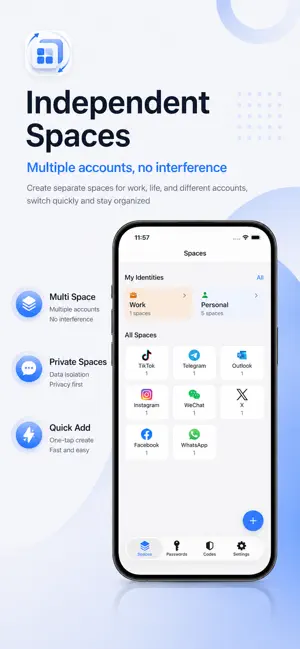
Keep your work, personal, client, and community accounts organized without mixing up logins. Multi Tool combines isolated web sessions, identity organization, passwords, and 2FA codes in one local-first workspace. Create a separate Account Space for each compatible website login, then connect the right password and verification code for faster, clearer switching. ISOLATED ACCOUNT SPACES • Create separate web spaces for compatible websites • Keep cookies and website data isolated between spaces • Organize work, personal, secondary, and client logins • Choose mobile or desktop web mode when supported IDENTITIES AND ACCOUNT ORGANIZATION • Group spaces, passwords, and verification codes by identity • Use custom icons and colors to distinguish contexts • Review linked resources from one organized view PASSWORDS AND 2FA • Store usernames, passwords, websites, and notes locally • Generate strong passwords and check for basic weak or reused password risks • Generate TOTP and HOTP verification codes • Add codes by camera, selected image, or manual secret entry • Use the iOS Password AutoFill extension for saved credentials LOCAL-FIRST SECURITY • Protect passwords and OTP secrets with Keychain and local encryption • Keep persisted web sessions encrypted and separated by space • Unlock protected content with Face ID or an App PIN • No advertising, tracking, or behavioral analytics SDKs • No developer-operated account is required BACKUP AND TRANSFER • Create password-protected encrypted backups • Restore your data when moving to another supported device • Import or export password CSV files when needed • Choose where exported files are saved Important: Multi Tool does not duplicate or modify installed native apps. Account Spaces are isolated in-app web sessions for services that support web login. Website features, sign-in rules, availability, and compatibility are controlled by their respective providers.
What’s new
Version 1.1 · Updated September 19, 2026
1. Optimize functions and fix known bugs 2. Removel monthly membership
App privacy
The developer, Kendrick Turner Lionel, reported these privacy practices to Apple.
Data Not Collected
The developer does not collect any data from this app.
Alternatives to Multi Tool - Multi Spaces
Looking for apps like Multi Tool - Multi Spaces? Here are 6 similar apps on the App Store. The highest rated is 多账号管家-实用多工具生活账号管理必备 (5.0/5), and all 6 are free to download.
-
 Dual Space・Parallel Account
4.5
-
 Multi Space Pro
2.7
-
 印章-电子印章生成、PDF盖章签字
-
 互传-安全高效一键换机搬家工具
3.7
-
 多账号管家-实用多工具生活账号管理必备
5.0
-
 Dual App: Multiple Accounts
3.9
| App | Rating | Price | Last updated | Compare |
|---|---|---|---|---|
| Multi Tool - Multi Spaces | 5.0 / 5 (1 rating) | Free | September 19, 2026 | |
| Dual Space・Parallel Account | 4.5 / 5 (143) | Free | Aug 17, 2026 | Compare |
| Multi Space Pro | 2.7 / 5 (3) | Free | Sep 16, 2026 | Compare |
| 印章-电子印章生成、PDF盖章签字 | – | Free | Oct 1, 2026 | Compare |
| 互传-安全高效一键换机搬家工具 | 3.7 / 5 (10) | Free | Jul 16, 2026 | Compare |
| 多账号管家-实用多工具生活账号管理必备 | 5.0 / 5 (1) | Free | Oct 18, 2024 | Compare |
| Dual App: Multiple Accounts | 3.9 / 5 (10) | Free | Nov 5, 2026 | Compare |