

Alarm Calendar - Event Alarms
Kazuya Abe Productivity iPhoneiPadiPod touch
Alarm Calendar - Event Alarms is a free Productivity app for iPhone and iPad by Kazuya Abe. Requires iOS 17.0. Updated September 26, 2026.
- Price
- Free
- on the App Store
- Size
- 121 MB
- Age 4+
- Updated
- Sep 26
- 2026 · v1.2
Screenshots

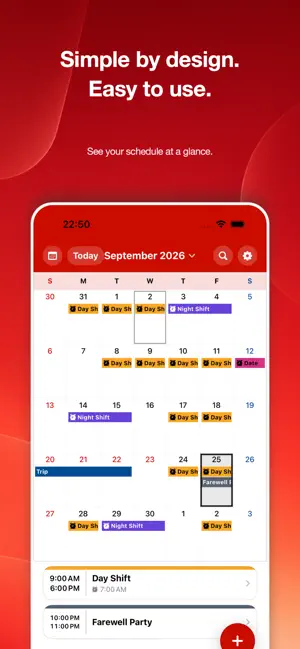
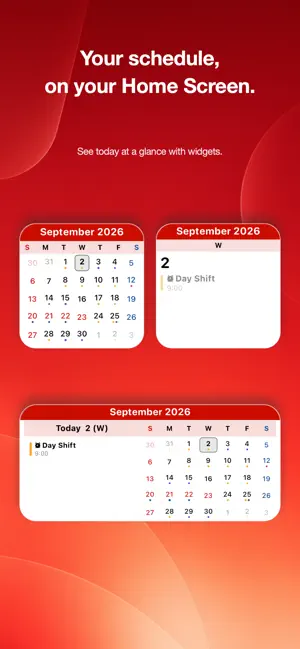
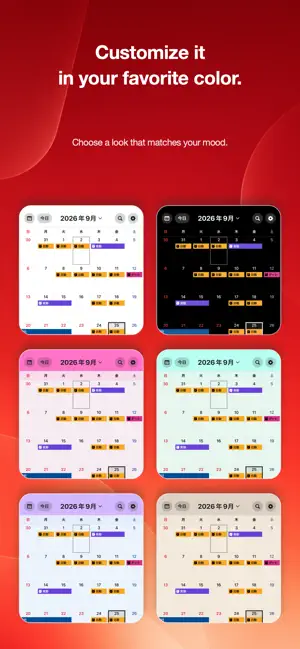
About Alarm Calendar - Event Alarms
Add an event. Open the Clock app. Set an alarm. KoyoBell brings those separate steps together. KoyoBell lets you set alarms as part of the same flow you use to add events to your calendar. Along with an event’s name, date, and time, you can add the exact times you want an alarm to ring—when to start getting ready, when to leave, or when the event begins. Add multiple alarms to a single event to stay on track at every step. View all your events and alarms together in monthly, weekly, or daily calendar views. Use KoyoBell to manage work shifts, medical appointments, medication, school events, family plans, daily routines, and anything else you do not want to forget. Key Features • Set alarms while adding calendar events • Add multiple alarms to each event • Create standalone alarms without an event • Switch between month, week, and day views • Repeat events daily, weekly, monthly, or yearly • Create custom recurrences, such as every two weeks or the second Monday of every month • Save frequently used events as templates • Search by event name or notes • View and import events from Apple Calendar • Export events you create to Apple Calendar • Sync across devices with iCloud • Receive a day-before summary of tomorrow’s events • Check today, this week, or this month with Home Screen widgets • Choose from different theme colors and Japanese fonts • Select alarm sounds including music-box tunes, ringtones, and ambient sounds Add the event. Set the alarm at the same time. Manage your schedule—and everything you do not want to forget—in one calendar. Terms of Use (EULA):https://www.apple.com/legal/internet-services/itunes/dev/stdeula/ Privacy Policy:https://abkz-dev.github.io/support/AlarmCalendar/en/privacy-policy.html
What’s new
Version 1.2 · Updated September 26, 2026
Bug fixes • Fixed an issue where "Couldn't add to iOS Alarms" or "Please re-register your alarms" could appear even though alarms were working, when many alarms were set. • Fixed an issue where fewer alarms than expected could be added to iOS Alarms when many weekly repeating alarms were set.
App privacy
The developer, Kazuya Abe, reported these privacy practices to Apple.
Data Not Collected
The developer does not collect any data from this app.
Alternatives to Alarm Calendar - Event Alarms
Looking for apps like Alarm Calendar - Event Alarms? Here are 6 similar apps on the App Store. The highest rated is Calendar Alarm (5.0/5), and 5 of the 6 are free to download.
-
 Event Alarm Sync
-
 Calendar Alarm & Reminder
-
 Just20Minutes
-
 Calendar Alarm
5.0
Calendar Alarm
5.0
-
 ToDo Calendar Pro
4.2
ToDo Calendar Pro
4.2
-
 Lofi Desk
| App | Rating | Price | Last updated | Compare |
|---|---|---|---|---|
| Alarm Calendar - Event Alarms | – | Free | September 26, 2026 | |
| Event Alarm Sync | – | Free | Sep 28, 2026 | Compare |
| Calendar Alarm & Reminder | – | Free | Aug 15, 2026 | Compare |
| Just20Minutes | – | 0.99 USD | Dec 21, 2025 | Compare |
| Calendar Alarm | 5.0 / 5 (1) | Free | May 7, 2026 | Compare |
| ToDo Calendar Pro | 4.2 / 5 (5) | Free | Sep 30, 2026 | Compare |
| Lofi Desk | – | Free | Oct 7, 2026 | Compare |