

E: Expense Tracker
WEI WEN MAH Finance iPhoneiPadiPod touch
E: Expense Tracker is a free Finance app for iPhone and iPad by WEI WEN MAH. Requires iOS 18.0. Updated October 29, 2026.
- Price
- Free
- on the App Store
- Size
- 23 MB
- Age 4+
- Updated
- Oct 29
- 2026 · v1.7.1
Screenshots


About E: Expense Tracker
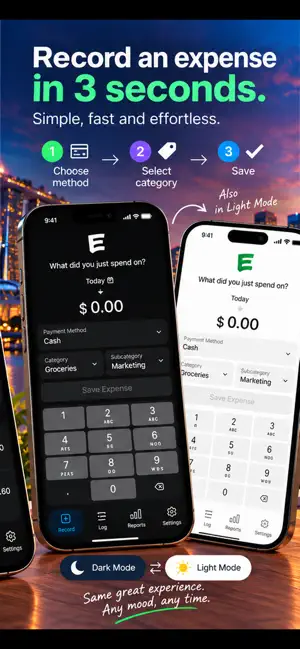
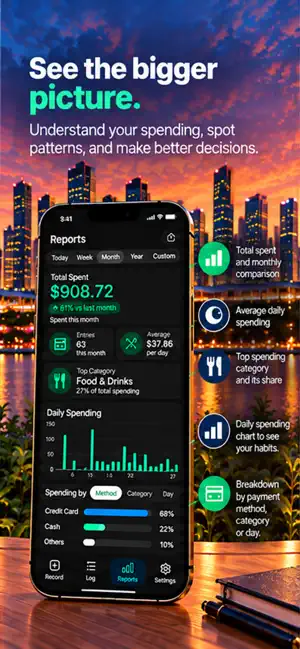
Record expenses in seconds, understand where your money goes, and keep a clear spending history—without advertising or a separate account. E is a focused, private expense tracker designed for quick daily use. FAST EXPENSE RECORDING • Enter an amount in seconds • Choose a payment method, category and optional subcategory • Add optional comments to saved expenses for instalments and extra details with E Supporter • Edit past entries whenever needed • Keep a clean, chronological spending log CREDITS AND RECONCILIATION • Record refunds, reimbursements, cashback, repayments, rebates or corrections as Credits • Give every Credit your own label • Credits reduce spending totals instead of being treated as income • Mark selected payment-method transactions as paid or reconciled REPORTS THAT EXPLAIN YOUR SPENDING • Today, week, month, year and custom date-range views • Swipe between weeks or use the week navigation controls • Compare spending with the previous equivalent period • See daily or monthly spending trends • Break spending down by payment method, category or day • Tap through to the expenses behind each total FLEXIBLE EXPORTS • Export all records or a custom date range • Choose Excel or CSV • Include comments in Excel and CSV exports • Open exported workbooks in Excel, Numbers or Google Sheets PRIVATE BY DESIGN • No separate account required • No advertising trackers • Expense data remains local by default • Optional multi-device sync uses your private iCloud account OPTIONAL ICLOUD SYNC Active monthly E Supporters can enable Multi-Device Sync to keep entries current across iPhones and E on a compatible Mac signed in to the same Apple Account. If monthly support ends, syncing pauses while entries already stored on each device remain available. E Supporter also unlocks eligible supporter extras including subcategories, expense comments and expense export. Payment is charged to your Apple Account. Auto-renewable subscriptions renew unless cancelled at least 24 hours before the end of the current period. Manage or cancel subscriptions in your Apple Account settings. Privacy Policy: https://kethj.com/privacy Terms of Use: https://www.apple.com/legal/internet-services/itunes/dev/stdeula/
What’s new
Version 1.7.1 · Updated October 29, 2026
This critical update improves expense notes and Money account management. • Monthly E Supporters can optionally enable a Comments button beside Save Expense • A new information preview explains how expense comments work • The Comments button stays out of the way during the Undo countdown • Money compartments now have a clear delete control with confirmation • Existing expenses, accounts, balances and compartments remain in place when updating
App privacy
The developer, WEI WEN MAH, reported these privacy practices to Apple.
Data Not Collected
The developer does not collect any data from this app.
Alternatives to E: Expense Tracker
Looking for apps like E: Expense Tracker? Here are 6 similar apps on the App Store.
-
 Budget | Savings & Assets
-
 Kiremit: Budget for Your Home
-
 Despesas: Expense Tracker
-
 CardTally: Wealth & Portfolio
-
 FlexFlow Pro - Smart Budget
-
 Tanda: Expense & Money Tracker
| App | Rating | Price | Last updated | Compare |
|---|---|---|---|---|
| E: Expense Tracker | – | Free | October 29, 2026 | |
| Budget | Savings & Assets | – | Free | Aug 19, 2026 | Compare |
| Kiremit: Budget for Your Home | – | Free | Sep 12, 2026 | Compare |
| Despesas: Expense Tracker | – | Free | Oct 4, 2026 | Compare |
| CardTally: Wealth & Portfolio | – | Free | Sep 13, 2026 | Compare |
| FlexFlow Pro - Smart Budget | – | Free | Jul 8, 2026 | Compare |
| Tanda: Expense & Money Tracker | – | Free | Oct 23, 2026 | Compare |
Compare E: Expense Tracker with the top alternatives: ratings, updates, ASO score and keyword gaps →