

Hum to Score - Melody to Notes
RAINBOW TREE LLC Music iPhoneiPadiPod touch
Hum to Score - Melody to Notes is a free Music app for iPhone and iPad by RAINBOW TREE LLC. Requires iOS 17.0. Updated October 21, 2026.
- Price
- Free
- on the App Store
- Size
- 7 MB
- Age 4+
- Updated
- Oct 21
- 2026 · v1.3.1
Screenshots
Save to Pinterest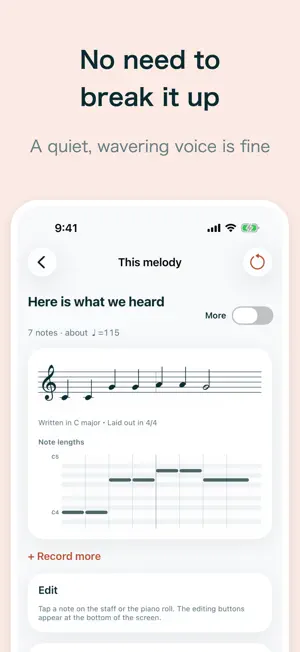


About Hum to Score - Melody to Notes
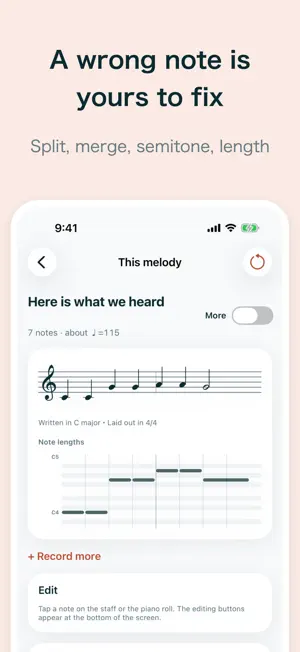
The melody you hum becomes sheet music, just as you hummed it. You do not have to change how you sing. Hum straight through without breaking it up, as quietly as you like. Wavering and second tries are taken as they come. Leave the melody that came to you before it slips away. You do not need to play an instrument, and you do not need to know how to write music. - What it does - - Tap the big button to start recording and tap again to stop, or hold it while you sing and let go (up to 60 seconds per take) - Shows a staff in well under a second after you stop - Puts a piano roll underneath, so you can see the note lengths - Plays the melody back on a piano. You can also play from a chosen note, loop, and let the view follow along - Press "+ Record more" on the score screen to join the next phrase onto the same melody, up to 5 minutes (60 seconds on the free app) - Choose a recording of your own humming, such as one in Voice Memos, to make a score from it (up to 5 minutes; the first one is free) - Light and dark appearance - The score is yours to fix, right there - Our reading is not perfect. That is why there are exactly four ways to fix it. - Split - a run held at one pitch becomes a single long note. Tap it, press Split, and it comes apart - Merge - when the tail of a fading voice is left behind as a short note, add it to the note before - Up and Down - move one note a semitone at a time - Longer and Shorter - change a note value one step at a time Undo and Redo move you back and forth. There is also transposition for the whole melody, and Fit to C major. Deeper tools, such as selecting a range to fix at once or zooming the roll, are kept under "More". - Key signatures - Turn on "More" and a Key signature row appears under Pitch. Choose from 12 keys, such as G major (one sharp) or F major (one flat), listed from the fewest accidentals this melody needs. Choosing one never changes a pitch, and it goes into MIDI and MusicXML too. - We do not overclaim - - Notes we were unsure of are drawn faintly, as a "worth a look" mark - The tempo is written as a rough guide. The speed slider changes it, and moving it never changes the note lengths - The key is not guessed at all. Unless you choose a key signature, it is simply written in C major - Your voice and scores stay on the device - The voice you record and the score it becomes stay on this device. Turning sound into notes also finishes on the device, so it works with no internet connection. The only things that leave it are the text you send from the app as a bug report or request, and the usage counts and crash reports that help us fix the app. - Export - The score image, the note-name text and the melody audio (piano) can be shared for free, always. The melody audio is an m4a file, so people who do not read music can hear it too. MIDI and MusicXML come with Pro, and open in MuseScore, Flat, GarageBand and the like. - What Pro adds - - Make scores from audio files such as Voice Memos (free: 1 file) - Record more and join it into one piece of up to 5 minutes (free up to 60 seconds) - Save without a limit (free saves 20) - Keep the original recording of a take, to play back or send - Play back and send as audio in five tones (free is piano) - Vibrato on playback and on melody audio - Import a backing track and play along - Export MIDI - Export MusicXML - AUv3: a MIDI FX for Logic Pro and GarageBand that plays a saved melody as MIDI in time with the host - What it costs - A one-time purchase. There is no subscription, and there are no ads. Even on the free app, recording and turning it into notes is unlimited, and so are playing back, editing, transposing, choosing a key signature and changing the speed. Saving stops at 20, but past 20 nothing you saved is removed, and all of it stays readable, playable and editable. Consider Pro only if you want more. - Requirements - iPhone and iPad, iOS 17.0 or later. Japanese and English.
What’s new
Version 1.3.1 · Updated October 21, 2026
Thank you for using the app. In this update, we went over the details to make the app more comfortable to use, including parts you may not notice. If you notice anything, please tell us through the in-app contact form. Your feedback shapes the next improvement.
App privacy
The developer, RAINBOW TREE LLC, reported these privacy practices to Apple.
Data Not Linked to You
The following data, which may be collected but is not linked to your identity, may be used for the following purposes:
- Purchases: Purchase History
- Identifiers: Device ID
- Usage Data: Product Interaction
- User Content: Customer Support
- Diagnostics: Crash Data, Performance Data, Other Diagnostic Data
Used for: Analytics, App Functionality
Alternatives to Hum to Score - Melody to Notes
Looking for apps like Hum to Score - Melody to Notes? Here are 6 similar apps on the App Store. The highest rated is Sound With Bones (5.0/5), and all 6 are free to download.
-
 Sound With Bones
5.0
-
 1981 FM: 80s Track Generator
5.0
-
 2099 Techno: Generative Synth
5.0
-
 Pendulums: Chaos Melody
5.0
-
 95 LoFi: Generative Beat Maker
5.0
-
 Memody - Voice to MIDI
4.2
| App | Rating | Price | Last updated | Compare |
|---|---|---|---|---|
| Hum to Score - Melody to Notes | – | Free | October 21, 2026 | |
| Sound With Bones | 5.0 / 5 (3) | Free | Oct 9, 2026 | Compare |
| 1981 FM: 80s Track Generator | 5.0 / 5 (3) | Free | Oct 20, 2026 | Compare |
| 2099 Techno: Generative Synth | 5.0 / 5 (2) | Free | Oct 20, 2026 | Compare |
| Pendulums: Chaos Melody | 5.0 / 5 (3) | Free | Oct 29, 2026 | Compare |
| 95 LoFi: Generative Beat Maker | 5.0 / 5 (6) | Free | Oct 18, 2026 | Compare |
| Memody - Voice to MIDI | 4.2 / 5 (6) | Free | Jul 22, 2026 | Compare |