

ClassPlan
Forge Lab, Inc. Education iPhoneiPadiPod touch
ClassPlan is a free Education app for iPhone and iPad by Forge Lab, Inc. Rated 5.0/5 from 3 ratings. Requires iOS 16.4. Updated September 15, 2026.
- Rating
- 5.0
- 3 ratings
- Price
- Free
- on the App Store
- Size
- 7 MB
- Age 4+
- Updated
- Sep 15
- 2026 · v1.1
Screenshots


About ClassPlan
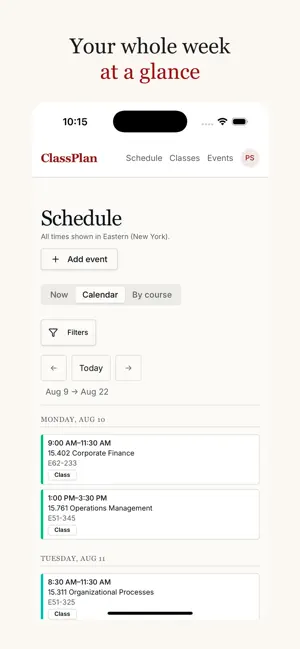
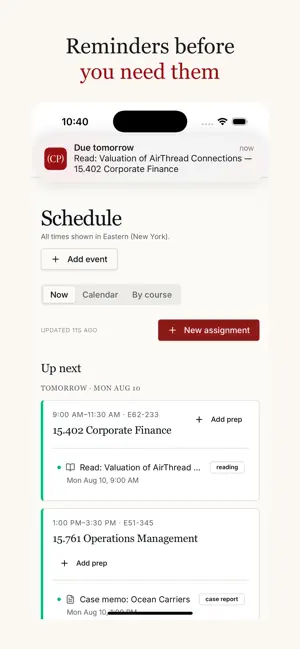
Always know exactly what to work on next. Every term starts the same way: multiple syllabi, disconnected systems, and no single place that tells you what's actually due. ClassPlan reads them and turns the pile into one ranked plan. WHAT YOU GET Up next — the one screen that matters. Your next classes and the readings, problem sets and papers due before them, in the order you should do them. No sorting, no cross-referencing. Your week at a glance — every class, room and deadline on one calendar. Switch to By course when you want to see a single subject end to end. Add a class in seconds — upload the syllabus and ClassPlan pulls out the assignments, due dates and class times for you. Shared classes — when a classmate adds the same course, you're automatically placed in one shared class you can edit together. Someone corrects a due date, everyone gets it. No group chat archaeology. In the calendar you already use — subscribe once and every class, room and due date shows up in Google Calendar, Apple Calendar or Outlook, staying current all term. No new app to remember. Reminders that land before you need them — a nudge the day before something is due, a heads-up half an hour before class with the room number, and an alert when a classmate changes something in a class you share. Events — talks, mixers and get-togethers for your program, with RSVPs in the same place as everything else. BUILT BY A STUDENT ClassPlan was built by an MIT Sloan Fellow who was tired of rebuilding the same spreadsheet every term, and it's used daily by hundreds of classmates. It's now open to students at any university with a school email. PRICING Join your first class and your first 30 days are free — no card required to start. Subscriptions purchased in the app are billed through your Apple ID and renew automatically until cancelled in Settings. Privacy Policy: https://classplan.xyz/privacy Terms of Use (EULA): https://www.apple.com/legal/internet-services/itunes/dev/stdeula/ Questions or feedback? We read everything.
What’s new
Version 1.1 · Updated September 15, 2026
ClassPlan now runs full screen on iPad. - Your whole week on one screen. The week view lays out all seven days side by side, so every class, room and deadline is visible at once instead of scrolling sideways. - Two columns of classes. My classes uses the full width rather than a single narrow stack. - Any orientation, and alongside another app. Rotate the iPad however you like, and keep your schedule open.
App privacy
The developer, Forge Lab, Inc., reported these privacy practices to Apple.
Data Linked to You
The following data, which may be collected and linked to your identity, may be used for the following purposes:
- Contact Info: Email Address, Name
- Financial Info: Payment Info
- User Content: Other User Content
- Identifiers: User ID, Device ID
Used for: Product Personalization, App Functionality
Data Not Linked to You
The following data, which may be collected but is not linked to your identity, may be used for the following purposes:
- Diagnostics: Crash Data, Performance Data, Other Diagnostic Data
Used for: Analytics
Alternatives to ClassPlan
Looking for apps like ClassPlan? Here are 6 similar apps on the App Store. The highest rated is SloanGroups at MIT Sloan (4.7/5), and all 6 are free to download.
-
 MIT SloanHub
-
 SloanGroups at MIT Sloan
4.7
SloanGroups at MIT Sloan
4.7
-
 OROT - Read Korean
-
 Project Trailhead
-
 Max Vocab: Learn words daily
4.6
Max Vocab: Learn words daily
4.6
-
 The Harvard School
| App | Rating | Price | Last updated | Compare |
|---|---|---|---|---|
| ClassPlan | 5.0 / 5 (3 ratings) | Free | September 15, 2026 | |
| MIT SloanHub | – | Free | Feb 16, 2026 | Compare |
| SloanGroups at MIT Sloan | 4.7 / 5 (413) | Free | Sep 21, 2026 | Compare |
| OROT - Read Korean | – | Free | Oct 17, 2026 | Compare |
| Project Trailhead | – | Free | Aug 29, 2026 | Compare |
| Max Vocab: Learn words daily | 4.6 / 5 (10) | Free | Dec 20, 2024 | Compare |
| The Harvard School | – | Free | Aug 13, 2025 | Compare |
Compare ClassPlan with the top alternatives: ratings, updates, ASO score and keyword gaps →