

SD Backup: NAS & SFTP
小祯 汪 Utilities iPhoneiPadiPod touch
SD Backup: NAS & SFTP is a free Utilities app for iPhone and iPad by 小祯 汪. Requires iOS 26.0. Updated September 4, 2026.
- Price
- Free
- on the App Store
- Size
- 16 MB
- Age 4+
- Updated
- Sep 4
- 2026 · v1.0
Screenshots


About SD Backup: NAS & SFTP
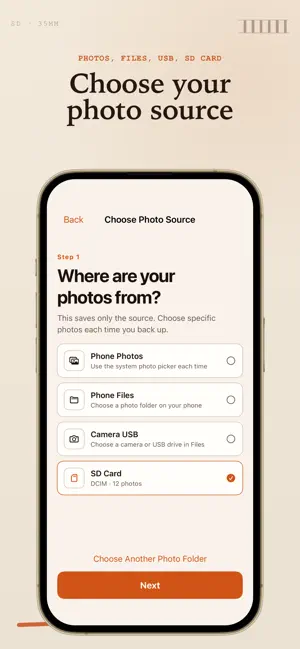
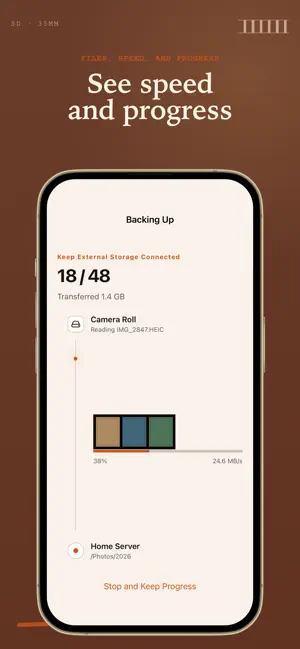
Back up photos and files directly to storage you control. SD Backup copies selected items from your iPhone, an external drive, or another folder to an SFTP server or a destination in the Files app. YOUR STORAGE, YOUR CHOICE • Connect to an SFTP server or NAS with SFTP enabled • Copy to a folder available through the Files app • Select photos or work with folders from external storage CLEAR TRANSFER STATUS • Review items before starting • Follow preparation and upload progress • See completed, resumable, and attention-required states • Confirm an SFTP server's host-key fingerprint when its identity changes PRIVACY BY DESIGN • No developer-operated cloud storage • No account required • No advertising or tracking • SFTP passwords are stored in the Apple Keychain • Files transfer directly between the locations you select SD Backup is made for personal servers, home NAS devices, and private storage workflows.
App privacy
The developer, 小祯 汪, reported these privacy practices to Apple.
Data Not Collected
The developer does not collect any data from this app.
Alternatives to SD Backup: NAS & SFTP
Looking for apps like SD Backup: NAS & SFTP? Here are 6 similar apps on the App Store.
-
 Ouhud QR
-
 ArchiveDock - SSD Photo Backup
-
 ZenTerm
-
 RelayPony: Fast File Transfer
-
 Image Rotator
-
 Spin the Wheel: Decide Now
| App | Rating | Price | Last updated | Compare |
|---|---|---|---|---|
| SD Backup: NAS & SFTP | – | Free | September 4, 2026 | |
| Ouhud QR | – | Free | Jul 26, 2026 | Compare |
| ArchiveDock - SSD Photo Backup | – | Free | Sep 7, 2026 | Compare |
| ZenTerm | – | Free | Jun 15, 2026 | Compare |
| RelayPony: Fast File Transfer | – | Free | Oct 16, 2026 | Compare |
| Image Rotator | – | Free | Oct 11, 2026 | Compare |
| Spin the Wheel: Decide Now | – | Free | Jun 9, 2026 | Compare |