

KOMA: Speech Bubble Maker
MINERVA K.K. Photo & Video iPhoneiPadiPod touch
KOMA: Speech Bubble Maker is a free Photo & Video app for iPhone and iPad by MINERVA K.K. Requires iOS 15.0. Updated September 5, 2026.
- Price
- Free
- on the App Store
- Size
- 85 MB
- Age 4+
- Updated
- Sep 5
- 2026 · v1.0.1
Screenshots
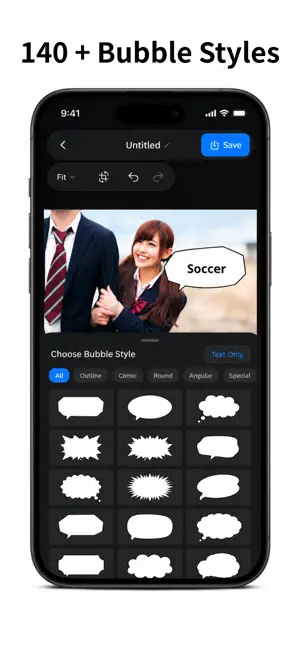


About KOMA: Speech Bubble Maker
Turn everyday photos into something worth sharing. KOMA is a simple speech bubble maker and photo editor that lets you add comic-style dialogue, thoughts, captions, and text to any image in just a few taps. Add a funny line to your pet photo, create a conversation between friends, add a playful quote to a family picture, or make an eye-catching image for social media. No complicated design tools. Choose a photo, pick a bubble, type your text, adjust the look, and save. MAKE YOUR PHOTOS TALK A single speech bubble can completely change the feeling of a photo. Give your dog a voice. Add your cat’s “inner thoughts.” Turn a group photo into a comic scene. Add a reaction, joke, note, or caption that makes people stop scrolling. KOMA is designed for quick, visual editing, so you can focus on the idea instead of learning a complicated editor. 140+ SPEECH BUBBLE STYLES Choose from more than 140 bubble designs for different moods and scenes. • Classic speech bubbles • Round and soft bubbles • Thought bubbles • Jagged shout bubbles • Angular comic bubbles • Emphasis and special styles From cute and casual to bold and dramatic, there is a bubble for almost any photo. Bubble graphics are vector-based, so they stay crisp when resized. EASY TOUCH CONTROLS Place each bubble exactly where you want it. Drag to move. Pinch to resize. Rotate with simple controls. Flip horizontally or vertically to change the tail direction. Point a bubble toward a person, pet, object, or empty area of the photo without rebuilding your design. CUSTOMIZE YOUR TEXT Change fonts, text size, rotation, and color to match the moment. Use bold, clean text for social posts or choose a different typeface to fit the mood. KOMA supports both horizontal and vertical text, giving you more freedom for multilingual layouts, comic-style composition, and Japanese vertical writing. COLORS THAT FIT YOUR PHOTO Customize the speech bubble and text colors separately. Keep it classic with black and white, choose bright colors for a playful post, or use a softer combination that blends naturally with the image. CROP FOR THE RIGHT FORMAT Crop and adjust your photo ratio for square layouts and other common formats. Create clean compositions for social media posts, profile images, thumbnails, reaction images, and visual notes. SAVE PROJECTS AND EDIT AGAIN Your work does not have to be final when you save it. KOMA keeps your creations as editable projects, so you can return later to change the words, move a bubble, adjust its size, try another style, or update the colors. Make alternate versions of the same photo without starting over. GREAT FOR PETS, FRIENDS, FAMILY, AND MORE Use KOMA to: • Add funny “thoughts” to pet photos • Create conversations in friend or family pictures • Make comic-style social posts • Add reactions, jokes, quotes, or captions • Add labels, notes, and visual annotations • Create simple thumbnails and eye-catching images • Add vertical or horizontal messages • Turn everyday snapshots into shareable stories SIMPLE BY DESIGN KOMA focuses on the tools you actually need for speech bubble editing. The interface is clean, direct, and easy to understand. Create something fun in seconds, while still having the controls to fine-tune the result. Whether you want to make your pet look like it is talking, create a mini comic from a photo, add a funny caption for social media, or place a clear note on an image, KOMA keeps the process simple and enjoyable. PHOTOS ARE BETTER WITH A VOICE Some photos are cute. Some are funny. Some need just one line to become memorable. Add the missing words with KOMA. Choose a photo. Add a bubble. Say what the picture is thinking. KOMA — make your photos talk. Terms of Use: (https://minerva.in.net/official/koma-terms/) Privacy Policy:(https://minerva.in.net/official/privacy-policy/)
What’s new
Version 1.0.1 · Updated September 5, 2026
fixed bug
App privacy
The developer, MINERVA K.K., reported these privacy practices to Apple.
Data Used to Track You
The following data may be used to track you across apps and websites owned by other companies:
- Location: Coarse Location
- Identifiers: Device ID
- Usage Data: Product Interaction, Advertising Data
- Diagnostics: Crash Data, Performance Data
Data Linked to You
The following data, which may be collected and linked to your identity, may be used for the following purposes:
- Location: Coarse Location
- Identifiers: Device ID
- Usage Data: Product Interaction, Advertising Data
- Diagnostics: Performance Data
Used for: Third-Party Advertising
Data Not Linked to You
The following data, which may be collected but is not linked to your identity, may be used for the following purposes:
- Diagnostics: Crash Data
- Purchases: Purchase History
Used for: Third-Party Advertising, Analytics, App Functionality
Alternatives to KOMA: Speech Bubble Maker
Looking for apps like KOMA: Speech Bubble Maker? Here are 6 similar apps on the App Store. The highest rated is Manga Maker: Photo Comics (5.0/5), and all 6 are free to download.
-
 BubbleSnap - Photo Bubbles
1.0
BubbleSnap - Photo Bubbles
1.0
-
 ドン!! - 漫画吹き出し・擬音・集中線・文字入れ
-
 もふトーク!-可愛いペットの写真に簡単に吹き出しを付けよう-
-
 Quick Image And Video Collage
-
 写真で漫画メーカー
-
 Manga Maker: Photo Comics
5.0
Manga Maker: Photo Comics
5.0
| App | Rating | Price | Last updated | Compare |
|---|---|---|---|---|
| KOMA: Speech Bubble Maker | – | Free | September 5, 2026 | |
| BubbleSnap - Photo Bubbles | 1.0 / 5 (1) | Free | Oct 2, 2026 | Compare |
| ドン!! - 漫画吹き出し・擬音・集中線・文字入れ | – | Free | Sep 1, 2026 | Compare |
| もふトーク!-可愛いペットの写真に簡単に吹き出しを付けよう- | – | Free | Mar 10, 2026 | Compare |
| Quick Image And Video Collage | – | Free | Oct 13, 2026 | Compare |
| 写真で漫画メーカー | – | Free | Apr 28, 2026 | Compare |
| Manga Maker: Photo Comics | 5.0 / 5 (1) | Free | Oct 14, 2026 | Compare |