

FocalWell 66: Medium Format
Sezer Kusku Photo & Video iPhoneiPadiPod touch
FocalWell 66: Medium Format is a free Photo & Video app for iPhone and iPad by Sezer Kusku. Requires iOS 17.0. Updated October 21, 2026.
- Price
- Free
- on the App Store
- Size
- 34 MB
- Age 4+
- Updated
- Oct 21
- 2026 · v2.0
Screenshots



About FocalWell 66: Medium Format
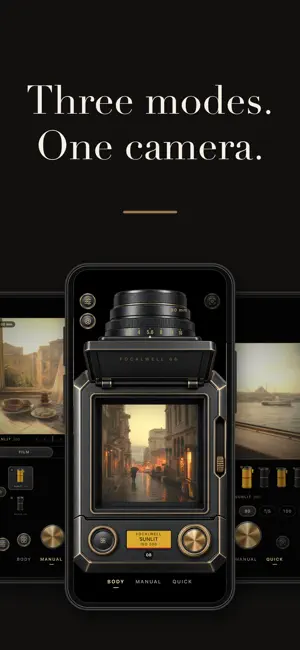
Your phone takes pictures. FocalWell takes photographs. FocalWell 66 brings the classic 6×6 medium format camera to iPhone. You compose on the ground glass of a waist-level finder: a square frame, optional grid, etched split-image and microprism rings, and an image mirrored as in a real finder or upright. Saved frames are always upright. THREE MODES • BODY: the whole camera on screen, with shutter speed, ISO and aperture controls. • MANUAL: frame on top, full exposure control below — shutter speed ruler, ISO, aperture, ±2 EV compensation, light-meter needle, 3 or 10 s self-timer, focus AUTO, POINT or MANUAL. One tap returns to auto. • QUICK: just the film rolls, lens chips and shutter. Front or back camera; flash continuous or at exposure. On iPhone Duo, in the laptop pose, the viewfinder lies below and the controls face you. FILM BEFORE THE SHOT The picker has three groups: ANALOG (color negative, slide, cine and black-and-white), VINTAGE (processing tricks, old print processes, light play) and MODERN (the unfiltered Normal look, Modern for clean medium format, and six looks that adapt to the light — one reads the scene and picks for you). Eighteen films, each an interpretation under its own name; none is a measured copy of a branded stock. Every roll previews live in the finder; press and hold one to make it a favorite. Tap the loaded film to set its color strength (0–100%), grain (0–200%) and one of six textures, live in the finder. Grain follows exposure, halation leaves a warm fringe only around real highlights, and every roll is a batch with a slight color shift of its own. SEVEN LENSES Normal, wide, portrait, soft focus, tilt-shift, fisheye and an antique meniscus, each with its own rendering and distortion. The lens is part of the frame; the film can be changed later. TWELVE FRAMES PER ROLL As on 120 film, numbered by roll and frame on a contact sheet. DEVELOPMENT Frames appear instantly, or wait in the tank for 1, 5 or 30 minutes or 2 hours, stage by stage, with a notification when ready. Push or pull from −2 to +2 stops, per frame and final. LONG AND DOUBLE EXPOSURE Hold the shutter open, or use bulb with timed 2, 4 or 8 s. "Expose again" puts your next shot on top of any frame. DARKROOM Strips lie on a light table: press and hold a frame to see it under a loupe; double-tap or pinch to zoom. Edit exposure, contrast, saturation and warmth, change the film, hold to compare. Film border and edge label on or off. Save to Photos (optionally automatic), share, or develop a photo from your library. Texture, grain, halation, bloom and color strength can also be set per frame. On supported models frames are developed from RAW sensor data; no separate RAW file is saved. FREE AND PRO Free: the unfiltered Normal look and two films (a color negative and a black-and-white), one roll each — 24 digital frames, 12 per film — the normal and fisheye lenses, three bulb and three double exposures. Free frames always carry the edge label. Pro: all eighteen films, Modern and the six looks, new films from the catalog, all seven lenses, unlimited frames, bulb and double exposure, zoom up to 3× and the edge label switch. Monthly or yearly subscription (the yearly plan starts with a free trial; cancel before it ends and nothing is charged) or a one-time lifetime purchase. Subscriptions renew automatically unless cancelled at least 24 hours before the period ends; manage them in your App Store account. No account, no ads, no analytics, no tracking. Frames stay on your device; the app only downloads the film catalog and verifies purchases. In 17 languages. Privacy: https://focalwell.github.io/gizlilik.html Terms: https://focalwell.github.io/kosullar.html
What’s new
Version 2.0 · Updated October 21, 2026
Three ways to shoot, one camera. • BODY: the whole camera on screen. • MANUAL: the frame on top, full exposure control below — shutter speed ruler, ISO, aperture, ±2 EV compensation, light-meter needle, 3 or 10 s self-timer; focus AUTO, POINT or MANUAL. • QUICK: just the film rolls, lens chips and the shutter. No development wait; hold the shutter for a burst. Darkroom • The contact strips lie on a light table. Press and hold a frame to see it under a loupe. • On a frame, double-tap or pinch to zoom. • Redesigned frame page and editor: exposure, contrast, saturation and warmth on a single ruler; hold to see the original. Per frame: color strength, grain, halation, bloom and texture. Film • The picker is grouped as MODERN · ANALOG · VINTAGE. • The picker now shows 18 films (63 in earlier versions): films too close to one another were retired. Nothing was deleted — frames shot with them still open, and a loaded film keeps working. • New: Modern, a clean medium format look without grain. • New: six looks — color grades that adapt to each frame; one of them reads the scene and picks for you. • Film settings: tap the loaded film to set color strength, grain strength and one of six textures, live in the finder. • Every film's color and grain was retuned. Frames already in the app are shown with the new tuning; copies saved to Photos don't change. • Lab correction (Settings → Capture, on by default): lifts dark frames, removes color casts, protects bright skies. • Favorites: press and hold a roll; favorites come first in every list. • Every film now has its own roll artwork. • New film catalog: the loaded film and the one you're trying, side by side. • Switching films is much faster. RAW • RAW capture is now on by default: on supported models frames are developed from RAW sensor data, and the system shutter sound may play. Turn it off in Settings → Capture. • The first RAW frame of a session is now prepared in advance, so the shutter no longer stalls. Look and feel • Matte graphite and brass throughout, and a new app icon. • A shorter, crisper shutter sound. • Rewritten field guide; translations reviewed in all 17 languages. iPhone Duo • In the laptop pose, the viewfinder lies on the lower half and the controls face you on the upper half.
App privacy
The developer, Sezer Kusku, reported these privacy practices to Apple.
Data Not Linked to You
The following data, which may be collected but is not linked to your identity, may be used for the following purposes:
- Purchases: Purchase History
Used for: App Functionality
Alternatives to FocalWell 66: Medium Format
Looking for apps like FocalWell 66: Medium Format? Here are 6 similar apps on the App Store. The highest rated is Relif - Restore Old Photos (1.0/5), and 4 of the 6 are free to download.
-
 Photo Print Sizes Calculator
-
 SCENE:
-
 AnyLUT - RAW + LUT Editor
-
 Relif - Restore Old Photos
1.0
-
 FrameDrop: Camera Import
1.0
-
 Puro - Zero AI Camera
1.0
| App | Rating | Price | Last updated | Compare |
|---|---|---|---|---|
| FocalWell 66: Medium Format | – | Free | October 21, 2026 | |
| Photo Print Sizes Calculator | – | 2.99 USD | Dec 10, 2025 | Compare |
| SCENE: | – | Free | Oct 6, 2026 | Compare |
| AnyLUT - RAW + LUT Editor | – | Free | Oct 17, 2026 | Compare |
| Relif - Restore Old Photos | 1.0 / 5 (1) | Free | Nov 9, 2025 | Compare |
| FrameDrop: Camera Import | 1.0 / 5 (1) | 2.99 USD | Oct 27, 2026 | Compare |
| Puro - Zero AI Camera | 1.0 / 5 (1) | Free | Jun 5, 2026 | Compare |