

LMS GamerMix
Lookout Mountain Systems LLC Utilities iPhoneiPadiPod touch
LMS GamerMix is a free Utilities app for iPhone and iPad by Lookout Mountain Systems LLC. Rated 5.0/5 from 3 ratings. Requires iOS 16.0.
- Rating
- 5.0
- 3 ratings
- Price
- Free
- on the App Store
- Size
- 4 MB
- Age 4+
- Updated
- Oct 17
- 2026 · v1.5
Screenshots


About LMS GamerMix
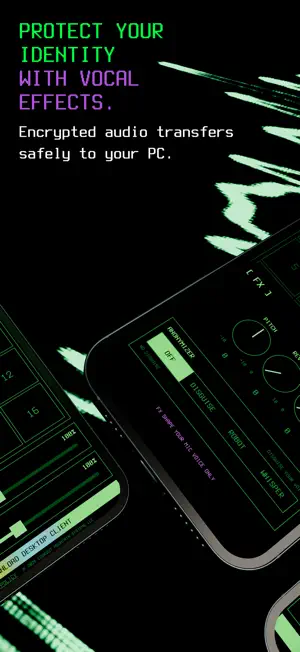
LMS GamerMix turns your phone into a wireless microphone and a 16-pad soundboard for your Windows PC. Your voice and your sound effects travel from the phone to the PC over your own Wi-Fi. On the PC they show up as an ordinary microphone, so any game, voice chat, streaming or recording app can use them. No cables, no mixer, no extra hardware. IMPORTANT: This is a companion app. It needs the free LMS GamerMix desktop app for Windows 11 (64-bit), which includes the virtual microphone driver. Without it the phone has nothing to connect to. Setup guide and download: lookoutmtsystems.github.io/LMSgamermix/how/ FREE - Full wireless microphone, no time limit - Soundboard pad 1, loaded with your own audio file - Put your own image or GIF on the pad GAMERMIX PRO - All 16 soundboard pads - Voice FX: pitch, reverb and delay - Anonymizer voice modes: disguise, robot and whisper - Save and load your setups as programs - Mic input level and soundboard send level controls HOW IT WORKS 1. Put the phone and the PC on the same Wi-Fi network. 2. Open the app and tap START. The phone displays its address. 3. Type that address into the desktop app and connect, then choose LMS GamerMix as your microphone in Windows or in your game. Tap a pad to fire a sound. Hold a pad to load your own audio or artwork. Pads mix directly into what the PC hears, so your team or your audience hears them the moment you do. The microphone keeps running with the screen locked. It stops when you tap STOP, or when another app takes over audio, such as a phone call or a video. WHAT YOU NEED - A Windows 11 64-bit PC running the free LMS GamerMix desktop app - Both devices on the same Wi-Fi network. Guest networks, and routers with client isolation or AP isolation enabled, will block the connection. PRIVACY Audio goes straight from your phone to your PC across your local network, encrypted on the way. Nothing is routed through the internet. There are no accounts to create, we run no servers, and we never receive or store your audio. SUBSCRIPTION GamerMix Pro is an annual auto-renewing subscription. Payment is charged to your Apple Account at confirmation of purchase. It renews automatically unless auto-renew is turned off at least 24 hours before the end of the current period, and your account is charged for renewal within 24 hours of the end of the current period. You can manage or cancel it in your Apple Account settings. The free microphone and pad 1 remain available whether or not you subscribe. SUPPORT [email protected] Lookout Mountain Systems, LLC Terms of Use: https://www.apple.com/legal/internet-services/itunes/dev/stdeula/ Privacy Policy: https://lookoutmtsystems.github.io/LMSgamermix/privacy/
What’s new
Version 1.5 · Updated October 17, 2026
What's new in 1.5 • iPhone landscape: turn your phone sideways for a two-column layout, with your controls and scope on the left and all 16 pads on the right. • iPhone Duo support: open it and GamerMix splits along the fold, with your controls on one half and the pads on the other. Held like a book, the controls sit on the left; turned so the fold runs across, they sit above the pads. Nothing is placed on the fold or under the camera. • On iPhone Duo, loading a pad opens the file picker in the controls half, so your pads stay in view. Pick several files at once and they fill the pads in order, starting from the one you chose. • Closed, GamerMix fits the outer screen of iPhone Duo. Held sideways, the pads take one side and your controls the other. Held upright, the controls sit on top and the pads fill the rest, with no scrolling. • On iPhone Duo, GamerMix works either way up. • Layout improvements and bug fixes.
App privacy
The developer, Lookout Mountain Systems LLC, reported these privacy practices to Apple.
Data Not Collected
The developer does not collect any data from this app.
Alternatives to LMS GamerMix
Looking for apps like LMS GamerMix? Here are 6 similar apps on the App Store. The highest rated is Likz Drop: File Transfer (5.0/5), and 5 of the 6 are free to download.
-
 Sound Scope Analyzer
-
 Farness
4.0
-
 QuietScore - Soundproof Test
-
 Likz Drop: File Transfer
5.0
-
 Voice Amplify
-
 MicButton
| App | Rating | Price | Last updated | Compare |
|---|---|---|---|---|
| LMS GamerMix | 5.0 / 5 (3 ratings) | Free | October 17, 2026 | |
| Sound Scope Analyzer | – | Free | Oct 10, 2026 | Compare |
| Farness | 4.0 / 5 (13) | 1.99 USD | Sep 25, 2026 | Compare |
| QuietScore - Soundproof Test | – | Free | Sep 8, 2026 | Compare |
| Likz Drop: File Transfer | 5.0 / 5 (5) | Free | Sep 17, 2026 | Compare |
| Voice Amplify | – | Free | Aug 20, 2026 | Compare |
| MicButton | – | Free | Sep 17, 2026 | Compare |
Compare LMS GamerMix with the top alternatives: ratings, updates, ASO score and keyword gaps →