

Tutor Worksheets
Krissam Tapa Education iPhoneiPadiPod touch
Tutor Worksheets is a free Education app for iPhone and iPad by Krissam Tapa. Rated 5.0/5 from 1 ratings. Requires iOS 16.4. Updated September 28, 2026.
- Rating
- 5.0
- 1 ratings
- Price
- Free
- on the App Store
- Size
- 30 MB
- Age 4+
- Updated
- Sep 28
- 2026 · v1.0.1
Screenshots


About Tutor Worksheets
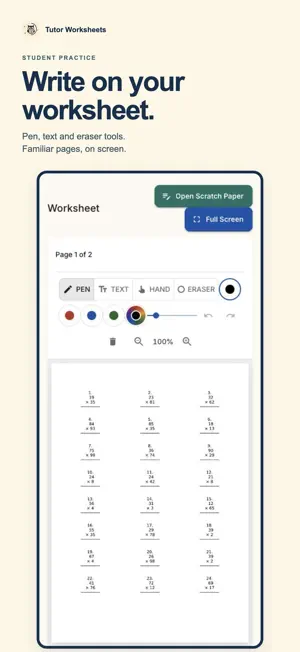
Bring your worksheets, let students work on the page, and get help with checking. Tutor Worksheets connects preparation, practice and review for parents, teachers and tutors. AI CHECKING, WITH YOU IN CONTROL Optional AI-assisted checking suggests scores and feedback on submitted work. Choose adult approval to review and correct suggestions before students see results, or review work manually. AI can make mistakes; your judgment matters. BRING YOUR OWN WORKSHEETS Upload worksheet PDFs or images, add a title and instructions, and assign practice to your students. Keep familiar learning materials in a digital workspace instead of juggling printouts. CREATE WITH AI FROM PHOTOS Use reference photos and optional instructions to generate a worksheet. Review the generated page before assigning it. This is photo-guided creation, so start with images of your topic or example material. A FAMILIAR WORKSHEET EXPERIENCE Students open assigned activities in their own account and write or type directly on worksheet pages. Pen, text and eraser tools help them put answers on the page. A private scratch area gives them room to work things out separately from their submitted answers. A SIMPLE ROUTINE 1. Upload a worksheet or create one from photos. 2. Connect your students and assign practice. 3. Students open the activity, work on the page and submit their answers. 4. Review the work, check any AI suggestions and share feedback. FOR PARENTS Keep home practice and your child's work together. Younger learners can use a username without needing their own email address. Use reviewed feedback to guide the next practice session. FOR TEACHERS AND TUTORS Organize worksheets by subject and grade. Keep activities, student access and submitted work in one routine. Use AI-assisted checking to support your review, without handing over the final decision when adult approval is enabled. FOR STUDENTS Find your assigned work, continue an activity and work out answers on screen. Return to published feedback and try again when a retake is available. Private scratch notes are not submitted with your answers. An internet connection and Tutor Worksheets account are required. Student access is set up or connected by a parent, teacher or tutor. AI checking, timing, pausing and retakes depend on activity settings. Review AI-generated content and checking suggestions before relying on them.
What’s new
Version 1.0.1 · Updated September 28, 2026
Improved handwriting and erasing on worksheet pages. • Fixed an issue that prevented saved writing from being erased after reopening a worksheet. • Improved eraser accuracy so the visible eraser size matches the area being erased. • Improved undo and redo reliability while drawing.
App privacy
The developer, Krissam Tapa, reported these privacy practices to Apple.
Data Not Collected
The developer does not collect any data from this app.
Alternatives to Tutor Worksheets
Looking for apps like Tutor Worksheets? Here are 6 similar apps on the App Store. The highest rated is Math Rally (5.0/5), and all 6 are free to download.
-
 ChildStep: Goals Done Together
4.8
-
 AI Math Solver - MathGen
-
 Math Rally
5.0
-
 TinyClimbs: Worksheet Maker
5.0
-
 SHSTAC Mobile App
-
 LangWizz: Accent & AI Tutor
| App | Rating | Price | Last updated | Compare |
|---|---|---|---|---|
| Tutor Worksheets | 5.0 / 5 (1 rating) | Free | September 28, 2026 | |
| ChildStep: Goals Done Together | 4.8 / 5 (4) | Free | Oct 10, 2026 | Compare |
| AI Math Solver - MathGen | – | Free | May 28, 2026 | Compare |
| Math Rally | 5.0 / 5 (10) | Free | Oct 2, 2026 | Compare |
| TinyClimbs: Worksheet Maker | 5.0 / 5 (1) | Free | Oct 2, 2026 | Compare |
| SHSTAC Mobile App | – | Free | Jun 9, 2026 | Compare |
| LangWizz: Accent & AI Tutor | – | Free | May 23, 2025 | Compare |
Compare Tutor Worksheets with the top alternatives: ratings, updates, ASO score and keyword gaps →