

Scenic Drive Routes
Tatiana Smolonogina Navigation iPhoneiPadiPod touch
Scenic Drive Routes is a free Navigation app for iPhone and iPad by Tatiana Smolonogina. Requires iOS 17.0. Updated November 20, 2026.
- Price
- Free
- on the App Store
- Size
- 5 MB
- Age 4+
- Updated
- Nov 20
- 2026 · v1.1
Screenshots
Save to Pinterest


About Scenic Drive Routes
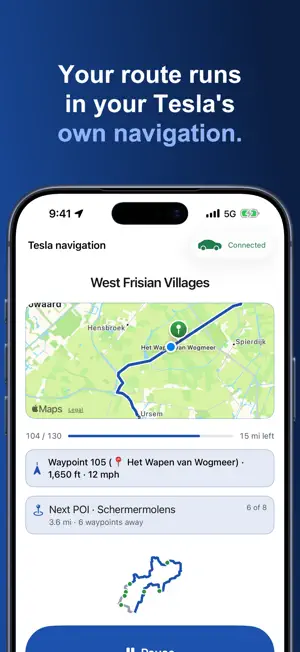
Your Tesla saves places. Save the road. You planned the drive. You pulled the line off the highway and through the hills, put the viewpoint on it, checked every turn. Then you get in the car and type in the destination, because the destination is all you can send it. Two junctions later the blue line jumps back to the highway. You disengage, drive your own way for a mile, re-engage, and watch the car reroute you to its road again. Scenic Drive puts your whole route into your Tesla's own navigation, on the car's screen, in one tap. The car follows your line to the last turn and never swaps it for the "optimal" one halfway through. ROUTES, SAVED. NOT JUST PLACES. Save the whole drive: start, every waypoint, finish. "Sunday by the sea." "Home through the woods." "The good way to the cabin." They sit in your library under names you chose and go to the car with one tap, every time you drive them. THE LINE STAYS YOURS No switch to the "faster" road at the next junction. The car follows the route you chose, turn for turn, whether you hold the wheel or Full Self-Driving (Supervised) does. Stop disengaging just to take the road you wanted. FROM GOOGLE MAPS STRAIGHT INTO THE CAR Paste a Google Maps link. Drop in a GPX or KML file from a route planner, your club or a friend. Every waypoint arrives, not just the pin at the end. No more typing a list into the car in the driveway. WAYPOINTS SHAPE THE ROAD. THEY DON'T STOP YOU. A point on your route means "go this way", not "pull over here". Nothing to delete from the screen at 60 mph. You stop where you want to stop. HUNDREDS OF SCENIC DRIVES Coastlines, mountain passes and quiet back roads, hand-picked and ready to send, from the Great Ocean Road to the Atlantic Ocean Road and the Dolomites. The TomTom can go back in the drawer. HOW IT WORKS 1. Connect your Tesla once. You sign in on Tesla's own page; your password never reaches us. 2. Bring a route or pick one: a Google Maps link, a GPX or KML file, your library or ours. 3. Tap start. Drive it yourself or let FSD (Supervised) drive it, with you in control. The car stays on your road to the last turn. Scenic Drive is an independent app, not affiliated with Tesla, Inc. Subscriptions renew automatically until cancelled. Terms of Use: https://scenicdrive.app/terms — Privacy Policy: https://scenicdrive.app/privacy
What’s new
Version 1.1 · Updated November 20, 2026
• Import KML files as well as GPX, up to 10 MB. • Clearer pause messages when your Tesla is offline or not responding, with what to do next. • Your selected car is shown by name everywhere. • Fixes and polish.
App privacy
The developer, Tatiana Smolonogina, reported these privacy practices to Apple.
Data Linked to You
The following data, which may be collected and linked to your identity, may be used for the following purposes:
- Purchases: Purchase History
- Location: Precise Location
- Identifiers: User ID
Used for: App Functionality
Alternatives to Scenic Drive Routes
Looking for apps like Scenic Drive Routes? Here are 6 similar apps on the App Store. The highest rated is Carve: Scenic Drive Planner (4.9/5), and all 6 are free to download.
-
 RouteDrop: EV Trip Planner
-
 Scenra: Scenic Road Trips
-
 Coffee & Radar
-
 Carve: Scenic Drive Planner
4.9
-
 Routes - Best Driving Roads
-
 Scenic Way
| App | Rating | Price | Last updated | Compare |
|---|---|---|---|---|
| Scenic Drive Routes | – | Free | November 20, 2026 | |
| RouteDrop: EV Trip Planner | – | Free | Oct 5, 2026 | Compare |
| Scenra: Scenic Road Trips | – | Free | Oct 13, 2026 | Compare |
| Coffee & Radar | – | Free | Jul 1, 2026 | Compare |
| Carve: Scenic Drive Planner | 4.9 / 5 (10) | Free | Nov 23, 2026 | Compare |
| Routes - Best Driving Roads | – | Free | Nov 23, 2026 | Compare |
| Scenic Way | – | Free | Nov 9, 2026 | Compare |