

Orlia: Makeup Mirror & Light
Ergun Erkan Lifestyle iPhoneiPadiPod touch
Orlia: Makeup Mirror & Light is a free Lifestyle app for iPhone and iPad by Ergun Erkan. Requires iOS 18.0. Updated November 21, 2026.
- Price
- Free
- on the App Store
- Size
- 7 MB
- Age 4+
- Updated
- Nov 21
- 2026 · v1.1.0
Screenshots
Save to Pinterest

About Orlia: Makeup Mirror & Light
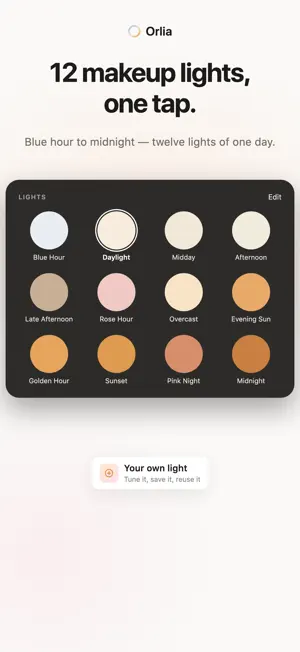
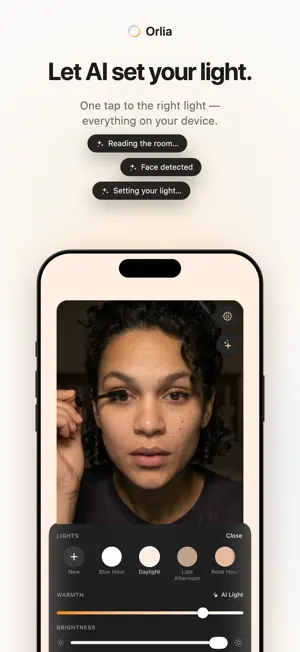
Set your light. Do your makeup. Take the shot. Orlia turns your phone into a lighted mirror: your camera in the middle, twelve shades of light around it. Bad light ruins good makeup, so you start with the light — warm it until your skin looks like your skin — then pick up the brush. No ads, no account, four lights free. A dark bedroom before you go out. A parked car ten minutes before dinner. A hotel bathroom with one yellow bulb on a wedding morning. You can finally see the lash line you are drawing. Nothing to carry, nothing to charge; your phone is already in your bag. While Orlia is open, the screen turns itself up to full brightness and stays awake until you are done. FIRST THE LIGHT: TWELVE SHADES, 2400K TO 6500K Blue Hour, Daylight, Midday, Afternoon, Late Afternoon, Rose Hour, Overcast, Evening Sun, Golden Hour, Sunset, Pink Night, Midnight — ordered like the day they are named for. They are lights, not filters: nothing is added to your face. Pick the light of the room you are going into, nudge the warmth degree by degree until your skin is neither orange nor grey, then save the light you found — up to twelve of your own. Hide the ones you never reach for, drag them into your own order, bring them back from Settings anytime. OR ONE TAP: AI LIGHT SETS IT Orlia measures how dark the room is and how your face is exposed, then sets brightness and warmth for you. Don't like it? One tap to undo. It all happens on your iPhone; nothing is sent anywhere. THEN YOUR MAKEUP, WITH BOTH HANDS FREE Drag the mirror, resize it, park it low so the light falls from above — everything around it stays lit. Double-tap and the frame freezes: check a lash line, a brow, the back of your head without holding a pose. Pinch to get close for liner and lashes. THEN THE PHOTO Swipe sideways on the mirror and press the shutter. What the mirror shows is what you get: no filters, no smoothing. Retake, save or share. No gallery inside the app; the photo reaches your Photos only if you save it. Free. Swipe once more to record video with sound, in the best quality your phone offers, with no time limit — watch it, then save, share or delete it. Video is part of Pro. NO ADS. NOT ONE. No full-screen video before you are allowed to see your own face. No account, no sign-up, no analytics, no trackers, no third-party SDKs. Nothing is saved unless you take a photo or record a video and save it yourself, and your image never leaves your iPhone. FREE, AND PRO IF YOU WANT IT Free forever: four lights, the mirror, brightness, three mirror sizes, freeze, zoom, all of photo mode and six app icons. Pro: all twelve lights, AI Light, video with sound, fine warmth control, your own saved lights, the mirror anywhere on screen, and every light added later. Subscribe monthly or yearly; the yearly plan starts with a 3-day free trial. Or skip subscriptions: Pro Lifetime, pay once, keep it. Set your light, do your makeup, take the shot — and meet yourself at your most radiant. Orlia Pro is an auto-renewing subscription. Payment is charged to your Apple Account at confirmation of purchase. The subscription renews automatically unless auto-renew is turned off at least 24 hours before the end of the current period. Manage or cancel it in Settings › your name › Subscriptions. Any unused part of a free trial is forfeited when a subscription is purchased. Pro Lifetime is a one-time purchase; it never renews. Terms of Use: https://orlia.app/terms Privacy Policy: https://orlia.app/privacy
What’s new
Version 1.1.0 · Updated November 21, 2026
What's new in 1.1.0 Record video. Swipe past the photo card to the new video page and record with sound, in the best quality your phone's front camera offers, with no time limit. Watch your take before you keep it, then save it to Photos, share it or delete it. Video is part of Orlia Pro. Photos stay free for everyone. Thank you for getting ready with Orlia!
App privacy
The developer, Ergun Erkan, reported these privacy practices to Apple.
Data Not Collected
The developer does not collect any data from this app.
Alternatives to Orlia: Makeup Mirror & Light
Looking for apps like Orlia: Makeup Mirror & Light? Here are 6 similar apps on the App Store. The highest rated is Mirror - Light, Camera, Zoom (5.0/5), and all 6 are free to download.
-
 Ring Light - Makeup Mirror
-
 Mirror — Makeup & Light
-
 Mirror - Light, Camera, Zoom
5.0
-
 PocketMirror: Lighted Mirror
-
 HomeGirl - AI Makeup Assistant
-
 Zemhery: Günlük Enerji Takibi
| App | Rating | Price | Last updated | Compare |
|---|---|---|---|---|
| Orlia: Makeup Mirror & Light | – | Free | November 21, 2026 | |
| Ring Light - Makeup Mirror | – | Free | Nov 26, 2026 | Compare |
| Mirror — Makeup & Light | – | Free | Aug 14, 2026 | Compare |
| Mirror - Light, Camera, Zoom | 5.0 / 5 (4) | Free | Nov 16, 2026 | Compare |
| PocketMirror: Lighted Mirror | – | Free | Sep 16, 2026 | Compare |
| HomeGirl - AI Makeup Assistant | – | Free | Aug 27, 2026 | Compare |
| Zemhery: Günlük Enerji Takibi | – | Free | Jan 26, 2026 | Compare |