

Distractless
Romil Svaikovskij Productivity iPhoneiPadiPod touchMac
Distractless is a free Productivity app for iPhone and iPad by Romil Svaikovskij. Requires iOS 17.0. Updated October 13, 2026.
- Price
- Free
- on the App Store
- Size
- 4 MB
- Age 4+
- Updated
- Oct 13
- 2026 · v1.1
Screenshots

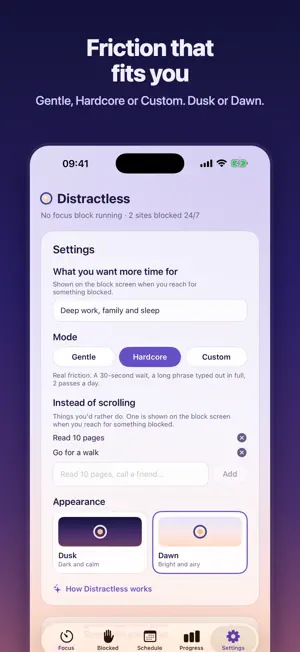


About Distractless
Distractless helps you take your time and attention back from the apps and websites built to hold on to them — on your iPhone and your Mac, together. It works the way habits actually change: by putting a little friction between an urge and acting on it. A block, a pause, a sentence to type. The urge passes. Your plan stays. ONE FOCUS, IPHONE AND MAC Install Distractless on your Mac too and everything stays in step through your own iCloud: blocked websites, schedules, settings and passes. Start a focus block on your iPhone and your Mac blocks too — end it on one and it ends on both. Distraction doesn't just move to the other screen. BLOCK APPS AND WEBSITES Choose the apps and categories that pull you away — straight from your own Screen Time, so you block what you actually use — and type the websites, blocked in every browser. Each one is blocked only during focus, or around the clock. Adding is instant; taking one off is slower on purpose. A WAY OUT, AT A PRICE For a real need, a pass opens something for a few minutes — only a few a day, and only after a short pause. Choose Gentle for a nudge, Hardcore for real friction, or set every value yourself in Custom. Easing your limits always asks you to wait first. FOCUS BLOCKS Sit down to something that matters, pick a length and start. Everything you've set to Focus is blocked until the timer ends. Lockdown makes a block impossible to end early — and stops apps being deleted while it runs. SCHEDULES Let blocks start on their own — weekday mornings, evenings, before bed — so the choice is made ahead of time, not in the moment of temptation. PROGRESS YOU CAN SEE See your pickups and screen time a day over four weeks, the apps you use most and how often you reach for them, and the websites you spend time on. Fewer pickups means the reflex is fading. MADE TO BE CALM Two designs — Dusk and Dawn. Your reason for focusing is shown on the block screen when you reach for something blocked, with things you'd rather be doing. PRIVATE BY DESIGN No accounts, no tracking, no ads. Distractless collects no data. Screen Time information is shown to you by iOS and is never seen by Distractless or sent anywhere. Sync uses your private iCloud database. Distractless uses Apple's Screen Time framework and requires your permission to manage app and website access.
What’s new
Version 1.1 · Updated October 13, 2026
• Edit your schedules, and see at a glance whether each one is blocking now or when it starts next. • A shorter, friendlier setup: pick the moments you lose the most time and set the times to fit your day. • Passes for apps: when you really need one, unblock it for a few minutes. • Choose what you want more time for with a tap. It's shown on every block screen. • Dawn, a new bright look, is now the default. Dusk is still in Settings. • Clearer text throughout, and Screen Time loads faster during setup.
App privacy
The developer, Romil Svaikovskij, reported these privacy practices to Apple.
Data Not Collected
The developer does not collect any data from this app.
Alternatives to Distractless
Looking for apps like Distractless? Here are 6 similar apps on the App Store. The highest rated is Laundris Management (4.5/5), and all 6 are free to download.
-
 Inventoryze
-
 Inventory: Organize and Track
-
 Home Inventory - Keepiko
-
 Laundris Management
4.5
-
 Home Inventory Tracker: HoTi
3.0
-
 VoiceClone AI-Multilingual TTS
4.0
| App | Rating | Price | Last updated | Compare |
|---|---|---|---|---|
| Distractless | – | Free | October 13, 2026 | |
| Inventoryze | – | Free | Jun 26, 2026 | Compare |
| Inventory: Organize and Track | – | Free | Oct 10, 2026 | Compare |
| Home Inventory - Keepiko | – | Free | Sep 24, 2025 | Compare |
| Laundris Management | 4.5 / 5 (2) | Free | Aug 29, 2026 | Compare |
| Home Inventory Tracker: HoTi | 3.0 / 5 (2) | Free | Aug 26, 2026 | Compare |
| VoiceClone AI-Multilingual TTS | 4.0 / 5 (5) | Free | Oct 6, 2026 | Compare |
Compare Distractless with the top alternatives: ratings, updates, ASO score and keyword gaps →