

MP3 a OGG: Conversor Audio
Antonio Gonzalez de la aleja german Productivity iPhoneiPadiPod touch
MP3 a OGG: Conversor Audio is a free Productivity app for iPhone and iPad by Antonio Gonzalez de la aleja german. Requires iOS 17.0.
- Price
- Free
- on the App Store
- Size
- 12 MB
- Age 4+
- Updated
- Sep 29
- 2026 · v1.1
Screenshots


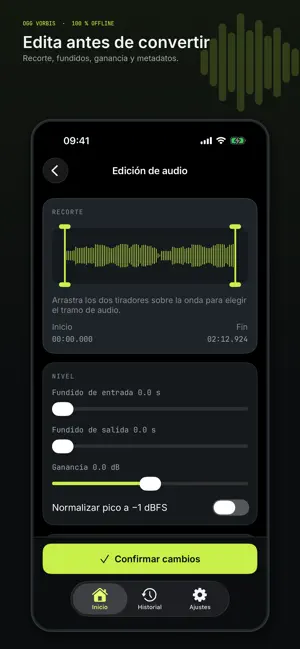
About MP3 a OGG: Conversor Audio
Convert MP3 files to Ogg Vorbis directly on your iPhone or iPad. Audio is processed on your device: nothing is uploaded to a server, and no account or internet connection is required. MP3 to OGG combines a focused converter with editing and encoding controls, so you can prepare each file before saving it. OGG CONVERSION UNDER CONTROL • Choose VBR from q−1 to q10, or ABR/CBR from 32 to 320 kbps. • Preserve the original sample rate or select a value from 8 to 48 kHz. • Keep the source channels or convert to mono or stereo. • Use Compact, Balanced, High and Very High presets, or save custom presets. • Check an estimated output size before you begin. EDIT BEFORE YOU CONVERT • Trim audio with a waveform and start/end handles. • Apply fade-in and fade-out. • Adjust gain and normalize the peak to −1 dBFS. • Get a warning when your settings may cause clipping. METADATA YOUR WAY Preserve or edit title, artist, album, genre, track number, date and comment. You can also add, replace or remove cover artwork. OUTPUTS READY TO USE The app validates each generated Ogg file before publishing it. You can then listen to it, save it to Files, share it, open it or rename it without overwriting another file. History groups conversions by date and lets you search by name, play outputs, repeat a conversion with the same settings, or remove records and files. Naming templates using {name}, {index}, {date} and {quality} help keep outputs consistent. Built for podcasts, game development and audio workflows that use Ogg Vorbis. Straightforward privacy: no accounts, no uploads and no tracking. The interface is available in English and Spanish, with light, dark and system themes. Terms of Use (EULA): https://www.apple.com/legal/internet-services/itunes/dev/stdeula/ Privacy Policy: https://www.freeprivacypolicy.com/live/6709a492-0082-4d37-b246-397c3cdc06a5
What’s new
Version 1.1 · Updated September 29, 2026
-Bug fixes
App privacy
The developer, Antonio Gonzalez de la aleja german, reported these privacy practices to Apple.
Data Not Collected
The developer does not collect any data from this app.
Alternatives to MP3 a OGG: Conversor Audio
Looking for apps like MP3 a OGG: Conversor Audio? Here are 6 similar apps on the App Store. The highest rated is MP3 Converter - All Formats (5.0/5), and all 6 are free to download.
-
 MP3 Converter - All Formats
5.0
MP3 Converter - All Formats
5.0
-
 My WebDAV
1.0
My WebDAV
1.0
-
 Mechanic App
-
 QmailClient
2.0
QmailClient
2.0
-
 TellMe - The simple AI
5.0
TellMe - The simple AI
5.0
-
 Blue Colibri
| App | Rating | Price | Last updated | Compare |
|---|---|---|---|---|
| MP3 a OGG: Conversor Audio | – | Free | September 29, 2026 | |
| MP3 Converter - All Formats | 5.0 / 5 (1) | Free | Oct 19, 2026 | Compare |
| My WebDAV | 1.0 / 5 (2) | Free | Jun 24, 2025 | Compare |
| Mechanic App | – | Free | Oct 18, 2026 | Compare |
| QmailClient | 2.0 / 5 (6) | Free | Feb 25, 2026 | Compare |
| TellMe - The simple AI | 5.0 / 5 (6) | Free | Dec 23, 2024 | Compare |
| Blue Colibri | – | Free | Sep 24, 2026 | Compare |