

Zero Pixel - Photo Art Studio
月蓬 桂 Photo & Video iPhoneiPadiPod touch
Zero Pixel - Photo Art Studio is a free Photo & Video app for iPhone and iPad by 月蓬 桂. Requires iOS 15.0. Updated October 6, 2026.
- Price
- Free
- on the App Store
- Size
- 31 MB
- Age 4+
- Updated
- Oct 6
- 2026 · v1.2.2
Screenshots

About Zero Pixel - Photo Art Studio
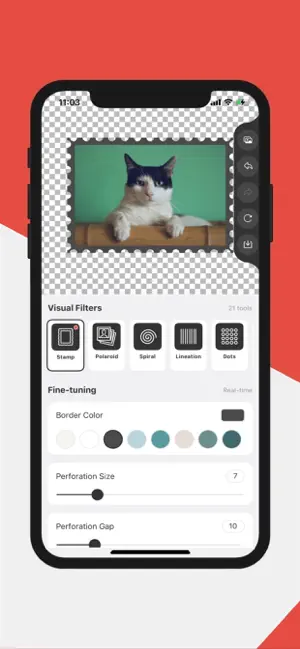
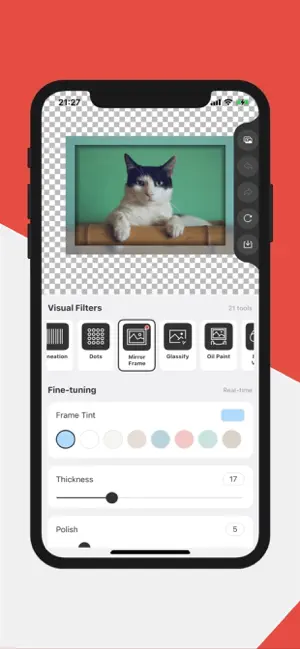
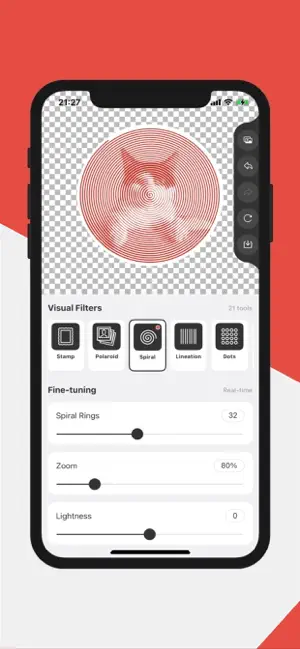
Turn your photos into art with Zero Pixel — a pocket studio of 30 real-time photo effect generators. Pick a photo or shoot a new one, choose an effect, and watch it render instantly. Fine-tune every parameter — color, angle, strength, size — until it looks exactly right, then save the result to your album in high quality. 30 CREATIVE TOOLS • Stamp — turn photos into perforated postage-stamp artwork • Polaroid — classic instant-photo frames with vintage tones • Film — 35mm film strip frames with sprocket holes, standard or negative look • Spiral — hypnotic spiral line art • Lineation — flowing line drawings from any photo • Dots — rebuild photos from circles, squares, stars, hearts and more • Mirror Frame — sleek metallic mirror frames • Line Drawing — pencil-style line art with adjustable thickness and color • Low Poly — triangulated low-poly artwork with adjustable point density • Glassify — frosted-glass refraction with tint • Oil Paint — rich painterly brushwork • Night Vision — military-style green night-vision look • Heatmap — thermal imaging palettes: thermal, fire, ice, iron • Blueprint — technical drawings on an adjustable grid • Hex Pixel — hexagonal pixel mosaics • Color Halftone — print-style CMYK halftone dots • Filters — curated visual filter styles • Kaleidoscope — symmetric kaleidoscope art • Emboss — embossed 3D relief effect • Dot Screen — comic-book screening dots • Bulge — playful fisheye bulge distortion • Swirl — twist and vortex distortions • Blur — zoom, lens, triangle and tilt-shift blur • Ink — bold ink-outline renditions of your photos • Edge Work — chiseled, etched edge relief • Vignette — cinematic edge darkening with adjustable size and amount • Canvas Resizer — expand your canvas with transparent or solid backgrounds • Cropper — crop to any aspect ratio, with rotate and flip • Round Corner — round one or all corners by pixels or percent • Pixelator — classic mosaic pixelation with adjustable pixel size WHY YOU'LL LOVE IT • Real-time rendering — every change is drawn instantly • Deep fine-tuning — each effect is fully parameterized • One-tap compare between original and result • Shoot with the camera or import from your album • High-quality export to your photo album • Clean, focused interface built for creating Whether you make pixel art, poster-style prints, thermal art or playful distortions, Zero Pixel gives you a complete effect workshop in one app. Friendly Reminder: Your images never leave your device. All processing is done in your client-side, ensuring your data privacy and security. The App doesn't upload, transfer, or store your data. Your privacy is our top priority. This means you can safely sharpen your personal images without any concerns about data security. Download today and transform your photos to all art effects! Terms of Use: https://www.apple.com/legal/internet-services/itunes/dev/stdeula/ Privacy Policy: https://a.tools/Apps/zero-pixel/privacy-policy.html
What’s new
Version 1.2.2 · Updated October 6, 2026
9 brand-new creative tools join the studio — 30 effects in total! NEW TOOLS • Film — 35mm film strip frames with sprocket holes, standard or negative look • Cropper — crop to any aspect ratio, with rotate and flip • Round Corner — round one or all corners by pixels or percent • Pixelator — classic mosaic pixelation with adjustable pixel size • Ink — bold ink-outline renditions of your photos • Edge Work — chiseled, etched edge relief • Vignette — cinematic edge darkening with adjustable size and amount • Line Drawing — pencil-style line art with adjustable thickness and color • Low Poly — triangulated low-poly artwork with adjustable point density ALSO IN THIS UPDATE • Faster real-time rendering for Blur, Oil Paint and Edge Work • Improved canvas mask adaptation and export quality • Other fixes and improvements
App privacy
The developer, 月蓬 桂, reported these privacy practices to Apple.
Data Not Collected
The developer does not collect any data from this app.
Alternatives to Zero Pixel - Photo Art Studio
Looking for apps like Zero Pixel - Photo Art Studio? Here are 6 similar apps on the App Store. The highest rated is MediaMate (5.0/5), and all 6 are free to download.
-
 MediaMate
5.0
MediaMate
5.0
-
 Stillwell · RAW Camera
4.2
Stillwell · RAW Camera
4.2
-
 Memory Camera: Photo Scrapbook
5.0
Memory Camera: Photo Scrapbook
5.0
-
 Vanto: NAS Media Player
5.0
Vanto: NAS Media Player
5.0
-
 关关-欲让些愉悦的时辰持续
-
 Kondobox
5.0
Kondobox
5.0
| App | Rating | Price | Last updated | Compare |
|---|---|---|---|---|
| Zero Pixel - Photo Art Studio | – | Free | October 6, 2026 | |
| MediaMate | 5.0 / 5 (7) | Free | Oct 8, 2026 | Compare |
| Stillwell · RAW Camera | 4.2 / 5 (5) | Free | Oct 19, 2026 | Compare |
| Memory Camera: Photo Scrapbook | 5.0 / 5 (1) | Free | Oct 13, 2026 | Compare |
| Vanto: NAS Media Player | 5.0 / 5 (3) | Free | Oct 21, 2026 | Compare |
| 关关-欲让些愉悦的时辰持续 | – | Free | Oct 20, 2026 | Compare |
| Kondobox | 5.0 / 5 (1) | Free | Oct 18, 2026 | Compare |