

Wayfarer: Simple Step Counter
Jimmy How Health & Fitness iPhoneiPadiPod touch
Wayfarer: Simple Step Counter is a free Health & Fitness app for iPhone and iPad by Jimmy How. Requires iOS 18.0. Updated October 19, 2026.
- Price
- Free
- on the App Store
- Size
- 20 MB
- Age 4+
- Updated
- Oct 19
- 2026 · v1.9.2
Screenshots


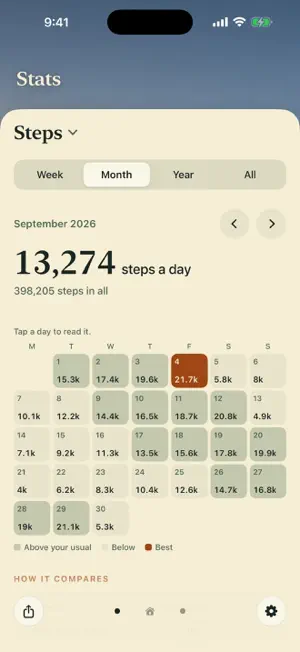
About Wayfarer: Simple Step Counter
Wayfarer is a simple step counter. Open it and see today’s steps, distance and stairs at a glance, set against a beautiful painted scene. No goals, no streaks and no pressure. SIMPLE STEP COUNTING Wayfarer reads the steps your iPhone already counts in Apple Health, so there’s nothing to set up. See today’s steps, how far you’ve walked and your last seven days in one calm view. Every day has one distance, so Today and Stats always agree. SEE HOW YOUR WALKING ADDS UP Stats lets you look back and compare. Choose steps, distance or stairs, then a week, month or year, and see each set against your own usual and against the one before. A month shows as a calendar with every day’s number. All shows your records: your most steps, furthest walk and most stairs in a day. Tap any day for its steps, distance, stairs and the hours you walked. BEAUTIFUL SCENERY Your steps sit on paintings of five famous walks: the Kumano Kodo in Japan, the Camino de Santiago in Spain, the West Highland Way in Scotland, the Appalachian Trail in the United States and the Milford Track in New Zealand. Each day brings a new place, painted for the morning, afternoon and evening. The painting follows your local weather and gently moves with it: grass and trees sway in the wind, rain ripples on rivers and lochs, birds cross the valleys and fireflies blink at night. Keep every walk, or choose the one you love. SHARE YOUR DAY Tap Share for a clean card of your day, week, month or year: your steps over the day’s painting, shaped so chats and posts show it whole. On a day you beat your best, Wayfarer celebrates it once. Turn on the evening summary for one quiet note with your day’s steps, distance and stairs. PRIVATE BY DESIGN Your walking history stays on your iPhone. Wayfarer has no account or advertising, and never writes to Apple Health. It can count which screens are used, anonymously and never with your steps, Health data or location; you can turn this off in Settings. Weather is optional and uses your location only while the app is open. Wayfarer asks to read Step Count, Walking + Running Distance and Flights Climbed from Apple Health.
What’s new
Version 1.9.2 · Updated October 19, 2026
- Share your day: tap Share for a clean card of your steps, distance and stairs over the day’s painting, ready for a chat, a post or a Story. Weeks, months, years and all time can be shared from Stats. - New records: the first time you open Wayfarer after beating your best day, painted leaves fall and you can share it. - Evening summary: turn it on in Settings for one note a day with your steps, at the time you choose. Off unless you turn it on. - Every walk’s places are now in full colour. - Clearer Stats, a smoother first launch, and many small fixes.
App privacy
The developer, Jimmy How, reported these privacy practices to Apple.
Data Not Linked to You
The following data, which may be collected but is not linked to your identity, may be used for the following purposes:
- Identifiers: Device ID
- Usage Data: Product Interaction
Used for: Analytics
Alternatives to Wayfarer: Simple Step Counter
Looking for apps like Wayfarer: Simple Step Counter? Here are 6 similar apps on the App Store. The highest rated is Walk & Hatch - MyDailySteps (5.0/5), and 5 of the 6 are free to download.
-
 Walking Buddy: Pedometer
-
 Simple Food Tracker
1.0
Simple Food Tracker
1.0
-
 Plant Step: Pedometer Walking
-
 Loggregate
-
 Walk & Hatch - MyDailySteps
5.0
Walk & Hatch - MyDailySteps
5.0
-
 Adima: Step Counter & Runs
| App | Rating | Price | Last updated | Compare |
|---|---|---|---|---|
| Wayfarer: Simple Step Counter | – | Free | October 19, 2026 | |
| Walking Buddy: Pedometer | – | Free | Oct 21, 2026 | Compare |
| Simple Food Tracker | 1.0 / 5 (1) | 3.99 USD | Apr 20, 2025 | Compare |
| Plant Step: Pedometer Walking | – | Free | Jun 2, 2026 | Compare |
| Loggregate | – | Free | Mar 1, 2026 | Compare |
| Walk & Hatch - MyDailySteps | 5.0 / 5 (2) | Free | Oct 7, 2026 | Compare |
| Adima: Step Counter & Runs | – | Free | Oct 24, 2026 | Compare |