

AnyNote: Infinite Canvas
Nam Vo Productivity iPadMac
AnyNote: Infinite Canvas is a free Productivity app for iPad and Mac by Nam Vo. Requires iOS 16.0. Updated October 24, 2026.
- Price
- Free
- on the App Store
- Size
- 22 MB
- Age 4+
- Updated
- Oct 24
- 2026 · v1.0.10
Screenshots

About AnyNote: Infinite Canvas
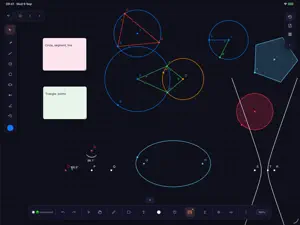
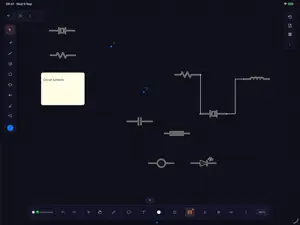
AnyNote is an infinite canvas for handwritten notes, diagrams and technical drawing — built for the way maths, physics and engineering are actually written down. Most note apps handle prose well and everything else badly. Sketch a circuit, construct a triangle, or work through an equation, and you end up switching between a note app, a graphing tool and a diagram editor. AnyNote puts all of it on one canvas. HANDWRITING AND SKETCHING Write and draw with pen, highlighter and eraser on a canvas that never runs out of room. Choose colours and stroke widths, use shapes when a straight line matters, and pan and zoom freely. GEOMETRY Construct points, lines, segments, circles, polygons and conic sections. The Algebra panel lists every object with its coordinates and equations, and updates live as you drag things — so a construction stays a construction, not a drawing that happens to look like one. Measure angles and distances as you go. CIRCUIT SCHEMATICS Place resistors, capacitors, inductors, diodes, meters and more from a symbol library, then connect them with the wire tool. Components carry editable labels and values. MATHS Write an equation by hand and convert it to typeset LaTeX. Compose formulas directly with a symbol palette. Plot 2D functions and explore surfaces in 3D. NOTES ON THE CANVAS Add typed text and sticky notes alongside your handwriting. Import a PDF and annotate it in place. Export any page as a PDF to hand in or share. ORGANISATION Group pages into notebooks and folders, tag them, and search across everything. COLLABORATION Share a notebook with a private link or publish it, and work on the same canvas together in real time. Sharing is off by default, and any link can be revoked at any time. FREE Every feature above is included. There are no in-app purchases, no subscriptions and no adverts.
What’s new
Version 1.0.10 · Updated October 24, 2026
Fixes AnyNote closing immediately after you open it. Your notebooks were never affected.
App privacy
The developer, Nam Vo, reported these privacy practices to Apple.
Data Linked to You
The following data, which may be collected and linked to your identity, may be used for the following purposes:
- Usage Data: Product Interaction
- Contact Info: Email Address, Name
- User Content: Photos or Videos, Other User Content
- Identifiers: User ID
Used for: Analytics, App Functionality
Alternatives to AnyNote: Infinite Canvas
Looking for apps like AnyNote: Infinite Canvas? Here are 6 similar apps on the App Store. The highest rated is Cloudless Notes (5.0/5), and 5 of the 6 are free to download.
-
 Cloudless Notes
5.0
Cloudless Notes
5.0
-
 Pronotes: Notes & PDF
5.0
Pronotes: Notes & PDF
5.0
-
 Researchist: PDF Reader
-
 Notex: Easy Noting
-
 BindNotes
-
 Libreta: A NoteBook App
5.0
Libreta: A NoteBook App
5.0
| App | Rating | Price | Last updated | Compare |
|---|---|---|---|---|
| AnyNote: Infinite Canvas | – | Free | October 24, 2026 | |
| Cloudless Notes | 5.0 / 5 (1) | Free | Apr 16, 2026 | Compare |
| Pronotes: Notes & PDF | 5.0 / 5 (1) | 9.99 USD | Oct 21, 2026 | Compare |
| Researchist: PDF Reader | – | Free | Oct 22, 2026 | Compare |
| Notex: Easy Noting | – | Free | Jul 30, 2024 | Compare |
| BindNotes | – | Free | Sep 16, 2026 | Compare |
| Libreta: A NoteBook App | 5.0 / 5 (2) | Free | Jul 13, 2026 | Compare |