

Thrive - Caffeine Tracker
Braincare Foundation Health & Fitness iPhoneiPadiPod touch
Thrive - Caffeine Tracker is a free Health & Fitness app for iPhone and iPad by Braincare Foundation. Rated 5.0/5 from 2 ratings. Requires iOS 16.4.
- Rating
- 5.0
- 2 ratings
- Price
- Free
- on the App Store
- Size
- 41 MB
- Age 12+
- Updated
- Oct 16
- 2026 · v1.1.0 (6)
Screenshots



About Thrive - Caffeine Tracker
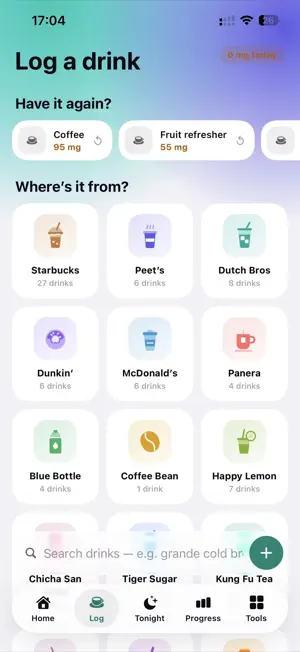
THRIVE is a caffeine & sleep tracker for people 13+, published by BrainCare Foundation (a nonprofit). There is no account, login, server, purchase, ad, analytics SDK or social feature. Every screen is reachable from the 5 bottom tabs; there are no hidden screens, feature flags, remote config, or behavior that changes by date, region or device. A fresh install is empty. The first launch shows a 3-step welcome (welcome + language, optional name and bedtime, "You're all set") that can be skipped with "Skip" (top right) or "Look around first" on the last step; nothing is unlocked by it. The app follows the phone's language (English, 简体中文, 繁體中文, Español, 日本語, 한국어) and can be switched in Settings → Language. To see all features in ~1 minute: 1. Log tab → pick where the drink is from (e.g. Starbucks), then tap the size you had (e.g. Caffè Latte → Grande). "Undo" appears for a few seconds. You can also search all drinks (search bar at the bottom) or tap "+" to add a drink with your own mg. Once drinks are logged, the shop tiles are ordered by how often you log each shop ("Sorted by what you log most"), counted on device from your own logs. 2. Home → rate last night's sleep; open "Caffeine Check-In" and answer 9 questions. 3. Tonight tab (moon icon) → bedtime caffeine estimate and cutoff times (5-hour half-life math on device). "Your pattern" shows a time-of-day summary once 5 drinks are logged in the past 14 days (before that it says so); it is counted on device from those logs only. 4. Progress tab → last 7 days of logged caffeine, streak, and XP rank (your own data only). 5. Tools tab → Swaps, Breathe, Ride out a craving, Healthy habits, Journal, Why it matters, and "Data sources". 6. Settings (gear on Home) → name, target bedtime, language, appearance, mascot color, privacy policy, data sources, support email, "Erase all data on this phone". There is no chatbot or AI of any kind; drink search is an on-device keyword filter. "Sage" is the app's owl mascot (a static illustration), not an assistant. Drink pictures on the shop tiles are THRIVE's own generic illustrations (cups, a can, a donut, a coffee bean, a tea bowl) in THRIVE's colors — no logos, wordmarks or brand colors. Caffeine values come from each brand's published data where available and each drink is labeled "Brand-published", "Third-party report" or "Estimate", with links to the sources (Tools → Data sources, or Settings → Caffeine data sources). Tea shops that publish no caffeine numbers (Happy Lemon, Chicha San Chen, Tiger Sugar, Kung Fu Tea, Gong Cha, generic boba) are all marked "Estimate", with a note on each shop's page. THRIVE is not affiliated with any brand listed. Changes since the previous submission (v2, build 4): - Redesigned interface in the current iOS style (system fonts, SF Symbols, Liquid Glass tab bar on iOS 26), new app icon (light / dark / tinted), Dark Mode and Dynamic Type. - Six languages, following the phone's language, with a switch in Settings. - A skippable 3-step first-launch welcome. It only sets the optional name, bedtime and language, which can all be changed later in Settings. - Original drink illustrations for each shop; five tea shops added (all values "Estimate"). - Shop tiles are ordered by the person's own logging frequency (on device). - Check-In shows one question at a time; Log search moved to the bottom of the screen. - Smaller app (no bundled font files) and bug fixes. No new data collection, permissions, network calls, accounts, purchases, or features behind settings, flags or dates. Everything listed in our previous notes still applies: no leaderboard, no demo data, no AI wording.
What’s new
Version 1.1.0 (6) · Updated October 16, 2026
New look, six languages, more tea shops, and a smaller download.
App privacy
The developer, Braincare Foundation, reported these privacy practices to Apple.
Data Not Collected
The developer does not collect any data from this app.
Alternatives to Thrive - Caffeine Tracker
Looking for apps like Thrive - Caffeine Tracker? Here are 3 similar apps on the App Store. The highest rated is Quabble: Daily Mental Health (4.8/5), and all 3 are free to download.


| App | Rating | Price | Last updated | Compare |
|---|---|---|---|---|
| Thrive - Caffeine Tracker | 5.0 / 5 (2 ratings) | Free | October 16, 2026 | |
| Vetster – Online Vets 24/7 | 4.6 / 5 (2,876) | Free | Oct 15, 2026 | Compare |
| Quabble: Daily Mental Health | 4.8 / 5 (4,388) | Free | Oct 29, 2026 | Compare |
| Sweatcoin Walking Step Counter | 4.5 / 5 (401,717) | Free | Oct 21, 2026 | Compare |