

StackBooks: Book Tracker & TBR
Kenta Nobutani Book iPhoneiPadiPod touch
StackBooks: Book Tracker & TBR is a free Book app for iPhone and iPad by Kenta Nobutani. Requires iOS 16.4. Updated October 16, 2026.
- Price
- Free
- on the App Store
- Size
- 128 MB
- Age 4+
- Updated
- Oct 16
- 2026 · v1.1.9
Screenshots


About StackBooks: Book Tracker & TBR
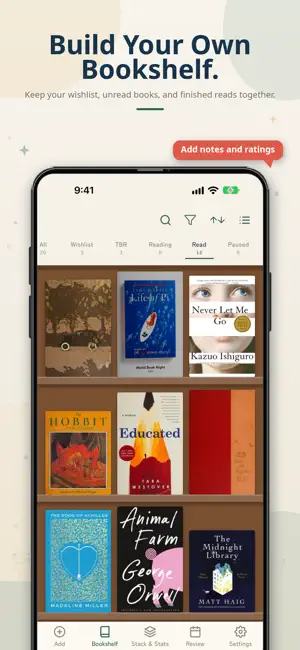
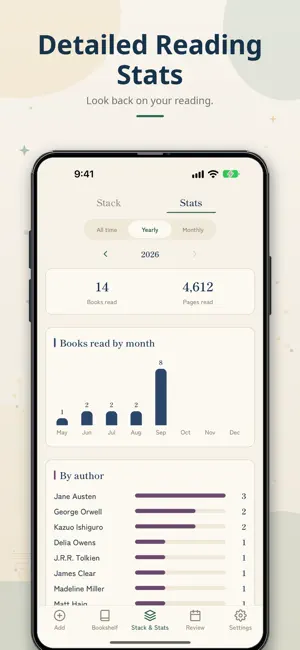
A reading tracker that makes adding books easy — and stacks up every book you finish. ADDING A BOOK IS ONE SCAN Point the camera at the barcode (ISBN) on the back of a book and the title, author, cover and page count are filled in. Scans run back to back, so a whole shelf takes a couple of minutes. You can also search by title or author and add a book from the results. WHAT YOU READ BECOMES HEIGHT The page count of each book turns into thickness, and your finished books pile up. Look back on how tall your stack has grown. A mug, an ostrich, a utility pole — your stack is drawn next to things you know, so you can see how far it has come. You can also turn the stack into an image and share it. YOUR TBR PILE AND YOUR READS, SORTED Five statuses keep your books sorted: Wishlist, TBR, Reading, Read and Paused. Books you're curious about go to Wishlist; books you own but haven't read yet go to TBR. Move them to Reading when you start, Read when you finish, or Paused if you set them aside. You can also see how tall your TBR pile alone has grown. Finished books can hold a star rating, the date you finished, and a note about what you thought. Add tags and you can filter later by "fiction", "work", or anything else you use. RE-READS COUNT TOO When you read a book again, each read gets its own finish date and notes. EVERYTHING STAYS ON YOUR DEVICE Titles, notes, ratings and the cover photos you take are kept on your device, not on a server. There is no account and nothing to log in to. When you change phones, export a backup and import it on the new one. LOOK BACK ON YOUR READING Built-in reading stats. Books read, pages read and the height of your stack, whenever you want to see them. See how much you read by author or by tag. WHO IT IS FOR - Readers whose TBR pile got out of hand - Anyone who wants to count books and pages, not just titles - Readers who want to keep notes instead of a separate reading journal - Fiction, non-fiction and comics, tracked in one place - Anyone looking for a book tracker that works without an account FREE, WITH NO BANNER OR FULL-SCREEN ADS Every feature is free. No banner or full-screen ads, and no in-app purchases. ALSO - English and Japanese, following your device language - Stack height in cm/m or inches/feet, whichever you prefer - Works offline; only book search needs a connection
What’s new
Version 1.1.9 · Updated October 16, 2026
Thank you for using StackBooks. • Added more objects to compare your book stack with.
App privacy
The developer, Kenta Nobutani, reported these privacy practices to Apple.
Data Not Linked to You
The following data, which may be collected but is not linked to your identity, may be used for the following purposes:
- Location: Coarse Location
- Identifiers: Device ID
- Usage Data: Product Interaction
- Search History: Search History
- Diagnostics: Crash Data, Performance Data, Other Diagnostic Data
Used for: Analytics, App Functionality
Alternatives to StackBooks: Book Tracker & TBR
Looking for apps like StackBooks: Book Tracker & TBR? Here are 6 similar apps on the App Store.
-
 Honyomu - Reading Log
-
 ブックタワー - 読書記録・読んだ本の本棚
-
 READ LOG - 読書の記録
-
 Kamigokochi: 3D Book Tracker
-
 Book Memo: Reading Log & Notes
-
 Libri 読書管理 - 本棚と栞で作る自分だけの図書館
| App | Rating | Price | Last updated | Compare |
|---|---|---|---|---|
| StackBooks: Book Tracker & TBR | – | Free | October 16, 2026 | |
| Honyomu - Reading Log | – | Free | Oct 18, 2026 | Compare |
| ブックタワー - 読書記録・読んだ本の本棚 | – | Free | Oct 17, 2026 | Compare |
| READ LOG - 読書の記録 | – | Free | Oct 20, 2026 | Compare |
| Kamigokochi: 3D Book Tracker | – | Free | Jul 28, 2026 | Compare |
| Book Memo: Reading Log & Notes | – | Free | Oct 12, 2026 | Compare |
| Libri 読書管理 - 本棚と栞で作る自分だけの図書館 | – | Free | Feb 18, 2026 | Compare |