

Waimea: Travel Alarm Clock
Kai Brabo Utilities iPhoneiPadiPod touchApple Watch
Waimea: Travel Alarm Clock is a free Utilities app for iPhone and iPad by Kai Brabo. Rated 5.0/5 from 2 ratings. Requires iOS 16.4. Updated October 21, 2026.
- Rating
- 5.0
- 2 ratings
- Price
- Free
- on the App Store
- Size
- 70 MB
- Age 4+
- Updated
- Oct 21
- 2026 · v1.3.0
Screenshots



About Waimea: Travel Alarm Clock
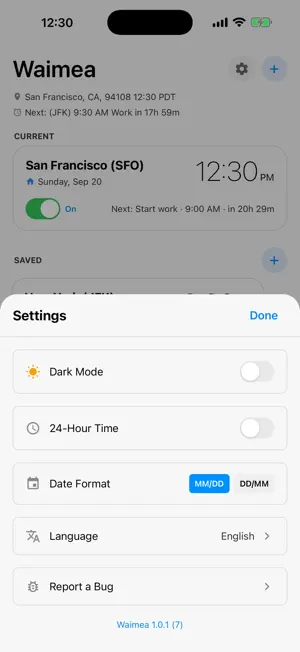
Waimea is a clock and alarm app that helps people who live, work and travel across the world stay on time, wherever they are. WHO IS IT FOR? • Remote and hybrid workers. An alarm set for 9:00 AM San Francisco time still rings at 9:00 AM San Francisco time when you are in Lisbon, Mexico City or Taipei. • Frequent travelers. Hawaii, Latin America, Asia, Europe: every alarm stays correct, without resetting a single one. • Families living apart. A reminder to call home that lands after dinner where they are, or to send that "Good morning!" message to the people who matter. • Photographers and outdoor enthusiasts, who need the light rather than the hour. PROBLEM Ordinary alarms ring by whatever your phone's clock says where you are now. That breaks the moment you travel: "wake at 7 AM" becomes 7 AM in the wrong time zone. Waimea pins each alarm to the time zone you meant, so your routine, your reminders and your meeting nudges all stay where you put them. Set 9:00 AM in San Francisco and it rings at San Francisco's 9:00 AM, whether you are at home or in Tokyo, São Paulo or Milan. SOLUTION • Timezone-anchored alarms. Each one carries its own zone and rings at that local time, anywhere in the world. • A world clock that holds your alarms. Saved places appear as cards with live local times. • Real ringing alarms. On supported devices they ring through silent mode and Focus, with a full-screen Stop and Snooze. Elsewhere they arrive as notifications. • Home Screen widgets. Small, medium and large, showing your current time and place, your next alarm with a live countdown, and clocks for your saved cities. • Apple Watch app and complications. Your next alarm and its countdown, on your wrist. • Flexible repeats. Daily, weekdays, custom days, monthly, or one time only. • Eleven alarm sounds, including a classic bugle Reveille. • Drag to reorder your places. The order carries through to your widgets. • Sunrise and sunset alarms, with any offset before or after. • Made for the world. 12 languages, 12 or 24-hour time, MM/DD or DD/MM dates, light or dark. HOW TO USE - User guide: https://kainoabrabo.com/waimea/guide/ • Add the city you are traveling to before you leave, and see its time beside yours. • Add an 8:30 AM alarm to San Francisco and wake at your usual San Francisco time, wherever you are. • Switch alarms on and off without deleting them. • Set sunset minus an hour in Lima or Lisbon for golden hour, and it moves with the season. ALARMS THAT FOLLOW THE SUN Set an alarm to sunrise or sunset instead of a clock time, and offset it however you like: an hour before sunset for golden hour, twenty minutes after sunrise, or right on the moment. The time shifts with the seasons on its own, so a golden hour alarm stays correct in June and December alike. Sunrise and sunset are worked out for each saved city from its own position, so an alarm pinned to Reykjavik follows Reykjavik's sun, not yours. PRIVATE BY DESIGN No accounts, no ads, no tracking, no servers. Everything stays on your device. Location is used only to work out which time zone you are in, and it never leaves your phone and paired Apple Watch. Set it once. Travel anywhere. Stay on time.
What’s new
Version 1.3.0 · Updated October 21, 2026
Added • Fasting windows. Pick a plan (14:10, 16:8, 18:6 or 20:4) and when your eating window opens, and Waimea reminds you when it opens and when the fast begins, on that city's time, so the schedule holds while you travel. Open any city and tap "Fasting window". Fixed • Alarms now ring while you're using your iPhone, not only on the Lock Screen. • An alarm no longer stops ringing on its own when Waimea is open. • Alarms keep ringing even if you don't open Waimea for a while. They used to stop after about a week. • The widget now changes date at midnight and keeps your cities' times, upcoming alarms and light or dark look current without opening the app. • After a flight, the widget and Apple Watch show the city you're in, not the one you left. • The Apple Watch app's clock, date and countdown stay current. Full changelog: https://kainoabrabo.com/waimea/changelog/
App privacy
The developer, Kai Brabo, reported these privacy practices to Apple.
Data Not Collected
The developer does not collect any data from this app.
Alternatives to Waimea: Travel Alarm Clock
Looking for apps like Waimea: Travel Alarm Clock? Here are 6 similar apps on the App Store. The highest rated is UTC Face: World Clock (5.0/5), and 5 of the 6 are free to download.
-
 Quiet Wake
-
 UTC Face: World Clock
5.0
-
 PiP Widgets
-
 Alarmee: Friends Shared Alarms
-
 Alarmee: Alarm & Reminder
-
 Winlive Remote Control
3.0
| App | Rating | Price | Last updated | Compare |
|---|---|---|---|---|
| Waimea: Travel Alarm Clock | 5.0 / 5 (2 ratings) | Free | October 21, 2026 | |
| Quiet Wake | – | Free | Sep 1, 2026 | Compare |
| UTC Face: World Clock | 5.0 / 5 (1) | 0.99 USD | Oct 10, 2026 | Compare |
| PiP Widgets | – | Free | Nov 10, 2025 | Compare |
| Alarmee: Friends Shared Alarms | – | Free | Sep 6, 2026 | Compare |
| Alarmee: Alarm & Reminder | – | Free | Sep 11, 2026 | Compare |
| Winlive Remote Control | 3.0 / 5 (1) | Free | Apr 12, 2024 | Compare |