

Longhand Transcribe
Pavel Ferencz Productivity iPhoneiPadiPod touchMacApple Watch
Longhand Transcribe is a free Productivity app for iPhone and iPad by Pavel Ferencz. Requires iOS 26.5. Updated October 10, 2026.
- Price
- Free
- on the App Store
- Size
- 22 MB
- Age 4+
- Updated
- Oct 10
- 2026 · v1.2
Screenshots
Save to Pinterest


About Longhand Transcribe
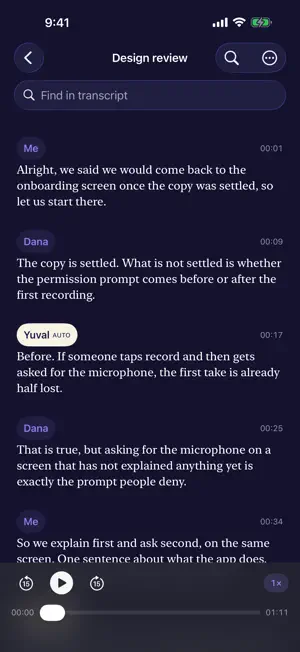
Longhand records or imports a conversation and gives you back a transcript with every speaker's words attributed to them. All of it runs on your device. Nothing is uploaded, and there is no account. WHAT IT DOES Record on iPhone, iPad, Apple Watch or Mac, or import an audio file you already have. Read a transcript split into turns, each turn labelled with who was speaking. Rename a speaker once and every one of their turns changes with it. Teach it your own voice, so you are named rather than numbered in later recordings. Search across your whole library, or find a phrase inside one transcript. Tap any word to move the audio to that moment. Correct a turn when the machine got it wrong. Corrections are stored apart from the transcript, so re-processing a recording never erases them. Export as Markdown, plain text, or the full transcript as JSON. IT RUNS ON YOUR DEVICE Transcription and speaker separation both happen locally. There is no server, no account and no analytics. The only network activity anywhere in the app is a one-time download of a speech model, and only when the language you are recording needs one. LANGUAGES Apple's own speech recognition covers a long list of languages and needs no download at all. For the rest, including Hebrew and Russian, Longhand uses a Whisper model that runs on your device after one download. It can also detect the language passage by passage, which keeps a conversation that switches languages readable. YOUR VOICE STAYS YOURS Voice profiles are biometric-like data. They are held on your device only, are never part of any export, and can be deleted completely whenever you want. ON EVERY SCREEN YOU OWN The same app runs full width on iPad, with a sidebar and hardware keyboard shortcuts. The Apple Watch app records a take on your wrist and hands it to your iPhone to process. The Mac app keeps its own library and takes files by drag and drop. Longhand does not summarise your conversations, score them, or send them anywhere. It writes down what was said, and tells you who said it.
What’s new
Version 1.2 · Updated October 10, 2026
Words while recording: the record sheet shows what is being said as you speak, for the languages Apple's recognizer handles on your device. A preview only; the transcript is still made after you stop. Off and on in Settings. Recordings named from the summary: a recording that has no name of its own takes a short title from its summary. A name you typed, or one from a file or a calendar event, is never replaced. Off and on in Settings. Faster transcription: the speech model loads while you are still recording and stays loaded for a few minutes, so a take that used to wait for the model starts transcribing at once. A fix for transcription failing once recordings had been made in more than five languages.
App privacy
The developer, Pavel Ferencz, reported these privacy practices to Apple.
Data Not Collected
The developer does not collect any data from this app.
Alternatives to Longhand Transcribe
Looking for apps like Longhand Transcribe? Here are 6 similar apps on the App Store. The highest rated is Catt: Transcribe Audio to Text (5.0/5), and all 6 are free to download.
-
 Throughline: AI Voice Notes
-
 Apex Voice Notes
-
 Ekimori: Train Focus Timer
-
 Voice to Text Notes
-
 Catt: Transcribe Audio to Text
5.0
-
 HA Transcribe
| App | Rating | Price | Last updated | Compare |
|---|---|---|---|---|
| Longhand Transcribe | – | Free | October 10, 2026 | |
| Throughline: AI Voice Notes | – | Free | Oct 6, 2026 | Compare |
| Apex Voice Notes | – | Free | Jul 26, 2026 | Compare |
| Ekimori: Train Focus Timer | – | Free | Nov 11, 2026 | Compare |
| Voice to Text Notes | – | Free | Nov 8, 2026 | Compare |
| Catt: Transcribe Audio to Text | 5.0 / 5 (1) | Free | Nov 1, 2026 | Compare |
| HA Transcribe | – | Free | May 18, 2025 | Compare |