

LoadNode
LoadNode Inc. Utilities iPhoneiPadiPod touch
LoadNode is a free Utilities app for iPhone and iPad by LoadNode Inc. Rated 5.0/5 from 1 ratings. Requires iOS 16.4. Updated October 24, 2026.
- Rating
- 5.0
- 1 ratings
- Price
- Free
- on the App Store
- Size
- 75 MB
- Age 17+
- Updated
- Oct 24
- 2026 · v2.1.11
Screenshots


About LoadNode
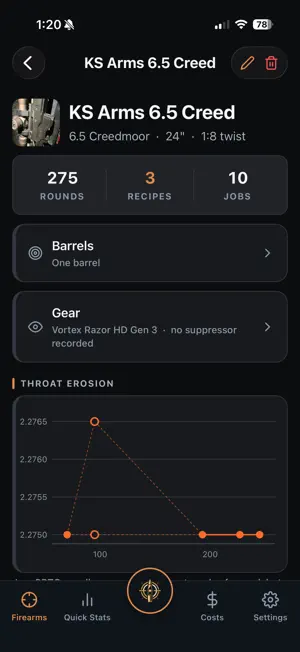
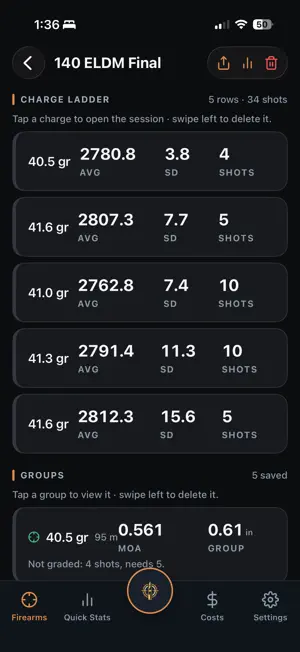
LoadNode is a precision reloading companion: bench to target. On your mobile phone and on the web! Bring your whole logbook on the big screen, at https://app.loadnode.app Track every load you develop, enter chronograph velocities with live SD/ES, measure your groups from a photo, and compare your charges with honest uncertainty. FREE • Log rifles, recipes, and load jobs • Charge weight, seating depth and tuner position tests, with live SD and extreme spread • Offline bullet / powder / primer / brass component search • Measure a group from a target photo (size and MOA) • Session conditions with density altitude, entered from your meter or computed • Password-encrypted backup and restore PRO: one-time, yours forever (no subscription) • Unlimited firearms and multi-barrel profiles • Garmin Xero chronograph sync • Velocity and group-vs-charge charts, plus charge comparison with honest uncertainty • Composite analysis: pool groups into 20 to 50-shot statistics • Full target-cam: firing order, on-photo data box, share cards • Neck-tension and shoulder-bump tracking • AI group analysis, with chronograph velocity correlation and observation-based suggestions (technique and environment only, never load advice) • Cost and ROI tracking: per-round cost and return vs factory ammo • Cloud sync and cloud photo backup across your devices • Personal records, medals and a season recap • Recipe versions, reports and the Load Book PDF • Throat-erosion tracking, saved groups, advanced metrics (mean radius, point of impact, scope clicks) and annotated image export An account is optional. Logging, the calculations, group measurement and component search all work offline. Weather autofill, sign-in, purchases, AI analysis and cloud sync need a connection. Handloading is an adult activity. LoadNode is a logbook, not load data: it never tells you what powder or charge to use. Always use current published data and work up safely.
What’s new
Version 2.1.11 · Updated October 24, 2026
LoadNode 2.1.11 Fill a ladder Tap the centre LoadNode button on a session or a saved job and choose Fill a ladder (it sits beside Add a single charge), or tap Fill a ladder on an empty ladder. Type the first rung, the last rung and the step: LoadNode lists exactly the rungs it will add, then adds them all at once. It works on charge, seating, neck tension, tuner and primer seating ladders, and it never goes past the last rung you typed. Purchase dates on prices Each price now has the day you bought it, so purchases entered after the fact keep their real dates, in any order. The newest purchase is the price your rounds are costed at. Add stock from your purchases Already entered what you bought on the prices screen? Inventory now offers to turn the purchases that are not in stock yet into stock. Every count is shown before anything is saved, several purchases of the same component are added together, rounds you have logged since the first purchase are taken off, and each entry can be edited afterwards. Session dates The date of a session can now be changed after it is created, so a job you set up days before (or after) the loading carries the right day. The date also shows beside each session in the rifle's list. Long notes print in full Very long recipe notes, with die settings, loading steps and case measurements, are now printed whole on the load card, the session report, the Load Book and the rifle's history. A long note prints below the load card at full page width, so the card itself stays on one page. Line breaks in session notes are kept too. A cleaner look for every export The PDFs have a tidier LoadNode layout with margins on every page, the session report names the day it was shot and the range, and the result and record cards carry the LoadNode logo.
App privacy
The developer, LoadNode Inc., reported these privacy practices to Apple.
Data Linked to You
The following data, which may be collected and linked to your identity, may be used for the following purposes:
- Purchases: Purchase History
- Contact Info: Email Address
- User Content: Photos or Videos, Other User Content
- Identifiers: User ID
Used for: App Functionality
Data Not Linked to You
The following data, which may be collected but is not linked to your identity, may be used for the following purposes:
- Location: Coarse Location
- Diagnostics: Crash Data, Performance Data
Used for: App Functionality
Alternatives to LoadNode
Looking for apps like LoadNode? Here are 6 similar apps on the App Store. The highest rated is ReloadVault — Reloading Log (5.0/5), and 5 of the 6 are free to download.
-
 ReloadVault — Reloading Log
5.0
ReloadVault — Reloading Log
5.0
-
 BenchLog — Reloading Journal
-
 PrecisionLoad Suite
5.0
PrecisionLoad Suite
5.0
-
 LoadBench
5.0
LoadBench
5.0
-
 Reloader's Bench
5.0
Reloader's Bench
5.0
-
 Shooting Diary
| App | Rating | Price | Last updated | Compare |
|---|---|---|---|---|
| LoadNode | 5.0 / 5 (1 rating) | Free | October 24, 2026 | |
| ReloadVault — Reloading Log | 5.0 / 5 (1) | Free | Sep 30, 2026 | Compare |
| BenchLog — Reloading Journal | – | Free | Oct 3, 2026 | Compare |
| PrecisionLoad Suite | 5.0 / 5 (1) | Free | Sep 26, 2026 | Compare |
| LoadBench | 5.0 / 5 (3) | Free | May 26, 2026 | Compare |
| Reloader's Bench | 5.0 / 5 (8) | Free | Mar 26, 2026 | Compare |
| Shooting Diary | – | 4.99 USD | Sep 28, 2026 | Compare |
Compare LoadNode with the top alternatives: ratings, updates, ASO score and keyword gaps →