

Tuck: ADHD Body Double
Himanshi Kapoor Productivity iPhoneiPadiPod touch
Tuck: ADHD Body Double is a free Productivity app for iPhone and iPad by Himanshi Kapoor. Requires iOS 16.4. Updated September 30, 2026.
- Price
- Free
- on the App Store
- Size
- 78 MB
- Age 4+
- Updated
- Sep 30
- 2026 · v2.0.1
Screenshots


About Tuck: ADHD Body Double
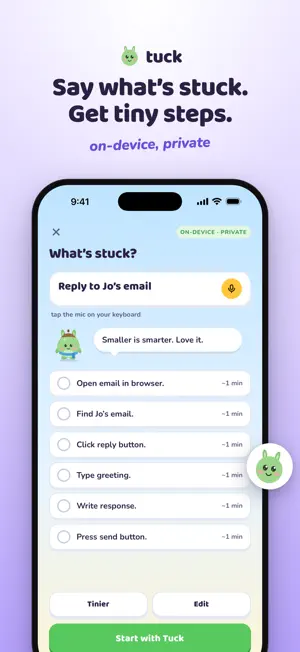
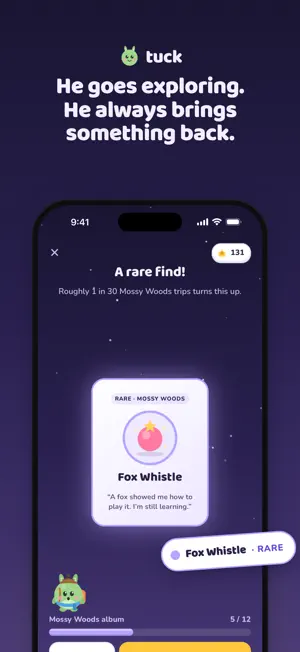
Tuck is a small, sleepy gremlin who starts things with you. He is not a coach and he does not keep score. Tell him what's stuck, and he breaks it into steps small enough to start, then does his own step beside you while you do yours. Starting next to someone is easier. People call it body doubling. Tuck is your body double. TELL TUCK WHAT'S STUCK Type it, or dictate it with the keyboard mic: "the laundry pile", "that email". Tuck turns it into three to six tiny steps. Too big? Tap Tinier. On iPhones with Apple Intelligence the steps are written on your phone by Apple's on-device model; everywhere else Tuck uses his own templates. Nothing you type leaves your phone. HE DOES HIS WHILE YOU DO YOURS Each step gets a visual timer ring. Done, Make it smaller and Skip all sit right there. Taking longer turns the ring lavender, never red, because taking longer still counts. A GLOW, NOT A STREAK Every step you finish is a firefly. Five steps in a day fill Tuck's glow, and a full glow sends him exploring. Nothing resets and nothing is taken away when you miss a day. If you're away a while, he's just napping when you come back. HE ALWAYS BRINGS SOMETHING BACK Pick where he goes. He waves, walks off, and comes back hours later with a find for his den: a feather, a pebble, a story. Light three lanterns in a week and the weekly chest opens with fireflies. The first few chests also bring something new for Tuck to wear, and the first one opens a new place to explore. HIS DEN, HIS WARDROBE Spend fireflies on furniture for his den and hats for his head. Trying things on is always free. ON YOUR LOCK SCREEN A Live Activity and the Dynamic Island keep Tuck with you during a session and while he's exploring. The medium widget has a Done button, so you can tick a step without opening the app. "Start with Tuck", "Tell Tuck what's stuck" and "Send Tuck exploring" are there as Siri and Shortcuts actions. YOUR FIRST ROUTINE, BUILT FROM YOUR ANSWERS A few quick questions at the start shape your first routine and your plan for the first month. No account, no email, no sign-in wall. TUCK PLUS Tuck is free to use. Tuck Plus is an optional subscription that lifts the limits: unlimited routines and "What's stuck?" breakdowns, three adventures a day instead of one, the rare places (Moon Pond and the Old Library), and Plus-only den and wardrobe items. Payment is charged to your Apple ID at confirmation of purchase. The subscription renews automatically unless it is cancelled at least 24 hours before the end of the current period; manage or cancel it in your App Store account settings. Terms: https://opensoftlabs.org/momo/terms · Privacy: https://opensoftlabs.org/momo/privacy WHAT TUCK IS NOT Tuck is scaffolding, not treatment. It is not a medical device, it does not diagnose anything, and it is not a substitute for a doctor, therapist or coach. Reminders are scheduled by your phone, so please don't rely on it for anything where a missed reminder matters, medication included. PRIVATE BY DEFAULT Your routines, steps and finds stay on your phone. There is no advertising, no tracking and no session recording. Usage counts are anonymous and can be switched off in one tap. Signing in with Apple or Google is optional, only to keep Tuck on your next phone.
What’s new
Version 2.0.1 · Updated September 30, 2026
Clearer plans: see exactly how the free week works, with a reminder from Tuck two days before it ends. Updating from Momo? Your routines come first, no paywall on the way in. Small fixes across the app.
App privacy
The developer, Himanshi Kapoor, reported these privacy practices to Apple.
Data Linked to You
The following data, which may be collected and linked to your identity, may be used for the following purposes:
- Contact Info: Email Address, Name
- Identifiers: User ID
- Other Data: Other Data Types
Used for: App Functionality
Data Not Linked to You
The following data, which may be collected but is not linked to your identity, may be used for the following purposes:
- Identifiers: Device ID
Used for: Analytics
Alternatives to Tuck: ADHD Body Double
Looking for apps like Tuck: ADHD Body Double? Here are 6 similar apps on the App Store. The highest rated is ZoBud: Daily Planner & Energy (5.0/5), and all 6 are free to download.
-
 Fav Timer
-
 Dopamine Dash
-
 Momo: ADHD Body Doubling
-
 ZoBud: Daily Planner & Energy
5.0
ZoBud: Daily Planner & Energy
5.0
-
 AI Social Assistant
-
 ADHD Planner Oragnizer : FOCO
5.0
ADHD Planner Oragnizer : FOCO
5.0
| App | Rating | Price | Last updated | Compare |
|---|---|---|---|---|
| Tuck: ADHD Body Double | – | Free | September 30, 2026 | |
| Fav Timer | – | Free | Sep 28, 2026 | Compare |
| Dopamine Dash | – | Free | Feb 9, 2026 | Compare |
| Momo: ADHD Body Doubling | – | Free | Oct 7, 2026 | Compare |
| ZoBud: Daily Planner & Energy | 5.0 / 5 (1) | Free | Oct 10, 2026 | Compare |
| AI Social Assistant | – | Free | Jul 29, 2024 | Compare |
| ADHD Planner Oragnizer : FOCO | 5.0 / 5 (17) | Free | Oct 12, 2026 | Compare |