

Anyvid: Video Player & AI Subs
MITSUOMI ITO Photo & Video iPhoneiPadiPod touch
Anyvid: Video Player & AI Subs is a free Photo & Video app for iPhone and iPad by MITSUOMI ITO. Requires iOS 18.0. Updated October 11, 2026.
- Price
- Free
- on the App Store
- Size
- 42 MB
- Age 4+
- Updated
- Oct 11
- 2026 · v2.0
Screenshots


About Anyvid: Video Player & AI Subs
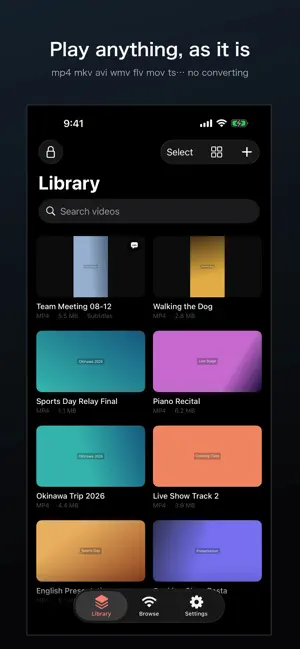
Play anything. Let AI write the subtitles. Ever been told "this format isn't supported"? Anyvid opens it and plays it — no converting, no uploading. ■ No conversion needed mp4, mov, mkv, avi, wmv, flv, ts, webm and many more. Stop checking file extensions. Just open the file. • Sound but no picture? Switch the playback engine and it appears • Playback speed, 10-second skip, skip silence • Resume where you left off • Send to a TV over HDMI or AirPlay ■ Speech becomes subtitles AI writes subtitles from the audio in your video. • Translate the subtitles into your own language • Tap any line to fix a word right where you are • Adjust timing to a hundredth of a second • Add or remove subtitle lines ■ Long video? Watch the good parts Highlights stitches the best moments together. It picks differently for sports, family memories, or meetings. • Build a summary and chapters to see what was said where • Ask the video a question and jump to the answer • Search the dialogue to find a moment ■ More fun with family videos • Search by what's on screen: pick dogs, cake, balls, red clothes and more from the list of what appears, and jump straight to those scenes. You can also search in your own words • Follow your child with zoom: tap a child once to make a zoomed video that follows them • Vertical clips: choose the scenes you want and save them in vertical 9:16, framed around the people • Voice-over: translated subtitles are read aloud while the original sound is lowered Search by what's on screen requires iOS 27 and an iPhone that supports Apple Intelligence. ■ Trim, merge, organise • Save just the part you want (four quality levels) • Join several videos into one • Create folders to keep things tidy • Select many at once to move or delete Your original files are never modified. ■ Keep private videos private The Vault is a passcode-protected space. Videos inside never appear in the Files app or Photos. While your device is locked, they stay encrypted. ■ Receive from your computer over Wi-Fi Send videos straight from a browser on the same Wi-Fi network. No cable. No cloud. You can also play from a NAS over SMB, FTP, SFTP or HTTP. ■ Your videos never leave your iPhone Subtitles and summaries are made entirely on the device. No video, audio or transcript is ever sent to a server. • No ads • No analytics • No account required ■ Pricing Playback, trimming, merging, folders, the Vault and Wi-Fi transfer are all free. AI subtitles, translation, Highlights, summaries, search by what's on screen, follow with zoom and voice-over are part of Anyvid Pro — a one-time purchase, not a subscription. Pay once, keep it.
What’s new
Version 2.0 · Updated October 11, 2026
What's new in Anyvid 2.0 ■ Search by what's on screen Anyvid lists what appears in a video — dogs, cake, balls, red clothes and more. Pick one to jump straight to those scenes, or search in your own words, like "child in red". Requires iOS 27 and an iPhone that supports Apple Intelligence. ■ Follow your child with zoom Tap a child once to make a zoomed video that follows them. You can check how it will look while it is being made. ■ Vertical clips Choose the scenes you want and save them in vertical 9:16, framed around the people. Ready to share. ■ Voice-over that reads subtitles aloud Translated subtitles are read aloud while the original sound is lowered. ■ Other improvements • Tapping a search result now plays from that scene • The purchase screen now shows which features work on your iPhone • "Restore purchase" now shows the result • Minor bug fixes All new features are part of Anyvid Pro. If you already have it, they are yours at no extra cost.
App privacy
The developer, MITSUOMI ITO, reported these privacy practices to Apple.
Data Not Collected
The developer does not collect any data from this app.
Alternatives to Anyvid: Video Player & AI Subs
Looking for apps like Anyvid: Video Player & AI Subs? Here are 6 similar apps on the App Store. The highest rated is Twilightscapes (5.0/5), and all 6 are free to download.
-
 LM-Monitor
1.0
LM-Monitor
1.0
-
 Twilightscapes
5.0
Twilightscapes
5.0
-
 Keeplay: Video & Photo Player
-
 VideoPlayerS - Media Player
-
 Super SloMo: Instant Replay
-
 XClipper - Save & Sort Videos
| App | Rating | Price | Last updated | Compare |
|---|---|---|---|---|
| Anyvid: Video Player & AI Subs | – | Free | October 11, 2026 | |
| LM-Monitor | 1.0 / 5 (1) | Free | Aug 12, 2026 | Compare |
| Twilightscapes | 5.0 / 5 (1) | Free | Jul 17, 2026 | Compare |
| Keeplay: Video & Photo Player | – | Free | Oct 14, 2026 | Compare |
| VideoPlayerS - Media Player | – | Free | Sep 16, 2026 | Compare |
| Super SloMo: Instant Replay | – | Free | Oct 11, 2026 | Compare |
| XClipper - Save & Sort Videos | – | Free | Oct 9, 2026 | Compare |