

FrameReplay: Sports Video
Yuta Jo Sports iPhoneiPadiPod touchApple Watch
FrameReplay: Sports Video is a free Sports app for iPhone and iPad by Yuta Jo. Requires iOS 17.0. Updated October 7, 2026.
- Price
- Free
- on the App Store
- Size
- 34 MB
- Age 4+
- Updated
- Oct 7
- 2026 · v1.2.3
Screenshots
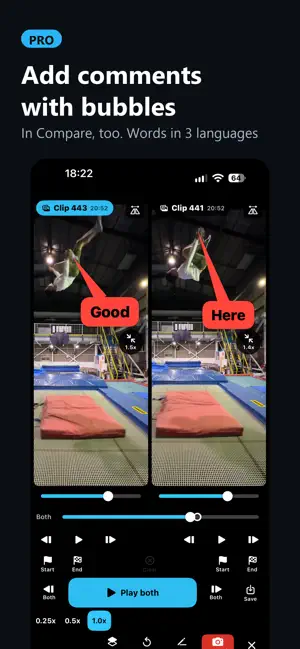
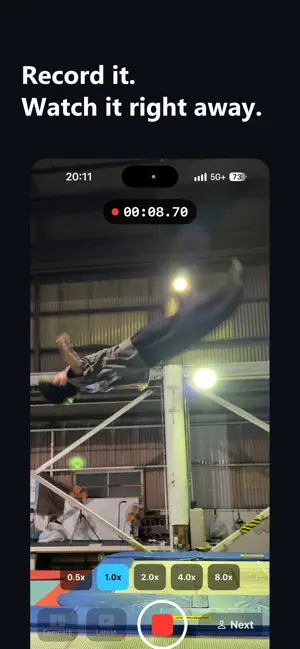


About FrameReplay: Sports Video
Film. Watch it back. Put it next to the last one. Film again. FrameReplay is built for that loop - no logins, no uploads, nothing to wait for. WORKS WHERE YOUR SIGNAL DOESN'T There is no account and no cloud. Video stays on your devices. Nothing is uploaded anywhere. That matters on a mountain with no bars, and anywhere recordings are not allowed to leave the building. RECORD - 30, 60, 120 or 240 frames per second - 720p, 1080p or 4K - A delay before recording starts, so you can set the phone down and get in position - Stop automatically after a set number of seconds - Start from your Apple Watch REVIEW - Step one frame at a time. Hold to run slowly - 0.25x, 0.5x and 1x playback - Mark a start and an end, and loop that section - Air time, in seconds and in frames - Mirror left and right - Pinch to zoom FRAMEREPLAY PRO (one-time purchase) - Two clips side by side, or laid over each other. Play both at once, step both together - Draw lines and measure angles - Continuous mode: the camera keeps running and movement splits each take - Replay: record continuously and scroll back through the last minutes - Save what you are watching to Photos at the same slow speed, including the two-up view - Import from a Wi-Fi SD card in your camcorder (FlashAir) Compare and drawing can be tried three times before you buy. One purchase, not a subscription. If you installed version 1.0 from the App Store, Pro is unlocked for you at no charge. MADE FOR COLD HANDS Move the buttons. Make them bigger. Switch to a left-handed layout, or the glove preset. The colours are built for a dark screen outdoors. ALSO - Japanese and English - No ads. No analytics. No tracking of any kind.
What’s new
Version 1.2.3 · Updated October 7, 2026
- Clock overlay: show a clock face over the video to describe body angles as "pointing to 1 o'clock" (review and Compare) - Import several videos from Photos at once, now almost instantly - Review and Compare open faster, and the share and save menus appear right away - Open the MultiCam guide from Settings
App privacy
The developer, Yuta Jo, reported these privacy practices to Apple.
Data Not Collected
The developer does not collect any data from this app.
Alternatives to FrameReplay: Sports Video
Looking for apps like FrameReplay: Sports Video? Here are 6 similar apps on the App Store. The highest rated is MTJudge (5.0/5), and all 6 are free to download.
-
 MTJudge
5.0
MTJudge
5.0
-
 TRICK DECK - Ski & Snowboard
-
 The Salt Log
-
 KinePair: Motion Compare
-
 Offseason Cam - オフトレ撮影
-
 little park
| App | Rating | Price | Last updated | Compare |
|---|---|---|---|---|
| FrameReplay: Sports Video | – | Free | October 7, 2026 | |
| MTJudge | 5.0 / 5 (1) | Free | Oct 9, 2026 | Compare |
| TRICK DECK - Ski & Snowboard | – | Free | Aug 28, 2026 | Compare |
| The Salt Log | – | Free | Jul 15, 2026 | Compare |
| KinePair: Motion Compare | – | Free | Aug 22, 2026 | Compare |
| Offseason Cam - オフトレ撮影 | – | Free | Sep 1, 2026 | Compare |
| little park | – | Free | Jun 18, 2026 | Compare |