

Cast to TV*: Screen Mirroring
Jigar Vaghasiya Utilities iPhoneiPadiPod touch
Cast to TV*: Screen Mirroring is a free Utilities app for iPhone and iPad by Jigar Vaghasiya. Requires iOS 15.6. Updated October 14, 2026.
- Price
- Free
- on the App Store
- Size
- 170 MB
- Age 4+
- Updated
- Oct 14
- 2026 · v1.0.5
Screenshots


About Cast to TV*: Screen Mirroring
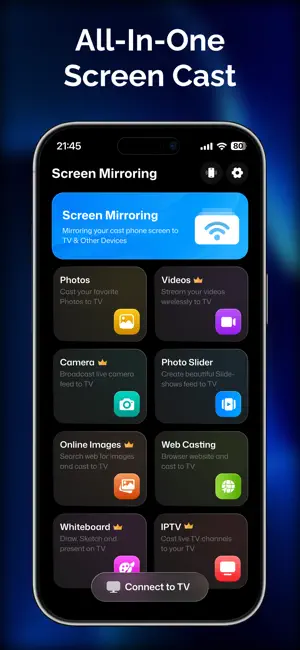
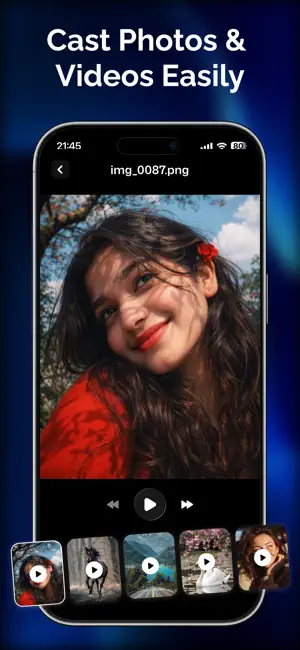
Cast to TV: Screen Mirroring is the ultimate, easy-to-use utility for sharing your device screen and streaming local media directly to any Smart TV or monitor. Designed for seamless performance over your local Wi-Fi network, our app lets you enjoy photos, videos, web streams, and live camera feeds on the big screen with minimal latency. Whether you are sharing family memories, streaming your favorite web videos, conducting a business presentation, or viewing photos from your gallery, Cast to TV delivers a smooth, high-quality casting experience without complex hardware or cables. KEY FEATURES • Real-Time Screen Mirroring: Mirror your screen directly to your Smart TV with high-definition clarity. Enjoy low-latency display sharing perfect for apps, presentations, and games. • Local Photo & Video Casting: Easily browse your device gallery and cast your favorite videos and high-resolution photos to your TV screen for a cinematic viewing experience. • Web Video Streamer: Use the built-in web browser to find and cast online videos directly to your TV. Stream web content seamlessly without interrupting other tasks. • Live Camera Cast: Turn your device into a live streaming monitor. Broadcast your live camera feed straight to the TV screen in real time. • Universal DLNA & UPnP Support: Built with support for DLNA, UPnP, and local wireless protocols to ensure reliable connections with most modern Smart TVs and casting receivers. • Fast, Clean & Secure: Operates directly over your local Wi-Fi network. Your local media is never uploaded to external servers, ensuring complete privacy and fast local streaming. HOW IT WORKS 1. Connect your phone/tablet and your Smart TV to the same Wi-Fi network. 2. Open the app and allow local network discovery. 3. Select your TV from the detected device list. 4. Choose screen mirroring, local media, or web casting to start streaming instantly. Note: Screen mirroring and media casting require both devices to be connected to the same local Wi-Fi network. Protected content with digital rights management (DRM) from specific third-party apps may restrict mirroring due to copyright protections. Terms of Use (EULA) : https://www.apple.com/legal/internet-services/itunes/dev/stdeula/
What’s new
Version 1.0.5 · Updated October 14, 2026
This release brings performance improvements and bug fixes.
App privacy
The developer, Jigar Vaghasiya, reported these privacy practices to Apple.
Data Used to Track You
The following data may be used to track you across apps and websites owned by other companies:
- Identifiers: Device ID
Data Not Linked to You
The following data, which may be collected but is not linked to your identity, may be used for the following purposes:
- Identifiers: Device ID
Used for: Analytics, App Functionality
Alternatives to Cast to TV*: Screen Mirroring
Looking for apps like Cast to TV*: Screen Mirroring? Here are 6 similar apps on the App Store. The highest rated is Cast TV & Screen Mirroring (5.0/5), and all 6 are free to download.
-
 AI Cleaner:Clean Up Storage XL
-
 Tether - File sharing
-
 AI Cleaner: Clean Up Storageㅤ
-
 Castify: Web Video Caster
-
 AIClean: Clean Up Storage
-
 Cast TV & Screen Mirroring
5.0
Cast TV & Screen Mirroring
5.0
| App | Rating | Price | Last updated | Compare |
|---|---|---|---|---|
| Cast to TV*: Screen Mirroring | – | Free | October 14, 2026 | |
| AI Cleaner:Clean Up Storage XL | – | Free | Apr 20, 2026 | Compare |
| Tether - File sharing | – | Free | Dec 29, 2025 | Compare |
| AI Cleaner: Clean Up Storageㅤ | – | Free | Oct 1, 2026 | Compare |
| Castify: Web Video Caster | – | Free | Sep 4, 2026 | Compare |
| AIClean: Clean Up Storage | – | Free | Mar 10, 2026 | Compare |
| Cast TV & Screen Mirroring | 5.0 / 5 (1) | Free | Sep 12, 2026 | Compare |