

CodePad – Code Editor & IDE
Touch LLC Developer Tools iPhoneiPadiPod touch
CodePad – Code Editor & IDE is a free Developer Tools app for iPhone and iPad by Touch LLC. Rated 5.0/5 from 2 ratings. Requires iOS 17.0.
- Rating
- 5.0
- 2 ratings
- Price
- Free
- on the App Store
- Size
- 53 MB
- Age 4+
- Updated
- Oct 30
- 2026 · v1.0.2
Screenshots


About CodePad – Code Editor & IDE
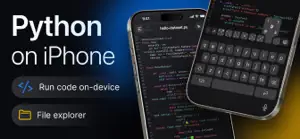
Write and run Python – right on your iPhone or iPad, with no ads and no subscriptions. CodePad is a full Python code editor and IDE built for iOS and iPadOS. It runs a real embedded Python interpreter directly on your device – no server or internet connection required. Your code executes locally, instantly, and works even offline. NO ADS. NO SUBSCRIPTIONS. • All features are available • No ads • No subscription required • No account required • Run Python locally and offline CODE WITH A REAL EDITOR • Full Python syntax highlighting • Line numbers, code folding, and current-line highlighting • Auto-indent and auto-close brackets • Line wrap and adjustable tab width • Find and replace across your file • Multiple editor themes and fonts with adjustable font size RUN PYTHON ON YOUR DEVICE • Execute Python scripts directly on your iPhone or iPad • No server round-trip – your code runs locally • Watch output appear in a dedicated console as your script runs • Send input to a running script interactively • Built-in timeout protection for runaway loops • Full Python tracebacks to help find and fix errors fast ORGANIZE YOUR WORK • Create and manage multiple projects, files, and folders • Import existing Python files or whole projects (.zip) • Export projects to share or back up • Deleted items move to Recently Deleted first NEVER LOSE YOUR PROGRESS • Automatic version history for every file • Compare earlier versions against your current code, line by line • Restore an older version in a single tap BUILT FOR iPHONE & iPAD • Dedicated Light and Dark editor themes • Keyboard accessory bar built specifically for writing code • Interview Mode for a clean, distraction-free workspace • Native experience on both iPhone and iPad Whether you're learning Python, prototyping an idea, preparing for an interview, or just need to run a quick script without opening a laptop, CodePad gives you a real Python environment anywhere. Write Python. Run it offline. Code anywhere. Python is a trademark of the Python Software Foundation. CodePad is not affiliated with or endorsed by the Python Software Foundation.
What’s new
Version 1.0.2 · Updated October 30, 2026
Smoother and more stable. Fixed freezes when a script prints a lot of output, refined the light theme, and you can now open the sidebar by swiping anywhere on the editor.
App privacy
The developer, Touch LLC, reported these privacy practices to Apple.
Data Not Linked to You
The following data, which may be collected but is not linked to your identity, may be used for the following purposes:
- Usage Data: Product Interaction
Used for: Analytics
Alternatives to CodePad – Code Editor & IDE
Looking for apps like CodePad – Code Editor & IDE? Here are 6 similar apps on the App Store.
-
 Simple Python
-
 CompilePilot: Build & Agents
-
 CodePad+ Code Editor
-
 SVN Browse
-
 MiraBridge AI Code Remote
-
 CodePad!
| App | Rating | Price | Last updated | Compare |
|---|---|---|---|---|
| CodePad – Code Editor & IDE | 5.0 / 5 (2 ratings) | Free | October 30, 2026 | |
| Simple Python | – | Free | Oct 7, 2026 | Compare |
| CompilePilot: Build & Agents | – | Free | Oct 29, 2026 | Compare |
| CodePad+ Code Editor | – | Free | Oct 28, 2026 | Compare |
| SVN Browse | – | Free | Sep 8, 2026 | Compare |
| MiraBridge AI Code Remote | – | Free | May 25, 2026 | Compare |
| CodePad! | – | Free | Sep 24, 2026 | Compare |