

CardSync - Verified Copy
Laurent Meurisse Photo & Video iPhoneiPadiPod touch
CardSync - Verified Copy is a paid Photo & Video app for iPhone and iPad by Laurent Meurisse. Requires iOS 17.0. Updated October 22, 2026.
- Price
- 2.99 USD
- on the App Store
- Size
- 7 MB
- Age 4+
- Updated
- Oct 22
- 2026 · v1.3
Screenshots


About CardSync - Verified Copy
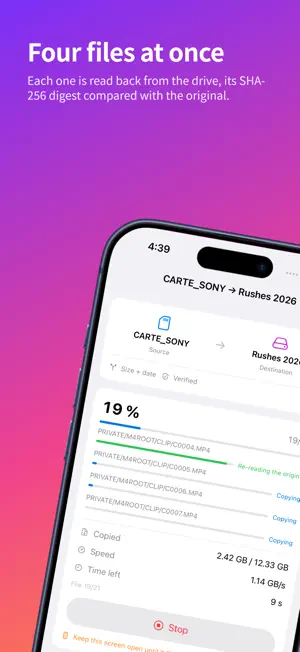
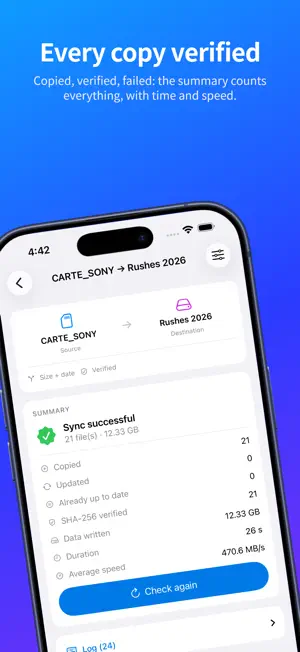
CardSync copies one folder to another and verifies every file it writes. Memory card, SSD or USB-C stick, iCloud Drive, the iPhone itself: anything the Files app exposes works, in both directions. The source can also be an album from your photo library, and the destination a server: S3 or SFTP, your own. The Files app can already move files. It cannot tell you whether the copy is faithful, what is still missing, or resume where it stopped. That is what CardSync does. VERIFICATION After each write, CardSync makes the system forget what it holds of the file, reads the copy back from the destination drive and compares its SHA-256 digest with the original's. The original is read again too, from the card: if the two reads differ, the card reader is at fault, and the app tells you instead of keeping corrupted data (can be turned off). ONLY WHAT IS MISSING Both sides are analysed before anything is written: you see what would be copied, then you decide. For a folder: size, size and date, or full digest; filter by type (RAW, JPEG, videos…), size or name. After an interruption — screen left, drive unplugged — only what is missing is copied. Up to four files at once, in blocks: a 4 GB video weighs no more than a photo. NOTHING IS EVER LOST Every file is written under a temporary name, then put in place in one move, once complete and verified. A file already present is never deleted before its replacement is ready. An interrupted copy leaves no truncated file behind. PHOTO LIBRARY An album or the whole library, with a "from a date" filter. CardSync exports the original file and, as you choose, the Live Photo video, the edited version and a readable metadata sidecar. Items left in iCloud are fetched (can be turned off). TO AN SFTP SERVER A computer, a rented server, a NAS that offers SFTP. A password, or a key created in the app, of which only the public half leaves the device. On the first connection the app shows the server's fingerprint so you can compare it with the server's own; it remembers it and stops if it changes. A file only appears under its name once complete: the server computes the SHA-256 digest of what it stored, compared with the original's (otherwise the app reads the file back from the server). The original date is set on the file. TO AN S3 SERVER An Amazon S3 bucket or one from a compatible service: yours, with your keys. Every upload carries its SHA-256 digest and the server rejects anything that does not match: proof it received the right bytes. For proof of what it stored, turn on read-back, at the cost of twice the traffic. FOR ANY SERVER Wi-Fi only by default; cellular data allowed server by server. A connection test, before saving, checks that it can be read from and written to, leaving nothing behind. Mirror and checksum comparison: folders only. MIRROR MODE WITHOUT DELETION For a folder source, extra files at the destination are moved into a dated folder, never deleted. If part of the source could not be read, mirror mode disables itself. WHAT YOU SEE A bar for each file with its step, throughput, time left, a log and a history. An honest summary: copied, verified, set aside, failed. WHAT DOES NOT LEAVE YOUR DEVICE No account, no tracking, no advertising, no data collected, no server of ours. Traffic happens only when you ask for it, between your device and your own accounts: the server you added, iCloud for your photos, the online service whose folder you pick. Passwords and keys stay in the device's keychain. The only libraries included are Apple's open-source software that speaks SSH. GOOD TO KNOW iOS does not allow copying in the background: keep CardSync on screen; the app prevents the screen from locking, and if you leave, the sync resumes next time. A powered USB-C hub is recommended for large volumes. To a server, after a stop, a large file starts again from the beginning. SFTP: no RSA keys; a server that offers no other kind cannot be reached.
What’s new
Version 1.3 · Updated October 22, 2026
• New destination: a server. Send a card, a folder or a photo-library album to Amazon S3 or an S3-compatible service, or to an SFTP server — your own, with your credentials. Tested with Amazon S3 and OpenSSH; for another service, the connection test tells you before the first upload what it can do. • A server can only be saved after a successful connection test. For S3, the app deliberately sends a corrupted part to make sure it is refused. For SFTP, it shows the server's fingerprint on the first connection, remembers it, and refuses to connect if it changes. • Checked on receipt: every S3 upload carries its SHA-256 digest and the server rejects anything that does not match; an SFTP server computes the digest of what it stored before the file takes its name. Optional full read-back from the server. • SFTP: sign in with a password, or with a key created in the app, of which only the public half leaves the device. • Wi-Fi only by default; cellular data can be allowed server by server. Network drop: the upload waits for the network and carries on; after a few minutes without it, it stops with a summary of what went through. Run it again: only what is missing is sent. • Filter a sync: by type (RAW, JPEG, HEIF, videos, or your own extensions), by size range, or by name with the * wildcard (“DSC*”, “*_final*”). The filter applies to both sides: in mirror mode, what it leaves out is never set aside. • The home screen groups your syncs by period, keeps the last one you ran in view, and gains a Servers section and an About screen. • Your passwords and keys stay in this device's keychain. CardSync still has no server of its own: nothing goes anywhere but to your own storage. To speak SSH, the app includes open-source libraries published by Apple; their licenses can be read in the app. • Fixed: a very long checksum comparison could produce a plan that had already expired by the time you started the copy.
App privacy
The developer, Laurent Meurisse, reported these privacy practices to Apple.
Data Not Collected
The developer does not collect any data from this app.
Alternatives to CardSync - Verified Copy
Looking for apps like CardSync - Verified Copy? Here are 6 similar apps on the App Store. The highest rated is TG RAW Photo (5.0/5), and 4 of the 6 are free to download.
-
 TG RAW Photo
5.0
-
 Proximator - Footage Converter
-
 ApolloOne GO: Photo Culling
5.0
-
 Datacolor LightColor Meter
1.7
-
 Pocket Light Meter
4.5
-
 DOF Slider: Focus Calculator
3.7
| App | Rating | Price | Last updated | Compare |
|---|---|---|---|---|
| CardSync - Verified Copy | – | 2.99 USD | October 22, 2026 | |
| TG RAW Photo | 5.0 / 5 (1) | 2.99 USD | Feb 10, 2026 | Compare |
| Proximator - Footage Converter | – | Free | Sep 29, 2026 | Compare |
| ApolloOne GO: Photo Culling | 5.0 / 5 (4) | Free | Oct 28, 2026 | Compare |
| Datacolor LightColor Meter | 1.7 / 5 (7) | Free | Mar 3, 2025 | Compare |
| Pocket Light Meter | 4.5 / 5 (1,045) | 9.99 USD | Feb 19, 2025 | Compare |
| DOF Slider: Focus Calculator | 3.7 / 5 (23) | Free | Oct 20, 2026 | Compare |