

Amber: Snippets, Images, Docs
Chinmay Pingale Productivity iPhoneiPadiPod touchMac
Amber: Snippets, Images, Docs is a free Productivity app for iPhone and iPad by Chinmay Pingale. Requires iOS 16.0. Updated October 11, 2026.
- Price
- Free
- on the App Store
- Size
- 51 MB
- Age 4+
- Updated
- Oct 11
- 2026 · v1.3.0
Screenshots


About Amber: Snippets, Images, Docs
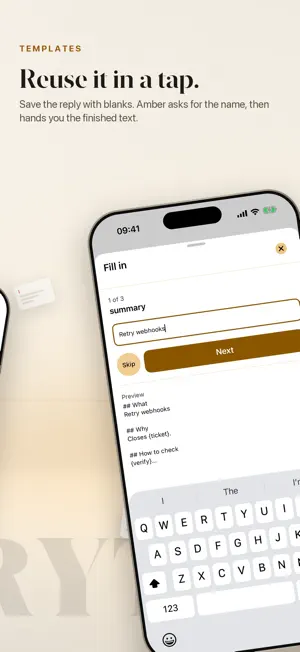
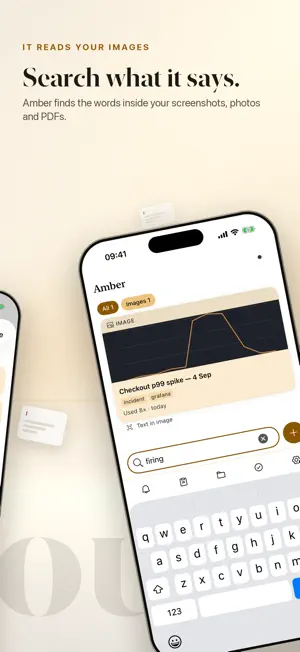
Amber is one fast, focused place for everything you reuse. Keep a snippet, an image, a file or a document once — then reach for it in a tap, from your iPhone, your iPad or your Mac. FOR THE REPLY YOU RETYPE EVERY WEEK Save it as a template with blanks, and Amber asks for the name and the project and hands you the finished text. FOR THE DOCUMENTS YOU SHOW CLIENTS Group them in a project, then present them page by page in Show Mode — and hand over the real file, not its filename. FOR THE TWENTIETH FORM ASKING FOR YOUR ADDRESS Fill a form lines up your own details in the order forms ask for them, one tap to copy each, and it keeps your place. ORGANISE IT THE WAY YOU THINK Projects hold shelves, and shelves nest inside them. Smart shelves are saved searches that stay live — "PDFs used this month" keeps itself up to date. Drag a card onto a shelf to move it; drop a file straight onto one to keep it there. AUTOMATIONS Turn any of that into a named routine you run with one tap. IT FINDS THINGS BY WHAT THEY SAY Amber reads the words inside your images and documents, so a screenshot of a receipt is findable by what is written on it. BRING YOUR SNIPPETS WITH YOU Import snippets from Raycast, Alfred, Text Replacements, CSV or plain text. YOUR IPHONE CAN DRIVE YOUR MAC Show a document on the big screen from your pocket, or beam a card to another of your own devices — no pairing, no cable. BUILT FOR THE KEYBOARD ⌘/ lists every shortcut Amber has. Widgets, Shortcuts, Spotlight and a menu bar item keep your cards close without opening the app. YOUR CONTENT STAYS YOURS There is no Amber account and no Amber server. Everything lives on your device and syncs through your own iCloud. No analytics, no tracking, no ads. Amber is free to use. Amber Pro is a one-off purchase — not a subscription — that lifts the card limit and unlocks the Pro features. If it ever lapses, your cards stay readable and copyable. Nothing is held hostage.
What’s new
Version 1.3.0 · Updated October 11, 2026
Amber, wherever you type and browse. • The Amber keyboard for iPhone and iPad: your library sits above the keys. Tap a text card to type it into any app; tap an image or file to copy it, ready to paste. Add it in Settings › Amber Keyboard. • Text shortcuts: give a text card a shortcut such as ;addr in its editor, and typing it with the Amber keyboard puts in the whole text. Delete straight after to get the shortcut back. • Keep in Amber from Safari on the Mac: turn on Amber in Safari › Settings › Extensions, then click it on any page to keep that page in the project you choose, without leaving Safari.
App privacy
The developer, Chinmay Pingale, reported these privacy practices to Apple.
Data Not Linked to You
The following data, which may be collected but is not linked to your identity, may be used for the following purposes:
- Purchases: Purchase History
- Identifiers: User ID
- Usage Data: Product Interaction
Used for: App Functionality
Alternatives to Amber: Snippets, Images, Docs
Looking for apps like Amber: Snippets, Images, Docs? Here are 6 similar apps on the App Store.
-
 Stash: Save & Reuse
-
 SaveCross: Clipboard Library
-
 Ledge – Clipboard & Snippets
-
 Found: Private Library
-
 Assorta
-
 Pomodoro Focus Timer - Tickro
| App | Rating | Price | Last updated | Compare |
|---|---|---|---|---|
| Amber: Snippets, Images, Docs | – | Free | October 11, 2026 | |
| Stash: Save & Reuse | – | Free | Oct 1, 2026 | Compare |
| SaveCross: Clipboard Library | – | Free | Sep 21, 2026 | Compare |
| Ledge – Clipboard & Snippets | – | Free | Sep 30, 2026 | Compare |
| Found: Private Library | – | Free | Sep 29, 2026 | Compare |
| Assorta | – | Free | Aug 19, 2026 | Compare |
| Pomodoro Focus Timer - Tickro | – | Free | Jun 10, 2026 | Compare |