

Draftmind: Draw & Ask AI Tutor
Brotherly Apps LLC Education iPhoneiPadiPod touch
Draftmind: Draw & Ask AI Tutor is a free Education app for iPhone and iPad by Brotherly Apps LLC. Rated 5.0/5 from 3 ratings. Requires iOS 17.0.
- Rating
- 5.0
- 3 ratings
- Price
- Free
- on the App Store
- Size
- 96 MB
- Age 12+
- Updated
- Oct 24
- 2026 · v1.1.4
Screenshots


About Draftmind: Draw & Ask AI Tutor
Tired of reuploading a photo from your gallery every time you ask an AI for help? Draftmind is a sketchbook with a tutor built in. Use it for calculus, chemistry, physics, biology, coding interviews, history notes, languages or anything else you're working on. Sketch it out or talk it through. The page you're on goes with every question automatically. Keep working, keep asking. LEARN WITH AI, NOT AROUND IT • Do the work yourself and ask it to be checked step-by-step • See exactly where a solution went wrong, and why • Any subject: math, science, code, languages, diagrams and more • Tap the mic button and ask out loud, with your hands still on the pen, and hear the answer read back • Every chat is saved under what you first asked, drawings included. Pick it back up anytime, or save it as a PDF DRAW LIKE YOU WOULD ON PAPER • Pen, pencil and marker, each with its own feel • Shapes, text, fills and a full color wheel • Drop in a photo and write straight on it • Everything saves as you work FREE TO START Draw with every core tool and chat with AI for free. Draftmind connects to AI models through a free OpenRouter account you link: 50 messages a day with no card required, or 1,000 a day once you add $10 of credit. Nothing costs a cent unless you choose it. DRAFTMIND PRO • Offline mode: download an AI model and keep studying with no signal, with no account needed • Offline voices, and every natural voice • PDF import, PDF export and printing • Unlimited boards, folders, and backup to iCloud Drive or Google Drive • The highlighter and other advanced tools, and your own colors
What’s new
Version 1.1.4 · Updated October 24, 2026
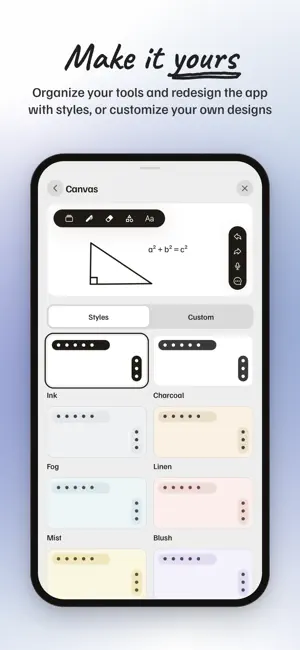
A full refresh of how Draftmind looks and works. • Redesigned chat — conversations get names you can edit, and you can drag the panel to any size or take it full screen • A cleaner tool bar and corner controls • The library resizes the same way, with folders and multi-select • New Customize options for colours and styles throughout the app • Draftmind now greets you with a short chat that sets up the AI, in place of the old connect card • Every board opens at its own fit • Clearer descriptions of what each offline AI model is good at
App privacy
The developer, Brotherly Apps LLC, reported these privacy practices to Apple.
Data Not Linked to You
The following data, which may be collected but is not linked to your identity, may be used for the following purposes:
- Usage Data: Product Interaction
- Purchases: Purchase History
- User Content: Photos or Videos, Other User Content
Used for: Analytics, App Functionality
Alternatives to Draftmind: Draw & Ask AI Tutor
Looking for apps like Draftmind: Draw & Ask AI Tutor? Here are 6 similar apps on the App Store. The highest rated is GradeGenius AI (5.0/5), and all 6 are free to download.
-
 The Ten Minute Tutor
-
 GradeGenius AI
5.0
GradeGenius AI
5.0
-
 Ai Tutor Pro - Study & Learn
-
 Rubitt - AI Tutor
5.0
Rubitt - AI Tutor
5.0
-
 InstaPrivat Tutor
-
 Geography AI Homework Helper
| App | Rating | Price | Last updated | Compare |
|---|---|---|---|---|
| Draftmind: Draw & Ask AI Tutor | 5.0 / 5 (3 ratings) | Free | October 24, 2026 | |
| The Ten Minute Tutor | – | Free | Oct 27, 2026 | Compare |
| GradeGenius AI | 5.0 / 5 (8) | Free | Jun 1, 2026 | Compare |
| Ai Tutor Pro - Study & Learn | – | Free | Sep 25, 2026 | Compare |
| Rubitt - AI Tutor | 5.0 / 5 (2) | Free | Aug 21, 2026 | Compare |
| InstaPrivat Tutor | – | Free | Dec 13, 2023 | Compare |
| Geography AI Homework Helper | – | Free | Apr 18, 2026 | Compare |