

PC Launchpad: Build & Compare
BRANDON CHARLES SCHENCK Utilities iPhoneiPadiPod touch
PC Launchpad: Build & Compare is a free Utilities app for iPhone and iPad by BRANDON CHARLES SCHENCK. Requires iOS 16.4. Updated September 29, 2026.
- Price
- Free
- on the App Store
- Size
- 50 MB
- Age 4+
- Updated
- Sep 29
- 2026 · v1.0
Screenshots


About PC Launchpad: Build & Compare
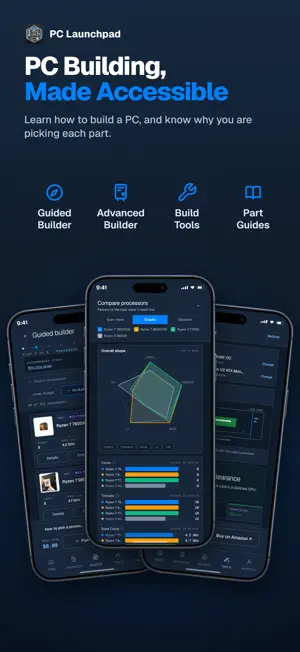
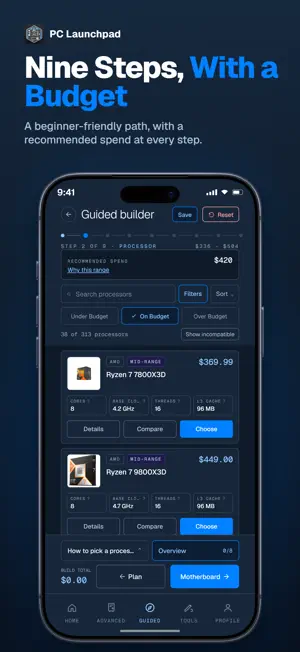
Plan a PC that fits together before you spend anything. PC Launchpad checks every part you add against the ones already in your build -- sockets, memory type, case clearance, wattage, power connectors. The things that turn a parts list into a return. Thousands of components with current Amazon pricing. No account needed to use the builders, the comparison tool, or the catalog. COMPARE PARTS SIDE BY SIDE Put up to four parts of the same type next to each other. The spec table marks the better value in every ranked row and leaves ties alone, because a tie has no winner. The graphs scale each bar against the best in its row, so an underdog reads as a short bar rather than an empty one. The decision view says what each part wins on, and says so plainly when a part leads on nothing. TWO BUILDERS, BECAUSE THAT QUESTION IS REALLY TWO QUESTIONS "What should I buy" sounds the same coming from a first-time builder and someone on their fifth machine, but it is not the same question. The guided builder walks nine steps in order. It explains what each part does, which specs actually matter, and what a sensible spend looks like for your budget and your build -- with a running total against your ceiling. The advanced builder gives you eight slots to fill in any order and stays quiet unless something is wrong. Switching between them carries every part across. A CATALOG THAT FILTERS INSTANTLY Browse eight categories -- processors, motherboards, video cards, memory, storage, CPU coolers, power supplies, cases. Filter by price, brand, socket, form factor and more. Filtering happens on your phone, so it is instant, and the catalog keeps working when you lose signal. CLASHES EXPLAINED, NOT ONLY FLAGGED When two parts clash, the app names both of them and the numbers involved: which socket your processor uses against what the motherboard has, how much clearance your case gives against how long the card is. Then it offers the parts that would fit. TWO CALCULATORS Check whether a graphics card clears your case before you order either one, and check whether your processor and card are balanced against each other rather than one starving the other. SEND A BUILD TO SOMEONE Share a saved build as a link. Whoever opens it sees the whole parts list and can take it into their own builder. If they have the app installed, the link opens there. IS THIS FREE? WHAT IS THE CATCH? It is free. We earn from affiliate links when you tap through to buy -- you pay the same price either way, and the recommendation engine is independent of the affiliate layer. We never move a part up the list because it pays more. HOW CURRENT IS THE DATA? Pricing comes from Amazon availability and refreshes regularly; specs come from manufacturer datasheets. Prices older than a day are marked as such. Confirm live stock and price on the retailer page before you buy. WHAT IT DOES NOT DO It does not sell you anything, and it does not estimate frame rates. It tells you what fits, what it costs, and which of two parts is better on the specs that are published.
App privacy
The developer, BRANDON CHARLES SCHENCK, reported these privacy practices to Apple.
Data Linked to You
The following data, which may be collected and linked to your identity, may be used for the following purposes:
- Contact Info: Email Address, Name
- User Content: Customer Support
- Identifiers: User ID, Device ID
Used for: Analytics, App Functionality
Data Not Linked to You
The following data, which may be collected but is not linked to your identity, may be used for the following purposes:
- Usage Data: Advertising Data, Product Interaction, Other Usage Data
- Diagnostics: Crash Data, Performance Data, Other Diagnostic Data
Used for: Third-Party Advertising, Developer’s Advertising or Marketing, Analytics, Product Personalization, App Functionality
Alternatives to PC Launchpad: Build & Compare
Looking for apps like PC Launchpad: Build & Compare? Here are 6 similar apps on the App Store. The highest rated is RoPilot (5.0/5), and all 6 are free to download.
-
 Megawrzuta
-
 PCForge™: PC Builder
4.3
-
 BuildSmart - AI PC Builder
1.0
-
 RoPilot
5.0
-
 PC Builder - DIY PC Builder
-
 Glide AI
5.0
| App | Rating | Price | Last updated | Compare |
|---|---|---|---|---|
| PC Launchpad: Build & Compare | – | Free | September 29, 2026 | |
| Megawrzuta | – | Free | Jul 15, 2026 | Compare |
| PCForge™: PC Builder | 4.3 / 5 (6) | Free | Nov 1, 2026 | Compare |
| BuildSmart - AI PC Builder | 1.0 / 5 (2) | Free | Jun 24, 2026 | Compare |
| RoPilot | 5.0 / 5 (1) | Free | Sep 24, 2026 | Compare |
| PC Builder - DIY PC Builder | – | Free | Jul 17, 2026 | Compare |
| Glide AI | 5.0 / 5 (2) | Free | Nov 1, 2026 | Compare |