

Groat: Expense Tracker
Felix Mezo Gomez Finance iPhoneiPadiPod touch
Groat: Expense Tracker is a free Finance app for iPhone and iPad by Felix Mezo Gomez. Requires iOS 16.4. Updated October 18, 2026.
- Price
- Free
- on the App Store
- Size
- 46 MB
- Age 4+
- Updated
- Oct 18
- 2026 · v1.8
Screenshots


About Groat: Expense Tracker
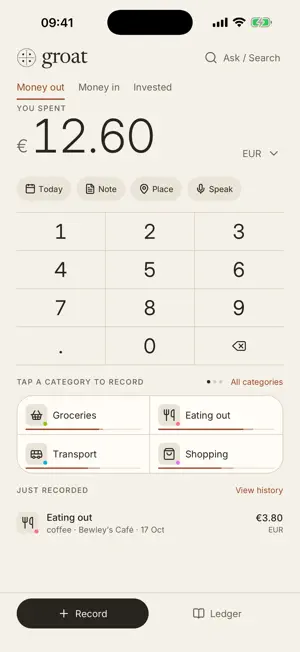
Groat is an expense tracker with one job: record what you spent before you forget it. Type the amount. Tap the category. Done — two taps, from the screen the app opens on. WHAT IT DOES • Log an expense or income in two taps, from the screen the app opens on — a receipt, Edit and Undo follow right away • Or just say it: "twelve fifty on groceries yesterday" appears as you talk and becomes an entry you confirm with one tap • Add where it was spent: pick the shop from the places around you, and see it on a small map • Investments — stocks, bonds, funds — recorded on their own, never counted as spending • Date an entry to any day, past or ahead, and add a note when you want one • Day, month and year reports: where it went by category, in, out and net, your average month, and your year as a heatmap • A budget per category, with the line in sight while you type • Schedules for rent and subscriptions, recorded when they fall due • Several currencies, each kept apart — nothing is ever converted • Search every month, export to CSV or Excel, import a CSV or TSV • Ask Groat: ask about your money in your own words and get the figure, a short answer and a chart, from your whole history • Paper and Ink: light and dark, following your phone or pinned to either • In nine languages STAYS OUT OF THE WAY No account. No bank connection. No sync, no subscription, no ads, no analytics. Your expenses live in a database on your phone. They leave it only when you export them, or when you ask Groat a question — and then only a summary, which nobody keeps. TOTALS THAT ARE ACTUALLY RIGHT Amounts are stored as whole cents rather than decimals that drift, so a year of expenses adds up exactly. Category percentages are worked out to sum to 100 instead of to 98. An expense is stamped with the calendar date you spent it, so it stays on that date when you travel. EXPORTS THAT OPEN PROPERLY The Excel export carries real date and number cells, so sorting, filtering and pivot tables work the moment the file opens — and it includes a category summary sheet alongside the raw expenses. The CSV is plain and unambiguous, and opens correctly in Excel on Windows as well as everywhere else. A groat is an English fourpenny coin, struck from 1279 and demonetised in 1856.
What’s new
Version 1.8 · Updated October 18, 2026
Talk to Groat, remember where you spent it, and keep your investments apart. Say it instead of typing it. Tap Speak on Record and say "twelve fifty on groceries yesterday" — the words appear as you talk, and Groat fills in the amount, category and day and waits for you to confirm. It understands all nine of Groat's languages. Ask a question the same way. Add a place. Tap Place and pick the shop or café from the places around you, or search for one. It shows on the entry as a small map, and you can find entries by it later. Places stay on your phone. Investments are their own kind now. Stocks, Bonds and Funds sit beside Money out and Money in, and what you invest is never counted as spending, income or your net. Your average month. Reports show what a normal month costs you — in total and for every category — and how this month compares. Ask Groat answers better. It reads your whole history, not just the last year, leads with the figure you asked for, and draws a chart when a comparison is clearer as a picture. One tap sends the question, and one stops it. Easier editing. Changes to an entry save when you go back, the keyboard never hides what you are typing and can always be put away, and a new category is made in three short steps. Tap the groat logo, or swipe in from the left, for Settings. Also: entries can be dated ahead again, for rent paid early or a trip already booked, and the receipt after a save always sits clear of the bottom bar.
App privacy
The developer, Felix Mezo Gomez, reported these privacy practices to Apple.
Data Not Linked to You
The following data, which may be collected but is not linked to your identity, may be used for the following purposes:
- Financial Info: Other Financial Info
- Location: Precise Location
- User Content: Other User Content
Used for: App Functionality
Alternatives to Groat: Expense Tracker
Looking for apps like Groat: Expense Tracker? Here are 6 similar apps on the App Store. The highest rated is Finny: AI Money Manager (4.4/5), and all 6 are free to download.
-
 Allocated: Budget Planner
-
 Move Money
-
 Kota
-
 LifeSight Pension IRL
-
 Colour Caribbean
2.8
-
 Finny: AI Money Manager
4.4
| App | Rating | Price | Last updated | Compare |
|---|---|---|---|---|
| Groat: Expense Tracker | – | Free | October 18, 2026 | |
| Allocated: Budget Planner | – | Free | Oct 12, 2026 | Compare |
| Move Money | – | Free | Feb 19, 2026 | Compare |
| Kota | – | Free | Nov 6, 2026 | Compare |
| LifeSight Pension IRL | – | Free | Jun 18, 2026 | Compare |
| Colour Caribbean | 2.8 / 5 (13) | Free | Sep 30, 2026 | Compare |
| Finny: AI Money Manager | 4.4 / 5 (37) | Free | Oct 10, 2026 | Compare |