

Speck: Object Counter
Yi Chao Ding Utilities iPhoneiPadiPod touch
Speck: Object Counter is a free Utilities app for iPhone and iPad by Yi Chao Ding. Requires iOS 17.0. Updated October 27, 2026.
- Price
- Free
- on the App Store
- Size
- 39 MB
- Age 4+
- Updated
- Oct 27
- 2026 · v1.2
Screenshots
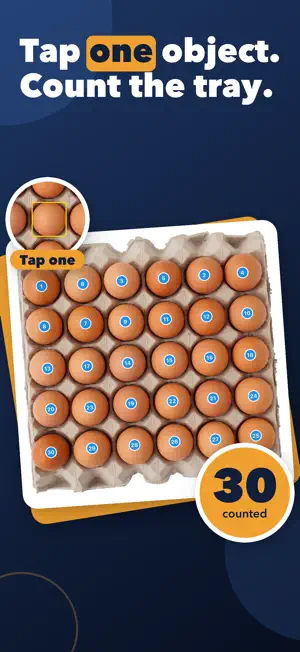



About Speck: Object Counter
Stop counting one by one. Photograph the pile, tap a single object, and Speck marks every match it finds with a numbered dot — then you fix the stragglers with a tap. HOW IT WORKS 1. Take a photo, or pick one from your library. 2. Tap one of the objects. That shows Speck what to count. Add a second or third example if they vary. 3. Tap Count. Every match gets a numbered dot, with a running total underneath. Speck finds most of them on its own. Missed one? Tap it to add a dot. Marked something that isn't there? Tap the dot to remove it. The total updates as you go, so the number you save is one you have checked yourself — not one you have to take on trust. WHAT PEOPLE COUNT WITH IT • Pills and tablets in a tray • Eggs, seeds, seedlings and produce • Screws, bolts, nuts and fixings in a bin • Rebar ends, pipe stacks, planks and log piles • Coins, beads, buttons and craft supplies • Bricks, blocks and tiles on a pallet • Stock on a shelf, at stocktake time MORE THAN A CLICKER • Frame part of the photo to count only what is inside it. • Split that frame down the middle or into a grid, and get a separate count for every cell. • Shrink the dots when you want to see what is underneath them. • See a warning when a photo is too crowded to trust at a glance, so you know when to check the dots. • Use the flash in dim store rooms. • Name a count — "Tray 3, blue caps" — and find it again in your history. • Reopen a saved count later to move the frame or fix a dot. • Share the marked-up photo, so the next person can see exactly what was counted. PRIVATE BY DESIGN Counting runs on your iPhone's Neural Engine. Your photos and your counts stay on the device and are never uploaded. Speck needs an internet connection once, on first launch, to finish setting itself up — after that it counts with no connection at all. No account. No ads. No subscription. WHAT IT IS GOOD AT — AND WHAT IT ISN'T Speck works best on a group of objects of a similar size and shape, photographed straight on and close enough that each one is clearly visible. Dense, overlapping or wildly uneven piles are harder: it will miss a few, or dot the same thing twice. That is exactly what the tap-to-fix dots are for. Speck is not a replacement for your own eyes — it is a fast first pass that gets you most of the way in a second, so you only have to correct the rest.
What’s new
Version 1.2 · Updated October 27, 2026
• Much better at counting small things spread out on a table, like screws, nuts, beads or pills. • Counting lots of small items can take a few extra seconds, and Speck reminds you to glance over the dots. • Fixes counting that never started on some older iPhones.
App privacy
The developer, Yi Chao Ding, reported these privacy practices to Apple.
Data Not Linked to You
The following data, which may be collected but is not linked to your identity, may be used for the following purposes:
- Identifiers: Device ID
- Usage Data: Product Interaction
- Diagnostics: Performance Data
Used for: Analytics
Alternatives to Speck: Object Counter
Looking for apps like Speck: Object Counter? Here are 6 similar apps on the App Store.
-
 Bottle Cap Counter & Tracker
-
 IMS MIA
-
 Count Things by Photo & Camera
-
 Object Counter - Count Things
-
 Smart Visual Counter
-
 Board Foot Calculator WoodPro
| App | Rating | Price | Last updated | Compare |
|---|---|---|---|---|
| Speck: Object Counter | – | Free | October 27, 2026 | |
| Bottle Cap Counter & Tracker | – | Free | Sep 4, 2026 | Compare |
| IMS MIA | – | Free | Nov 15, 2024 | Compare |
| Count Things by Photo & Camera | – | Free | Sep 18, 2026 | Compare |
| Object Counter - Count Things | – | Free | Sep 30, 2026 | Compare |
| Smart Visual Counter | – | Free | Jun 19, 2026 | Compare |
| Board Foot Calculator WoodPro | – | Free | May 7, 2026 | Compare |