

DocNavy: Docs to Markdown
Thi Thanh Van Do Productivity iPhoneiPadiPod touchMac
DocNavy: Docs to Markdown is a free Productivity app for iPhone and iPad by Thi Thanh Van Do. Requires iOS 17.0. Updated September 17, 2026.
- Price
- Free
- on the App Store
- Size
- 12 MB
- Age 4+
- Updated
- Sep 17
- 2026 · v1.1.0
Screenshots
About DocNavy: Docs to Markdown
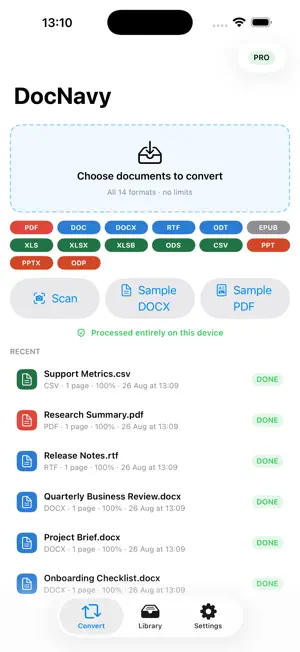
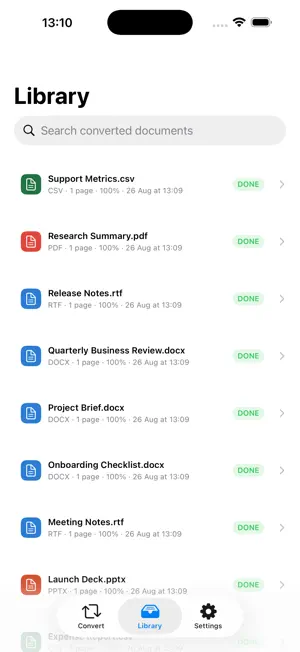
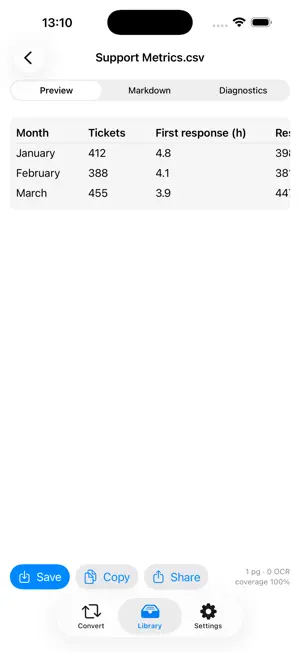
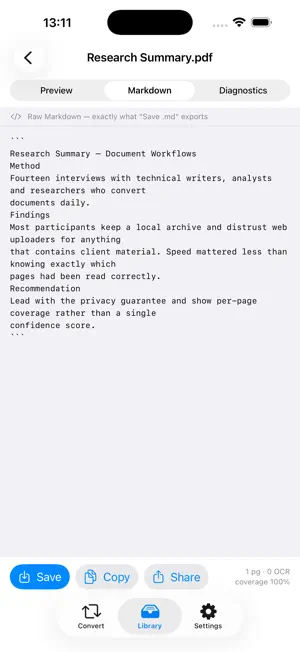
Turn PDF, Word, Excel, PowerPoint and 10 more formats into clean Markdown — entirely on your iPhone, iPad or Mac. Your documents never leave the device. No server, no account, no upload. WHAT IT CONVERTS • PDF, DOC, DOCX, RTF, ODT, EPUB • XLS, XLSX, XLSB, ODS, CSV • PPT, PPTX, ODP WHAT SURVIVES THE CONVERSION Tables, merged cells, footnotes, headings, bold and italic, nested lists, math formulas as LaTeX, embedded images written out next to the Markdown, and — when you convert a whole folder — the folder structure itself. SCANNED PAGES, HANDLED PROPERLY Pages with no text layer go through on-device OCR. The language is detected automatically, so a Japanese invoice and an English contract in the same batch both come out right. Nothing is sent anywhere to make that happen. HONEST ABOUT QUALITY Every conversion comes with a per-page report: how many pages were read directly, how many needed OCR, how many failed, and why. Most converters hand you a file and hope you do not check. DocNavy tells you what it actually managed to read. BUILT FOR MARKDOWN PEOPLE Made for Obsidian, Logseq, Bear and plain-text vaults. Preview the result, read the raw Markdown side by side, then save the .md file wherever you keep your notes. PRIVACY YOU CAN VERIFY DocNavy makes no network requests at all. You do not have to take our word for it: turn on Settings › Privacy & Security › App Privacy Report, use the app for a few days, and the domain list for DocNavy will stay empty. The App Store privacy label says Data Not Collected because that is literally what happens. FREE AND PRO The free tier is the whole app: all 14 formats, on-device OCR, whole-folder conversion, zip export and the full diagnostics report — every page of every file, however long. One limit applies: 5 documents a day. Pro removes it and changes nothing else: no extra features, no watermark, no upsell. Take it monthly at $2.99 with a 3-day free trial, or pay $29.99 once and keep it. Either way it is a Universal Purchase, so buying on iPhone unlocks iPad and Mac too. Privacy Policy: https://docnavy.com/privacy Terms of Use (EULA): https://docnavy.com/terms
What’s new
Version 1.1.0 · Updated September 17, 2026
The free tier no longer limits pages. Every file converts in full, however long — the only free-tier limit is now five documents a day. Nothing else changes: same 14 formats, same on-device OCR, same output quality.
App privacy
The developer, Thi Thanh Van Do, reported these privacy practices to Apple.
Data Not Collected
The developer does not collect any data from this app.
Alternatives to DocNavy: Docs to Markdown
Looking for apps like DocNavy: Docs to Markdown? Here are 6 similar apps on the App Store. The highest rated is Weeklane: Weekly To-Do Planner (5.0/5), and all 6 are free to download.
-
 CleanMD: PDF to Markdown
-
 Markdown to PDF: Pro Editor
4.4
Markdown to PDF: Pro Editor
4.4
-
 Timmio: Visual Day Planner
4.9
Timmio: Visual Day Planner
4.9
-
 Weeklane: Weekly To-Do Planner
5.0
Weeklane: Weekly To-Do Planner
5.0
-
 PDF Scanner File Converter
-
 oh my hours
4.0
oh my hours
4.0
| App | Rating | Price | Last updated | Compare |
|---|---|---|---|---|
| DocNavy: Docs to Markdown | – | Free | September 17, 2026 | |
| CleanMD: PDF to Markdown | – | Free | Sep 4, 2026 | Compare |
| Markdown to PDF: Pro Editor | 4.4 / 5 (9) | Free | Sep 9, 2026 | Compare |
| Timmio: Visual Day Planner | 4.9 / 5 (11) | Free | Sep 15, 2026 | Compare |
| Weeklane: Weekly To-Do Planner | 5.0 / 5 (1) | Free | Sep 23, 2026 | Compare |
| PDF Scanner File Converter | – | Free | Jun 23, 2024 | Compare |
| oh my hours | 4.0 / 5 (3) | Free | Sep 15, 2026 | Compare |