

RecovaCoach -Strength training
Riki Nakano Health & Fitness iPhoneiPadiPod touch
RecovaCoach -Strength training is a free Health & Fitness app for iPhone and iPad by Riki Nakano. Requires iOS 15.1. Updated September 30, 2026.
- Price
- Free
- on the App Store
- Size
- 44 MB
- Age 4+
- Updated
- Sep 30
- 2026 · v1.2.3
Screenshots


About RecovaCoach -Strength training
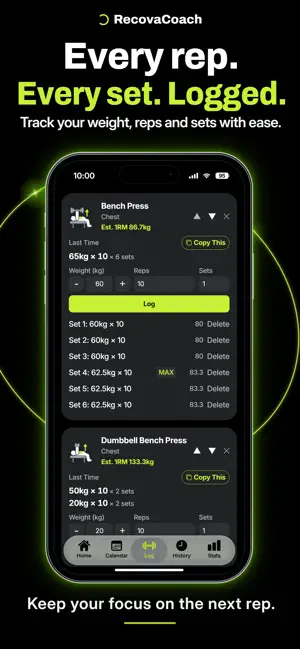
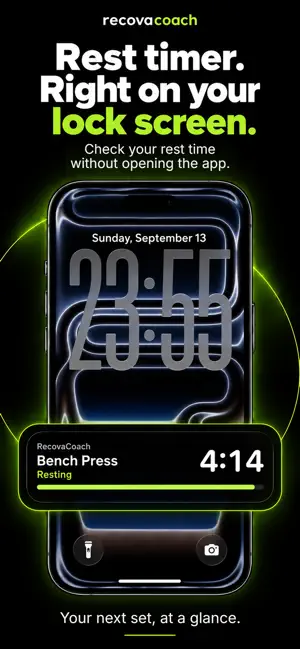
Go beyond just logging your workouts. RecovaCoach is a strength training app that helps you manage not only your workouts, but your recovery too. ■ See each muscle's recovery at a glance Check which muscles have recovered and which are still recovering on a body map, covering your chest, back, legs, shoulders, arms, core, and more. With Pro, recovery times are estimated from your sets, weights, and profile, such as age and body type. ■ Know what to train today RecovaCoach suggests muscles that have fully recovered, helping you train efficiently while avoiding overtraining. With Pro, suggestions also include the reasons, exercise ideas, and target weights. ■ Simple yet detailed logging Log weight × reps, time, or bodyweight exercises, each in the format that fits. Your previous numbers are shown automatically, so logging is quick. Work in kilograms or pounds, and set your height in feet and inches. ■ 161 exercises, each with an illustration Chest, back, legs, shoulders, arms, glutes, traps, forearms, calves and abs — 161 free-weight, machine, and bodyweight exercises are built in. Each illustration shows the movement and highlights the muscles it works. One exercise can work more than one muscle, so a bench press counts toward your shoulders and triceps as well as your chest. You can add your own exercises too. ■ Watch your strength climb Every set shows its estimated 1RM, and your strongest set of the day is marked MAX. Open any exercise to see how that number has moved over weeks and months, alongside its personal best history. ■ Start from your routines Exercise combinations you do often are detected automatically, so you can start them again in one tap. ■ Never miss a personal best Every set is checked automatically, and RecovaCoach celebrates the moment you hit a new PR. ■ Review your progress Stats are split into Summary, By Exercise, and By Muscle, so you can zoom out to your overall volume or drill into a single lift. The free version covers the last 3 months; Pro unlocks a full year and your entire history. ■ Share your effort Turn a day's workout, a list of every exercise you did, your recovery map, or a new personal best into an image. With Add to Photo, a sticker of the muscles you trained and your volume goes right onto your own photo. Tap Finish on the Log screen after your last set to share the day's summary right away. Transparent stickers are available too. ■ Check your rest time on the Lock Screen Your rest timer appears on the Lock Screen and in the Dynamic Island, so you can see the time until your next set without picking up your phone. It also appears on Apple Watch. (iOS 16.2 or later; Apple Watch requires watchOS 11 or later) Your workout logs are stored on your device, and you can log workouts even when you're offline. Some features require a Pro subscription (in-app purchase), available monthly or annually. Great for you if you: • Just started strength training and aren't sure what to train • Want to avoid overtraining • Want to manage recovery, not just log workouts • Want to see the results of your training About Pro (auto-renewing) • Pro Monthly — renews automatically every month • Pro Annual — renews automatically every 12 months • How to cancel: cancel in your device's Settings at least 24 hours before your next renewal date Terms of Use (EULA): https://www.apple.com/legal/internet-services/itunes/dev/stdeula/ Privacy Policy: https://recovacoach-app.github.io/recovacoach-site/en/#privacy
What’s new
Version 1.2.3 · Updated September 30, 2026
A new intro tour for new users, and MAX badges that compare against your past best. New intro tour The intro you see when you first open the app now also covers the rest timer, sharing, and stats. The recovery and Today's Pick scenes have been rebuilt to show how they work, and dots show where you are. Already using RecovaCoach? You can replay it anytime from Settings > Replay Tutorial. MAX badges On the Log screen, in Calendar, and on the Workout List share image, the MAX badge now appears on every set that matches or beats your previous best estimated 1RM. Days that don't reach it get no badge. For an exercise you log for the first time, your best set that day gets the badge. Estimated 1RM on Workout List The estimated 1RM in the top-right corner of the Workout List image now shows your best across all your logs, not just that day's sets. Also in this release • Fixed the logging scene in the intro sometimes overlapping the title on smaller iPhones
App privacy
The developer, Riki Nakano, reported these privacy practices to Apple.
Data Linked to You
The following data, which may be collected and linked to your identity, may be used for the following purposes:
- Identifiers: User ID
- Usage Data: Product Interaction
- Purchases: Purchase History
Used for: Analytics, App Functionality
Alternatives to RecovaCoach -Strength training
Looking for apps like RecovaCoach -Strength training? Here are 6 similar apps on the App Store. The highest rated is KiloAI: AI Fitness Trainer (5.0/5), and all 6 are free to download.
-
 Waiton: Workout Log & Tracker
-
 Strive
-
 GymRec - Workouts & Plans
-
 KiloAI: AI Fitness Trainer
5.0
KiloAI: AI Fitness Trainer
5.0
-
 Tremoni – Log Workouts in 5s
-
 Workout Log - yoisho
| App | Rating | Price | Last updated | Compare |
|---|---|---|---|---|
| RecovaCoach -Strength training | – | Free | September 30, 2026 | |
| Waiton: Workout Log & Tracker | – | Free | Sep 30, 2026 | Compare |
| Strive | – | Free | Sep 8, 2026 | Compare |
| GymRec - Workouts & Plans | – | Free | Oct 2, 2026 | Compare |
| KiloAI: AI Fitness Trainer | 5.0 / 5 (2) | Free | Sep 21, 2026 | Compare |
| Tremoni – Log Workouts in 5s | – | Free | Jan 24, 2026 | Compare |
| Workout Log - yoisho | – | Free | Oct 1, 2026 | Compare |