

TikTomato: Unblur & Upscale
纲波 代 Photo & Video iPhoneiPadiPod touch
TikTomato: Unblur & Upscale is a free Photo & Video app for iPhone and iPad by 纲波 代. Requires iOS 17.0. Updated October 29, 2026.
- Price
- Free
- on the App Store
- Size
- 4 MB
- Age 12+
- Updated
- Oct 29
- 2026 · v1.3
Screenshots


About TikTomato: Unblur & Upscale
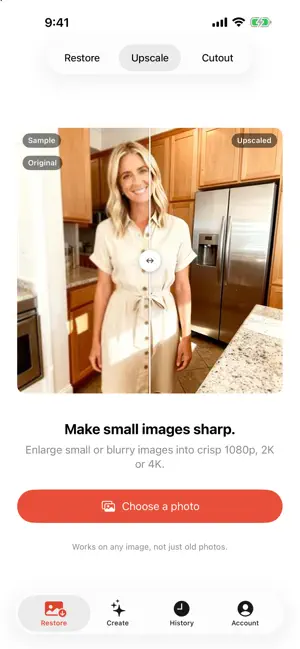
Make blurry photos sharp, upscale small images to 4K, and bring old family photos back to life. UNBLUR & UPSCALE - Turn a small or blurry image into a crisp 1080p, 2K or 4K - Works on any image, not just old photos RESTORE OLD PHOTOS TikTomato repairs scratches, creases, stains and fading, sharpens soft faces, and can add natural color to black-and-white photos. Pick a photo and tap once. The work runs on our servers, so you can leave the app — the result is waiting in History when it's done. WHAT IT FIXES - Scratches, creases, tears and missing corners - Stains, mold spots and uneven yellowing - Faded, washed-out color - Soft, blurry faces COLOR OPTIONS - Original tone: remove yellowing and fading, keep the photo's own character - Black & white: clean, neutral monochrome - Colorize: add natural color to a monochrome photo - Leave as is: repair the damage, don't touch the color CHECK THE PHOTOS THAT MATTER AI fills in missing detail by inference, so a face or expression can look slightly different from the original. Check the result for important photos, and keep the original print and scan. MORE TOOLS - Video: turn one or two photos into a trend video with sound — Toc Toc dance, Hit the Road Dude, Hotel Lobby rap - Cutout: remove the background from people, pets and products for a transparent PNG - Create: describe an image in words, or add reference photos and say how to change them They all use the same credits, and everything you make lands in History. CREDITS, NOT A SUBSCRIPTION New accounts start with free credits so you can try it out, and no card is required. After that you buy credits only when you need them. Nothing renews and there is nothing to cancel. YOUR PHOTOS Photos are uploaded to be processed and are deleted after 30 days, so save the ones you want to keep. We explain exactly what happens to a photo before the first upload. See our Privacy Policy for details.
What’s new
Version 1.3 · Updated October 29, 2026
New: Video. Turn one or two photos into a trend video with sound — the Toc Toc dance, Hit the Road Dude and the Hotel Lobby rap duet. Choose the length and quality, see the cost before you start, and save the result straight to Photos. The app now opens on Create, and there is a bigger credit pack for heavy users.
App privacy
The developer, 纲波 代, reported these privacy practices to Apple.
Data Linked to You
The following data, which may be collected and linked to your identity, may be used for the following purposes:
- Identifiers: User ID, Device ID
- Usage Data: Other Usage Data
- Other Data: Other Data Types
- Purchases: Purchase History
- Location: Coarse Location
- Contact Info: Email Address, Name
- User Content: Photos or Videos, Customer Support, Other User Content
Used for: Analytics, App Functionality
Alternatives to TikTomato: Unblur & Upscale
Looking for apps like TikTomato: Unblur & Upscale? Here are 6 similar apps on the App Store. The highest rated is Eye Opener: Fix Close Eyes (5.0/5), and all 6 are free to download.
-
 Everfond: Restore Old Photos
-
 Eye Opener: Fix Close Eyes
5.0
Eye Opener: Fix Close Eyes
5.0
-
 Photo Restore – Fix Old Photos
4.8
Photo Restore – Fix Old Photos
4.8
-
 GeoFlux - Photo Geotag Editor
1.0
GeoFlux - Photo Geotag Editor
1.0
-
 Pic Navi
4.4
Pic Navi
4.4
-
 Colorize & Restore Photos
5.0
Colorize & Restore Photos
5.0
| App | Rating | Price | Last updated | Compare |
|---|---|---|---|---|
| TikTomato: Unblur & Upscale | – | Free | October 29, 2026 | |
| Everfond: Restore Old Photos | – | Free | Sep 7, 2026 | Compare |
| Eye Opener: Fix Close Eyes | 5.0 / 5 (1) | Free | Sep 30, 2026 | Compare |
| Photo Restore – Fix Old Photos | 4.8 / 5 (9) | Free | Jul 26, 2026 | Compare |
| GeoFlux - Photo Geotag Editor | 1.0 / 5 (2) | Free | Dec 17, 2025 | Compare |
| Pic Navi | 4.4 / 5 (27) | Free | Oct 27, 2026 | Compare |
| Colorize & Restore Photos | 5.0 / 5 (8) | Free | Dec 3, 2025 | Compare |