

Quitt – Receipt & Expenses
arearun LLC Finance iPhoneiPadiPod touch
Quitt – Receipt & Expenses is a free Finance app for iPhone and iPad by arearun LLC. Requires iOS 26.0. Updated October 14, 2026.
- Price
- Free
- on the App Store
- Size
- 7 MB
- Age 4+
- Updated
- Oct 14
- 2026 · v1.3.1
Screenshots

About Quitt – Receipt & Expenses
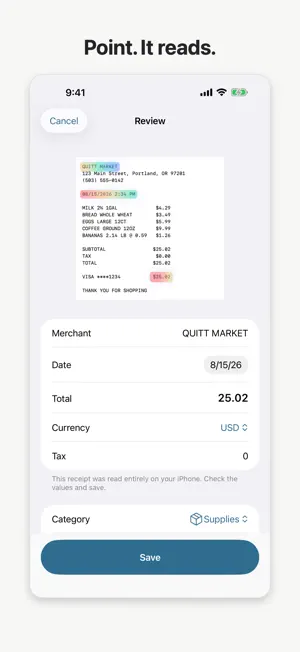
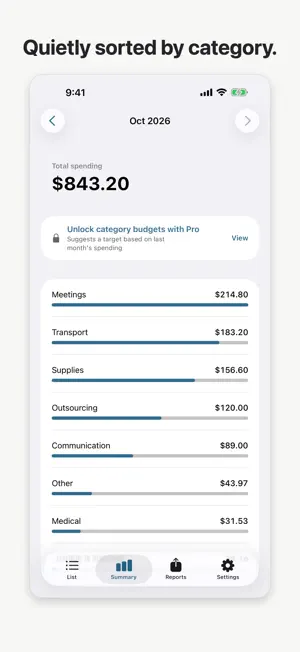
No subscription. No account. No data collection. Quitt is a one-time-purchase expense tracker: just point it at a receipt. ■ Point. It reads. Receipts are captured automatically. Merchant, date, total and tax are read on the spot — and the words Quitt read light up right on the receipt. You just confirm and save. Multi-receipt capture included. ■ Reading happens on your iPhone Reading happens on-device with Apple Intelligence. Quitt has no servers, and we can't see your records. Only if you turn on iCloud Sync (Pro, optional) do your records sync to your own private iCloud — receipt photos are never synced. No bank linking, no sign-up. Our App Store privacy label says it all: Data Not Collected. ■ Get organized for tax season Expenses are sorted by category automatically. Export any month or fiscal year as a PDF report with receipt images attached, or as CSV for your accounting tools. No more shoebox of receipts before filing. ■ A merchant library that learns Correct a merchant name once and Quitt remembers. The places you visit most get read more accurately — and categorized automatically. ■ Pay once. That's it. • Free: 15 scans per month; unlimited manual entries, browsing and summaries • Pro (one-time purchase): unlimited scans, PDF & CSV reports No monthly bills. Buy it once, keep it forever. ■ Features • Automatic receipt capture and reading (multi-scan) • Reading highlights — see exactly what was read • Unlimited manual entry • Categories you can add and edit • Monthly summaries and configurable fiscal year • PDF reports with receipt images / CSV export • English, German and Japanese Note: AI reading requires an Apple Intelligence capable iPhone (iPhone 15 Pro or later). Capture, automatic rule-based reading, manual entry and reports work on every supported device. Reports are reference material based on your records. Please confirm your filing with a tax professional and keep original receipts as required by local law.
What’s new
Version 1.3.1 · Updated October 14, 2026
■ Improved ・The Save button now stays at the bottom of the screen, so you can save without scrolling ・Quitt now asks before discarding unsaved changes, and confirms on screen when a receipt has been saved ・Deleting a category now asks for confirmation and shows how many receipts are in it ・Better layout at larger text sizes on the purchase screen, onboarding, home, and the receipt list ・Refined Dark Mode colors so small text and buttons are easier to read ・VoiceOver improvements, including the price on the purchase button and the share button for reports ・Clearer privacy explanations that stay accurate when you use iCloud Sync or iPhone backups
App privacy
The developer, arearun LLC, reported these privacy practices to Apple.
Data Not Collected
The developer does not collect any data from this app.
Alternatives to Quitt – Receipt & Expenses
Looking for apps like Quitt – Receipt & Expenses? Here are 6 similar apps on the App Store. The highest rated is ReceiptNow: Smart Scanner (5.0/5), and 5 of the 6 are free to download.
-
 Autocost: Vehicle Expense
-
 Receipt Organizer:Expensify AI
-
 Mnemor Beleg Scanner OCR
-
 KrankengeldHeld – Rechner
-
 ReceiTracker: Receipt Scanner
-
 ReceiptNow: Smart Scanner
5.0
ReceiptNow: Smart Scanner
5.0
| App | Rating | Price | Last updated | Compare |
|---|---|---|---|---|
| Quitt – Receipt & Expenses | – | Free | October 14, 2026 | |
| Autocost: Vehicle Expense | – | Free | May 26, 2026 | Compare |
| Receipt Organizer:Expensify AI | – | Free | Aug 22, 2026 | Compare |
| Mnemor Beleg Scanner OCR | – | Free | Apr 30, 2026 | Compare |
| KrankengeldHeld – Rechner | – | Free | Oct 13, 2026 | Compare |
| ReceiTracker: Receipt Scanner | – | 2.99 USD | Oct 5, 2026 | Compare |
| ReceiptNow: Smart Scanner | 5.0 / 5 (4) | Free | Sep 8, 2026 | Compare |