

Swipe Photo Cleaner — Limina
ROBERTO INSUA BRANDARIZ Utilities iPhoneiPadiPod touch
Swipe Photo Cleaner — Limina is a free Utilities app for iPhone and iPad by ROBERTO INSUA BRANDARIZ. Requires iOS 18.7. Updated October 17, 2026.
- Price
- Free
- on the App Store
- Size
- 19 MB
- Age 4+
- Updated
- Oct 17
- 2026 · v1.3
Screenshots



About Swipe Photo Cleaner — Limina
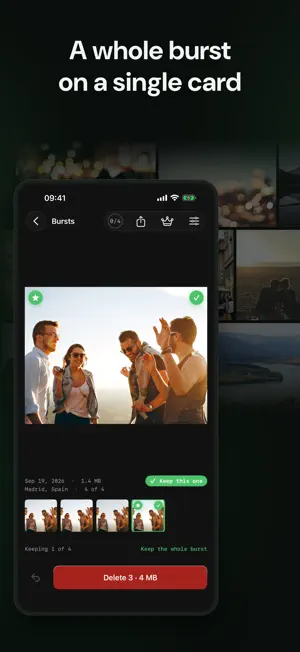
Your camera roll has thousands of photos and videos you'll never look at again — blurry, duplicate, or plain forgotten. Limina makes tidying it up feel like flipping through a deck of cards instead of a chore. Swipe right to keep, left to mark for deletion. Fifteen at a time. Once you've decided on a photo, Limina never shows it to you again — no re-litigating the same shot twice. When you're ready, review everything you've marked and delete it all in one batch. Nothing is removed from your library until you confirm, and anything you do delete goes to your phone's own Recently Deleted album first, recoverable for 30 days like any other photo you remove. Start wherever makes sense: • Oldest first — the default, for the backlog you've been avoiding • Newest first — catch duplicates from a recent burst • Shuffled — a little of everything • Videos — the space hogs, longest ones first (Pro) • Screenshots — the clutter nobody meant to keep • This time last year — a quick trip through your memories • Similar — near-duplicate shots taken seconds apart, so you stop keeping five almost-identical photos (Pro) • Bursts — a whole rapid-fire sequence at once, instead of scrolling past fifty shots of the same jump • Live Photos — keep just the photo and reclaim the space its video takes (Pro) Clutter doesn't only live on your phone: plug a USB drive or SSD into your iPhone or iPad and clean it up with the same swipes, similar shots included (Pro). Your favorites are automatically skipped — Limina never asks you to reconsider a photo you already marked as one to keep. Going for a long session? Infinite mode (Pro) moves straight from one batch into the next without stopping at a summary screen, so you can keep swiping until you're actually done. Your photos are never uploaded anywhere, and there's no account to create. There are no ads and no tracking, free or Pro. Swipe Photo Cleaner — Limina. Camera roll cleanup, one swipe at a time. Terms of Use (EULA): https://www.apple.com/legal/internet-services/itunes/dev/stdeula/
What’s new
Version 1.3 · Updated October 17, 2026
What's new in 1.3: • No more ads: not in the free version, not in Pro, and no tracking either. • Ready for iPhone Duo: open it and the photo takes one page while the round and the buttons take the other. Turn it and leave it half open, and the photo sits above the fold, with everything else below. Fold it mid-round and you carry on where you were. • Accessibility, screen by screen: Increase Contrast, Reduce Transparency and Reduce Motion are respected everywhere, every control has a name for Voice Control, and the largest text sizes fit on every screen. • iPad: bursts and similar shots open in two panes, and a hardware keyboard decides a whole round. • Various fixes and performance improvements.
App privacy
The developer, ROBERTO INSUA BRANDARIZ, reported these privacy practices to Apple.
Data Not Linked to You
The following data, which may be collected but is not linked to your identity, may be used for the following purposes:
- Purchases: Purchase History
Used for: App Functionality