

Kanji Speed Drill
Lambda 7 Tech LLC Education iPhoneiPadiPod touch
Kanji Speed Drill is a free Education app for iPhone and iPad by Lambda 7 Tech LLC. Requires iOS 15.1. Updated September 3, 2026.
- Price
- Free
- on the App Store
- Size
- 36 MB
- Age 4+
- Updated
- Sep 3
- 2026 · v1.0.0
Screenshots


About Kanji Speed Drill
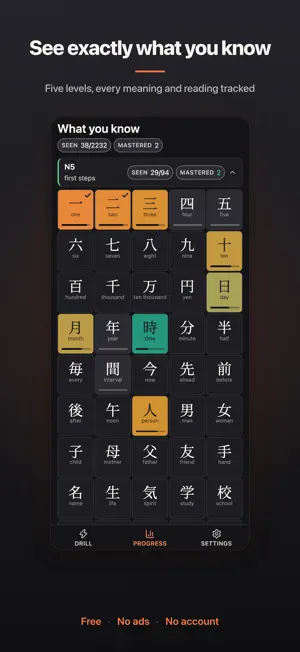
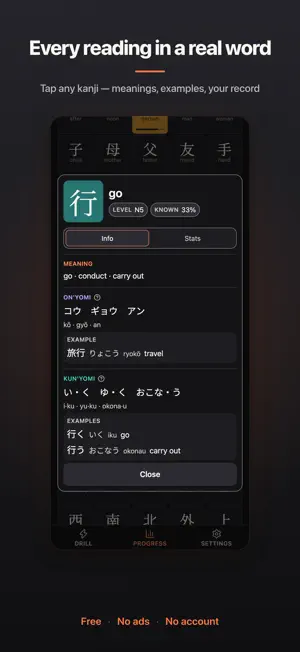
Kanji Speed Drill is a timed drill for kanji. You practice until you can read a character without stopping to work it out. A kanji appears, or a compound word in the upper levels, with four answers under it: meanings, or readings in kana or romaji. You tap one, and the app times how long it took. That time is what the app grades you on. Working out that 曜 is yō after four seconds isn't reading, so only quick correct answers count toward knowing a character. Meaning, on'yomi and kun'yomi are tracked separately, because knowing one says nothing about the others. A kanji counts as known once all of them are fast. WHAT YOU GET • All 2,136 jōyō kanji plus compounds in five levels, following the common JLPT study lists from N5 to N1 • Three question types per kanji: meaning, on'yomi and kun'yomi, each drilled and tracked separately • Readings shown in kana, romaji, or both at once — your choice, each backed by a real example word • Tap any kanji in the charts for its full card: every meaning, every reading in context, and your record on each • Sessions built around a small working set of your weakest kanji, so things repeat until they stick • Wrong answers pulled from real confusions: lookalikes such as 犬 beside 大, and readings one sound apart • A chart of every level, colored by how well you know each kanji • A ranking that puts your weakest facts first and names what you mix them up with • Session stats: median time, fastest answer, best streak, accuracy • Four Japanese typefaces built in: Print, Modern, Rounded and Textbook, or Shuffle for a different one every question • Light and dark themes, with layouts built for phone, tablet and landscape FOUR TYPEFACES, BECAUSE THE SHAPE CHANGES 令 ends in a vertical stroke in print and a curve in handwriting, and a device set to another language can quietly draw kanji in the wrong regional forms. All four faces ship inside the app, so every character renders the Japanese way, offline, with nothing falling back to a font that draws it differently. OFFLINE AND PRIVATE No account, no ads, no analytics. The app makes no network calls at all. Your progress stays on your device, and you can export it to a file whenever you want to move it. FREE All of it. Nothing locked, no subscription. Made by ConvoCopilot. Terms of Service: https://kanji.convocopilot.app/terms Apple Standard EULA (App Store): https://www.apple.com/legal/internet-services/itunes/dev/stdeula/ Privacy Policy: https://kanji.convocopilot.app/privacy
App privacy
The developer, Lambda 7 Tech LLC, reported these privacy practices to Apple.
Data Not Collected
The developer does not collect any data from this app.
Alternatives to Kanji Speed Drill
Looking for apps like Kanji Speed Drill? Here are 6 similar apps on the App Store. The highest rated is Japanese Writer (4.8/5), and all 6 are free to download.
-
 JLPT Pro
-
 Japanese Writer
4.8
Japanese Writer
4.8
-
 JFT-Basic Exam Preparation
1.0
JFT-Basic Exam Preparation
1.0
-
 N5 Kanji Master
-
 Flashy• Vocabulary List Cards
2.6
Flashy• Vocabulary List Cards
2.6
-
 Kanji Pad: Learn by Writing
4.2
Kanji Pad: Learn by Writing
4.2
| App | Rating | Price | Last updated | Compare |
|---|---|---|---|---|
| Kanji Speed Drill | – | Free | September 3, 2026 | |
| JLPT Pro | – | Free | May 6, 2024 | Compare |
| Japanese Writer | 4.8 / 5 (4) | Free | Mar 8, 2026 | Compare |
| JFT-Basic Exam Preparation | 1.0 / 5 (1) | Free | Oct 11, 2026 | Compare |
| N5 Kanji Master | – | Free | Jan 22, 2026 | Compare |
| Flashy• Vocabulary List Cards | 2.6 / 5 (5) | Free | Jun 21, 2024 | Compare |
| Kanji Pad: Learn by Writing | 4.2 / 5 (9) | Free | Aug 30, 2026 | Compare |
Compare Kanji Speed Drill with the top alternatives: ratings, updates, ASO score and keyword gaps →