

CourtClock
Mihee Youn Sports iPhoneiPadiPod touch
CourtClock is a free Sports app for iPhone and iPad by Mihee Youn. Requires iOS 15.0. Updated September 10, 2026.
- Price
- Free
- on the App Store
- Size
- 2 MB
- Age 4+
- Updated
- Sep 10
- 2026 · v1.1
Screenshots


About CourtClock
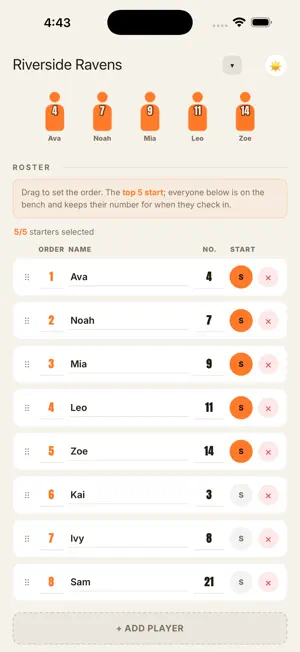
Whoever has the substitution job this week can pick this up cold. CourtClock tracks who is on the court, who is on the bench, and how long each player has actually been out there. There is no account and nothing to sign up for - open it and start. WHAT IT DOES • The bench is sorted least-played first, so “who goes on next” is already answered. • A shift timer counts down to the next substitution - and once it is overdue it keeps counting up and keeps flashing, so a missed sub stays visible instead of quietly resetting. • Tap a player on the court, then tap one on the bench. That is a substitution. Undo is there if you mis-tap. • Every player on court carries a gauge for how long their shift has run; the bench shows how long each player has rested. • At the end you can see the minutes everyone played and copy a summary. FOR THE PERSON DOING IT THIS WEEK On a lot of teams the substitution duty rotates. That person is often doing it for the first time, is responsible for other people’s kids, and would quite like to watch their own child play too. CourtClock is built to be handed over: nothing to configure, nothing to learn, and an objective record of minutes if anyone asks why a player sat. QUIET BY DESIGN • No accounts, no sign-in. • Your team, your roster and your game stay on your device. • No ads. • Works without a connection - a gym is a bad place to find out you have no signal. CourtClock is a tracking tool for whoever is running substitutions. It does not coach, and it does not decide who plays - you do.
What’s new
Version 1.1 · Updated September 10, 2026
Fixes the six-players-on-court bug. • Editing the roster during a game no longer changes who is on court — the court only changes by subbing. • Players on court can't be removed mid-game; sub them out first. • "Back to game" keeps your undo history. • After the game ends, the setup screen offers "Start next game" — minutes reset, new starting five. • Court numbers are fixed at game start; reordering mid-game sets next game's starters. • Duplicate team names capped at 20 characters. • Added a small cross-promo note for our other apps (PeriodVol, SaveBoard) on the setup and game screens. • With no saved preference the app now follows your phone's light/dark setting, and falls back to light.
App privacy
The developer, Mihee Youn, reported these privacy practices to Apple.
Data Not Linked to You
The following data, which may be collected but is not linked to your identity, may be used for the following purposes:
- Identifiers: Device ID
- Usage Data: Product Interaction
Used for: Analytics
Alternatives to CourtClock
Looking for apps like CourtClock? Here are 6 similar apps on the App Store.
-
 Sub Wizard: Basketball Subs
-
 Easy Sport Sub Tracking
-
 MyCourtStats: Basketball Stats
-
 Kickd: Sports Coach App
-
 Blitz Golf
-
 Beyond Score: Sports Parent
| App | Rating | Price | Last updated | Compare |
|---|---|---|---|---|
| CourtClock | – | Free | September 10, 2026 | |
| Sub Wizard: Basketball Subs | – | Free | Oct 14, 2026 | Compare |
| Easy Sport Sub Tracking | – | 0.99 USD | Sep 23, 2026 | Compare |
| MyCourtStats: Basketball Stats | – | Free | Oct 21, 2026 | Compare |
| Kickd: Sports Coach App | – | Free | Oct 22, 2026 | Compare |
| Blitz Golf | – | Free | Oct 14, 2026 | Compare |
| Beyond Score: Sports Parent | – | Free | Oct 8, 2026 | Compare |
Compare CourtClock with the top alternatives: ratings, updates, ASO score and keyword gaps →