

PauseOwl
Alok Shrestha Utilities iPhoneiPadiPod touch
PauseOwl is a free Utilities app for iPhone and iPad by Alok Shrestha. Rated 5.0/5 from 1 ratings. Requires iOS 17.0. Updated October 3, 2026.
- Rating
- 5.0
- 1 ratings
- Price
- Free
- on the App Store
- Size
- 6 MB
- Age 4+
- Updated
- Oct 3
- 2026 · v1.1
Screenshots



About PauseOwl
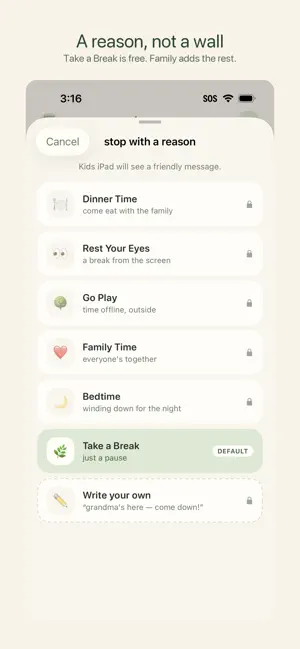
Here’s a polished **App Store Description** for PauseOwl: PauseOwl — Screen Time, Simplified Sometimes screen time just needs to stop. Dinner is ready. It’s time for bed. Homework needs to get done. Or maybe your child simply needs a break. With **PauseOwl**, you can pause selected apps on your child’s device right from your phone — without taking their device away or setting up complicated schedules. When it’s time for a break, just tap **STOP**. When they’re ready to use the app again, tap **ALLOW**. SIMPLE PARENT CONTROLS PauseOwl is designed around one simple idea: give parents an easy way to pause an app when it matters. • Choose which apps you want to control • Tap STOP from your phone • The selected apps pause on your child’s device • Tap ALLOW when they can use them again FRIENDLIER SCREEN-TIME BREAKS Instead of a generic blocked screen, PauseOwl Family lets you tell your child why it’s time to pause. Choose from friendly messages for: • Dinner Time • Bedtime • Family Time • Rest Your Eyes • Time Offline • Take a Break You can also send your own custom message. PRIVATE BY DESIGN PauseOwl is about giving parents simple controls — not monitoring children. There are no activity dashboards, browsing-history reports, advertising profiles, or social features. START FREE Use PauseOwl free with: • 1 child • 1 controlled app • Unlimited STOP & ALLOW • Take a Break messaging Want more control? PAUSEOWL FAMILY — ONE PURCHASE, NO SUBSCRIPTION Unlock PauseOwl Family for a **one-time purchase of $9.99**. Get: • Unlimited controlled apps • STOP ALL & ALLOW ALL • All friendly break reasons • Custom parent messages **No monthly subscription. One payment. Yours for good.** PauseOwl makes screen-time boundaries simpler: when it’s time to stop, just tap STOP.
What’s new
Version 1.1 · Updated October 3, 2026
Choosing apps now happens on your child's device. That device is the only one that knows what is actually installed on it, so the list is simply right — and the names and icons are there. • Your child's device lists its own apps. You pause them from your phone, as before • Apps that were missing from the list now appear, with their names and icons • Untick an app to remove it, in the same list you added it from • Choosing a whole category works now, and brings the apps inside it with it • An app you stopped stays stopped when the list changes • A device is no longer shown as connected if it cannot actually pause anything • Steadier confirmation after you tap STOP Thank you for using PauseOwl.
App privacy
The developer, Alok Shrestha, reported these privacy practices to Apple.
Data Not Linked to You
The following data, which may be collected but is not linked to your identity, may be used for the following purposes:
- Identifiers: User ID
- Other Data: Other Data Types
Used for: App Functionality
Alternatives to PauseOwl
Looking for apps like PauseOwl? Here are 6 similar apps on the App Store. The highest rated is RainPoint-TY (4.6/5), and all 6 are free to download.
-
 Gps Coordinates - My Location
-
 Aromadd
1.7
-
 RainPoint Home
2.2
-
 RainPoint-TY
4.6
-
 Wisenet mobile
1.6
-
 Ncell
3.4
| App | Rating | Price | Last updated | Compare |
|---|---|---|---|---|
| PauseOwl | 5.0 / 5 (1 rating) | Free | October 3, 2026 | |
| Gps Coordinates - My Location | – | Free | Oct 14, 2026 | Compare |
| Aromadd | 1.7 / 5 (75) | Free | Oct 9, 2026 | Compare |
| RainPoint Home | 2.2 / 5 (63) | Free | Aug 10, 2026 | Compare |
| RainPoint-TY | 4.6 / 5 (1,083) | Free | Aug 22, 2025 | Compare |
| Wisenet mobile | 1.6 / 5 (273) | Free | Sep 8, 2026 | Compare |
| Ncell | 3.4 / 5 (190) | Free | Oct 9, 2026 | Compare |
Compare PauseOwl with the top alternatives: ratings, updates, ASO score and keyword gaps →