

StudGo
Maximilian Elias Paasch Education iPhoneiPadiPod touch
StudGo is a free Education app for iPhone and iPad by Maximilian Elias Paasch. Requires iOS 16.0. Updated October 5, 2026.
- Price
- Free
- on the App Store
- Size
- 6 MB
- Age 4+
- Updated
- Oct 5
- 2026 · v1.8.2
Screenshots


About StudGo
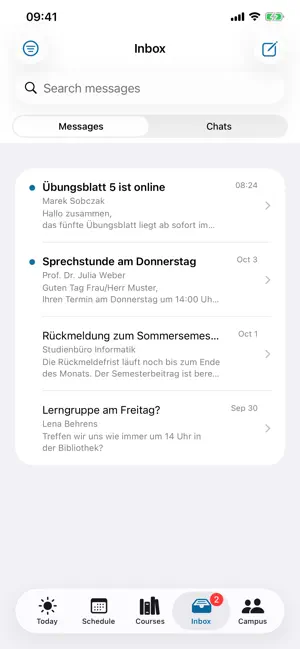
StudGo is a private, open-source student project and not an official app of any university. It is developed by a student. The app is a client for Stud.IP and signs in to your own university's Stud.IP through the official OAuth2 interface. It brings your study day into one app instead of spreading it across five browser tabs. You sign in with your own university account, directly at the university. StudGo has no server of its own. TODAY The start screen answers the one question that matters in the morning: what's on? Your next class with room and time, the rest of the day below it, unread messages and new announcements. WIDGETS Your next event and unread messages as widgets on the Home Screen and the Lock Screen: small, medium with “Then”, round or rectangular below the clock. When an event ends, the widget moves on to the next one by itself. The widgets never contact the server themselves. TIMETABLE The weekly grid you know, plus a day view and a list of events. Events arrive as real sessions with dates, including room, topic and cancellations. Switch between the current and the upcoming semester. Share your timetable as an image, for example with your study group. IN iOS CALENDAR If you like, the next eight weeks appear in a separate “StudGo” calendar that updates every time you open the app – so they also show up on Apple Watch, in CarPlay and in Siri. Turning it off removes the calendar again. PUBLIC HOLIDAYS Lower Saxony's public holidays appear next to the date on the start screen, in the day view and in the list, so a day off no longer looks like a forgotten event. COURSES All your courses with description, lecturers, participants, events, announcements, forum, wiki and the course's courseware. Plus search across the entire course catalog. FILES Every course's file area: browse folders, preview and share files, upload your own files, create folders. INBOX Messages and Blubber conversations in one place. Read, reply, delete, write new ones. In Blubber chats, tapping a person opens their profile. CAMPUS Activity stream, contacts, people search, office hours with booking, study groups, institutes, cafeteria menus in day and week view, and statistics about your own semester. REMINDERS Local reminders before classes and events, plus a notice about new messages. Without any push server. ENGLISH AND GERMAN The app follows your device language, with eight color themes, light or dark. Text follows your preferred text size. TRY IT WITHOUT AN ACCOUNT On the sign-in screen, “View demo without signing in” opens a complete version of the app with sample data. No account, no network connection, no data transmitted. WHICH SERVER This version is set up for the Stud.IP at studip.uni-hannover.de; other Stud.IP installations are not supported at the moment. Signing in requires a valid account there. Without one, you can explore the full app in demo mode. PRIVACY StudGo has no server of its own. The app talks directly to your university's Stud.IP with the account you sign in with. For cafeteria menus it queries the open directory OpenMensa, without any account or identifier. Access tokens are kept in the device's Keychain, cached content inside the app. Calendar sync writes only to its own “StudGo” calendar and reads no other events. No analytics, no tracking, no ads, no sharing with third parties. The app never sees your university password: sign-in runs through OAuth2 in the system browser, directly at the university. GOOD TO KNOW Exam registration and grades are handled in QIS, not Stud.IP; a button in your profile takes you there. Stud.IP is a trademark of Stud.IP e. V.; StudGo is not affiliated with it.
What’s new
Version 1.8.2 · Updated October 5, 2026
New in 1.8.2: • Lock Screen widgets, plus a medium widget with “Then”. After each event, the widgets move on to the next one by themselves. • Timetable in iOS Calendar: optionally in a separate “StudGo” calendar, so it also shows up on Apple Watch, in CarPlay and in Siri. • Share your timetable as an image, for example with your study group. • StudGo is now available in English. • More reliable at the start of the semester: if Stud.IP is overloaded or down for maintenance, you stay signed in and see the last loaded state. • A short introduction after signing in, and text everywhere now follows your preferred text size.
App privacy
The developer, Maximilian Elias Paasch, reported these privacy practices to Apple.
Data Not Collected
The developer does not collect any data from this app.
Alternatives to StudGo
Looking for apps like StudGo? Here are 6 similar apps on the App Store.
-
 KorrekturKai: Jura Klausuren
-
 Beijing Accent Handbook
-
 IKM Games
-
 NMR Calculator 2
-
 Hebrew Calendar Zmanim
-
 Leibniz Uni Hannover
| App | Rating | Price | Last updated | Compare |
|---|---|---|---|---|
| StudGo | – | Free | October 5, 2026 | |
| KorrekturKai: Jura Klausuren | – | Free | Sep 20, 2026 | Compare |
| Beijing Accent Handbook | – | Free | Jun 30, 2026 | Compare |
| IKM Games | – | Free | Apr 23, 2024 | Compare |
| NMR Calculator 2 | – | Free | Jun 24, 2026 | Compare |
| Hebrew Calendar Zmanim | – | Free | Oct 7, 2026 | Compare |
| Leibniz Uni Hannover | – | Free | Sep 5, 2025 | Compare |
Compare StudGo with the top alternatives: ratings, updates, ASO score and keyword gaps →