

WODTap
M Krus Health & Fitness iPhoneiPadiPod touchApple Watch
WODTap is a free Health & Fitness app for iPhone and iPad by M Krus. Requires iOS 26.6. Updated October 16, 2026.
- Price
- Free
- on the App Store
- Size
- 12 MB
- Age 4+
- Updated
- Oct 16
- 2026 · v2.1
Screenshots


About WODTap
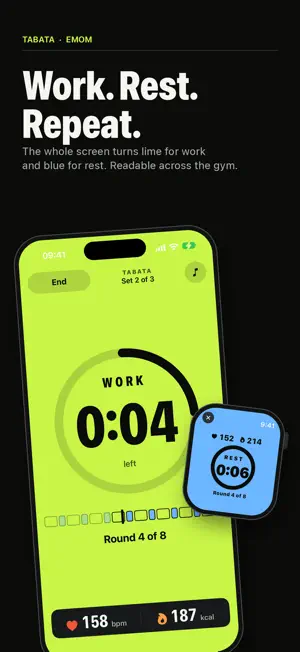
WODTap is a focused workout timer for iPhone and Apple Watch. Set up the format you want, start moving, and let clear visual, audio, and haptic cues keep every interval on track. ## App Store description WODTap gives your workout a reliable rhythm without getting in the way. Choose a timer for **Rounds for Time**, **AMRAP**, **EMOM**, or **Tabata**, or tap **Quick Start** for an untimed workout. Build a **Composite** workout when your session needs multiple work and rest stages. During the workout, a large round button counts your rounds without a look. The current phase, round, and remaining time stay easy to read at a glance. Use WODTap on its own or pair it with Apple Watch. The Watch app runs a workout on its own or follows the one on your iPhone, with live heart rate and active calories. The phone and Watch stay synchronized so you can keep your attention on the workout. **Walk the Dog** on Apple Watch times an outdoor walk and saves it to Health with its distance and route. When the session is finished, save a detailed record to your workout history. Review rounds, elapsed time, notes, photos, heart rate with each round marked, calories, and time in each heart-rate zone. Rate how hard the workout felt, from 1 to 10, and the rating is saved to Apple Health with the workout. Add photos from the camera or photo library to capture the session. ### Features - Rounds for Time with optional time cap - AMRAP countdowns - EMOM work and rest intervals - Tabata rounds, sets, and rest between sets - Quick Start untimed workouts, and repeat your last workout with one tap - Composite workouts with custom stages and rest periods - iPhone and Apple Watch workout support - Apple Watch heart rate and active-calorie tracking - Walk the Dog outdoor walks on Apple Watch, with distance and route - Large countdown, phase, and round displays - Layouts for iPhone Duo, closed, half-folded, or open - Audio cues, voice announcements, haptics, and configurable voices - Apple Music playback controls during a workout - Workout history with editable rounds and notes - Optional workout photos - Heart-rate summaries, charts, and time in zones - Effort rating from 1 to 10, saved to Apple Health - Auto, light, and dark appearance, and text-size preferences - Apple Watch complication for quick access ## How it works 1. Choose a workout format. 2. Configure the rounds, intervals, duration, and rest periods. 3. Start the workout on iPhone or Apple Watch. 4. Follow the cues and tap to record completed rounds where applicable. 5. Save the completed session to your history. WODTap works without an account. Workout history, settings, and attached photos are stored on your device. HealthKit, Camera, Photos, Media & Apple Music, Location, and Apple Watch features are optional and require your permission. ## Requirements - iPhone running iOS 26.6 or later - Apple Watch running watchOS 26 or later for Watch features - A paired Apple Watch with WODTap installed for live Watch metrics ## Privacy WODTap does not require an account and does not include advertising or third-party tracking. Health and fitness data is used to provide the workout features you choose and is handled through Apple's HealthKit permissions. See the [WODTap Privacy Policy](https://www.hupahup.com/wodtap-privacy-policy/).
What’s new
Version 2.1 · Updated October 16, 2026
**iPhone Duo** WODTap now officially supports iPhone Duo! **During the workout** In AMRAP, and in Quick Start when taps count rounds, tap This round to show the round time on the large clock. Tap it again to swap back. WODTap keeps your choice for later workouts. **Fixes** The iPhone no longer goes to sleep between the stages of a Composite workout. Apple Watch now shows the rest between Composite stages on the large clock, also after a stage that counts rounds. Both Active and Total Calories are now saved with the activity
App privacy
The developer, M Krus, reported these privacy practices to Apple.
Data Not Linked to You
The following data, which may be collected but is not linked to your identity, may be used for the following purposes:
- Health & Fitness: Health, Fitness
- Location: Precise Location
- User Content: Photos or Videos
Used for: App Functionality
Alternatives to WODTap
Looking for apps like WODTap? Here are 6 similar apps on the App Store. The highest rated is Mariabs · Interval Timer (5.0/5), and all 6 are free to download.
-
 EVG: Pet Owner
-
 Mariabs · Interval Timer
5.0
-
 SAC Leisure
5.0
-
 Ayrshire 360
-
 KA Leisure
5.0
-
 Supplify: Supplement Tracker
4.2
| App | Rating | Price | Last updated | Compare |
|---|---|---|---|---|
| WODTap | – | Free | October 16, 2026 | |
| EVG: Pet Owner | – | Free | Jan 6, 2026 | Compare |
| Mariabs · Interval Timer | 5.0 / 5 (1) | Free | Oct 22, 2026 | Compare |
| SAC Leisure | 5.0 / 5 (1) | Free | Oct 9, 2026 | Compare |
| Ayrshire 360 | – | Free | Oct 28, 2026 | Compare |
| KA Leisure | 5.0 / 5 (4) | Free | Oct 9, 2025 | Compare |
| Supplify: Supplement Tracker | 4.2 / 5 (21) | Free | Dec 13, 2025 | Compare |
Compare WODTap with the top alternatives: ratings, updates, ASO score and keyword gaps →